
Animation of Lines with Square and Rectangle by BUHARDEEN KANSOOR RAHMAN (4)
Loading the math board and drawing, please wait…
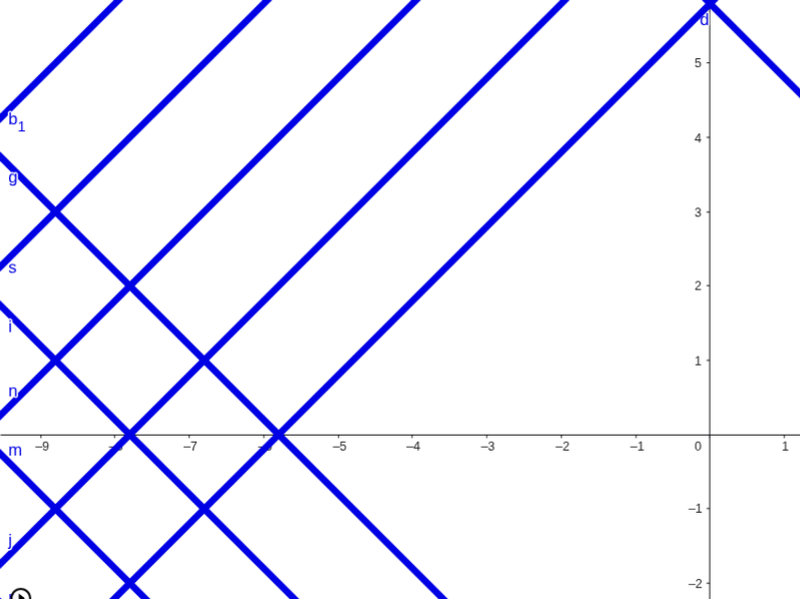
This example demonstrates how to dynamically generate perpendicular lines to y=x and y=-x using a slider, and create points on these lines to form the locus of squares and rectangles. Key math concepts include coordinate geometry, line equations, symmetry, and geometric transformations. GeoGebra commands used are OrthogonalLine and objects like a, b, c, A, etc. Suitable for high school mathematics teaching to understand geometric properties of line families and trajectory transformations.
GeoGebra Commands & Parameters
OrthogonalLine(A, a) → dOrthogonalLine(B, b) → eOrthogonalLine(C, b) → fOrthogonalLine(D, a) → gOrthogonalLine(E, a) → hOrthogonalLine(F, a) → iOrthogonalLine(G, b) → jOrthogonalLine(H, b) → kOrthogonalLine(I, a) → lOrthogonalLine(J, a) → mOrthogonalLine(K, b) → nOrthogonalLine(L, b) → pOrthogonalLine(M, a) → qOrthogonalLine(N, a) → rOrthogonalLine(O, b) → sOrthogonalLine(P, b) → tOrthogonalLine(Q, a) → a_1OrthogonalLine(R, b) → b_1OrthogonalLine(S, a) → c_1OrthogonalLine(T, b) → d_1OrthogonalLine(U, a) → e_1OrthogonalLine(V, b) → f_1OrthogonalLine(W, a) → g_1OrthogonalLine(X, b) → h_1
AI Drawing Prompt Reference
Draw two perpendicular lines y=x and y=-x, and dynamically generate perpendicular lines to these using a slider. Create points on these perpendicular lines to form the locus of squares and rectangles, illustrating key math concepts like coordinate geometry, line equations, symmetry, and geometric transformations.
The prompt above was compiled from the original drawing commands and is for reference only.