
Animated Long Division with Whole Numbers
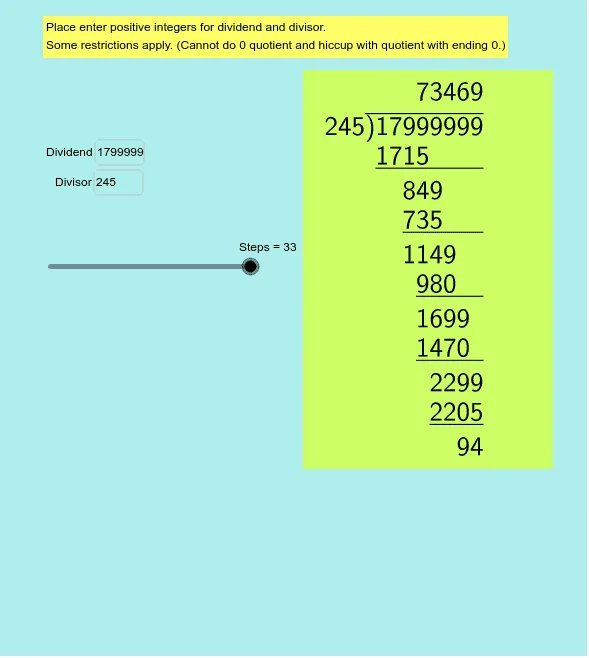
Loading the math board and drawing, please wait…
This example demonstrates the traditional long division method with animated steps. ① It illustrates the process of integer long division, making abstract mathematical operations intuitive through dynamic step-by-step calculations. ② Core mathematical concepts include integer division, remainder, quotient calculation, and digit handling. ③ Construction utilizes GeoGebra commands and objects like Join, Sequence, Mod, If, LaTeX, Element, Length, and Textfield for dynamic text generation and step control. ④ Suitable for upper elementary and middle school students learning long division, as well as mathematical teaching demonstrations.
GeoGebra Commands & Parameters
Join({Sequence[floor(Mod[(quotient * 10^((-i))), 10]), i, iterate - 1, 0, -1], {0}}) → digitsSequence(floor(lg(Element[list5, i])) + 1, i, 1, Length[list5]) → list6Sequence(floor(lg(Element[leftover, i])) + 1, i, 1, Length[leftover]) → leftnumdigitsSequence(i, i, floor(lg(quotient)), floor(lg(quotient)) - iterate + 1, -1) → indentJoin({Sequence[floor(Mod[(dividend * 10^((-i))), 10]), i, iterate - 1, 0, -1], {0}}) → divdigitsJoin({Sequence[If[Element[partialproduct, i] ≟ 0 ∨ (Element[list4, i] < 0), "", floor(Element[leftover, i] / 10^(Element[list4, i])) + "\phantom{" + (10^(spacing - (iterate - 1 - Element[leftnumdigits, i]) - Element[list6, i])) + "}\\"], i, 1, iterate - 1], {remainder + "\phantom{1000}"}}) → list3Join({Sequence[If[Element[partialproduct, i] ≟ 0, "", "\underline{" + (Element[partialproduct, i]) + "\phantom{" + (10^(iterate - i - 1)) + "}}" + "\phantom{" + (10^(spacing - iterate + 1)) + "}\\"], i, 1, iterate - 1], If[Element[partialproduct, iterate] ≟ 0, {""}, {"\underline{" + (Element[partialproduct, iterate]) + "}" + "\phantom{0000}\\"}]}) → list1Mod(Steps, 4) → levelJoin({{0}, Sequence[floor((quotient * 10^((-i)))), i, iterate - 1, 0, -1]}) → partialquotientIf(Element[partialquotient, order] > 0, Element[partialquotient, order], "p") → bLaTeX(list1, true, true) → text2LaTeX(text3, true, true) → text4Element(partialleftover, 5) → cElement(divdigits, 6) → dJoin({Sequence[If[Element[partialproduct, i] ≟ 0 ∨ Element[partialleftover, i] ≟ 0, "", Element[partialleftover, i] + "\phantom{" + (10^(spacing - i + 1)) + "}\\"], i, 1, iterate - 1], {remainder + "\phantom{1000}"}}) → list2Join({list1, list3}) → Jointlist1Join({list1, list2}) → Jointlist2Length(Jointlist1) → eJoin({Sequence[Element[Jointlist1, floor(i) + ((iterate * 2) * Mod[i, 1])], i, 1, iterate, 0.5], remainder + {"\phantom{0000}"}}) → resultcarryLength(resultcarry) → fTextfield(dividend) → inputBox1Textfield(divisor) → inputBox2Join({Sequence[Element[Jointlist2, floor(i) + ((iterate * 2) * Mod[i, 1])], i, 1, iterate, 0.5], remainder + {"\phantom{0000}"}}) → result
AI Drawing Prompt Reference
Create an animated illustration of integer long division, showing the step-by-step calculation process starting from a dividend and divisor. Display each step's remainder, partial quotient, and partial remainder, highlighting the current digit being processed with an underline. The animation should demonstrate the entire long division process dynamically, including the movement and calculation of digits, suitable for educational purposes.
The prompt above was compiled from the original drawing commands and is for reference only.