
Animated Acute Angles Demonstration
Loading the math board and drawing, please wait…
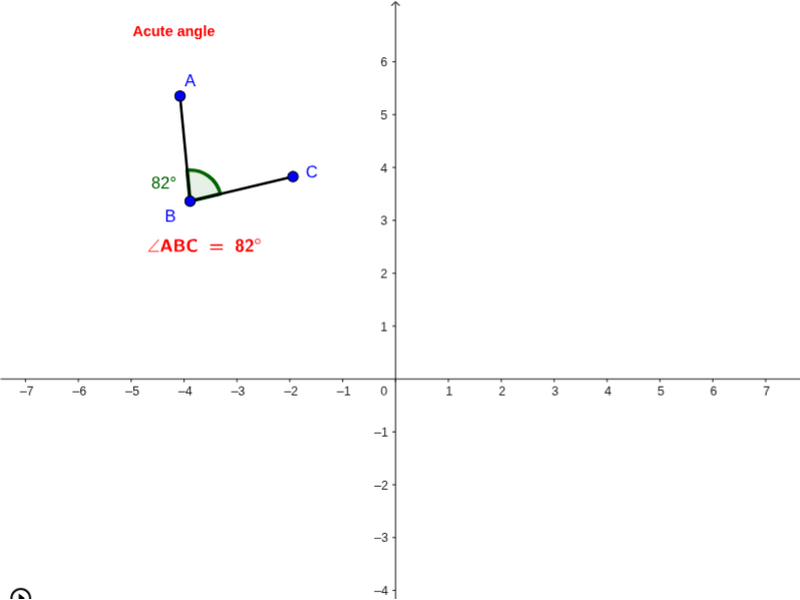
① This example shows an acute angle dynamically changing inside a circle as a point rotates, illustrating the relationship between angle measure, arc length, and segments. ② Core math concepts: definition of acute angles, angle measurement, rotation transformation, and geometric properties of circles and line segments. ③ Construction highlights: Circle creates the base circle; Point defines key points; Rotate moves a point to generate the moving angle; Angle marks and displays the angle value; Segment connects points to form line segments. Main objects used are a, B, c, C, α, A, β, b, d, acute, text1. ④ Suitable for middle‑school geometry lessons introducing angles, high‑school trigonometry review, and teachers building interactive teaching materials.
GeoGebra Commands & Parameters
Circle(B, a) → cPoint(c) → CRotate(C, α, B) → AAngle(C, B, A) → βSegment(B, A) → bSegment(B, C) → d
AI Drawing Prompt Reference
Draw a circle with a center point, place a point on its circumference, then rotate that point around the center by a given acute angle to obtain a second point; connect the center to both points forming two radii, mark the angle between them and display its measure dynamically as the rotation changes, illustrating the relationship between the acute angle, arc length, and the radii.
The prompt above was compiled from the original drawing commands and is for reference only.