
Angles in Parallelogram
Loading the math board and drawing, please wait…
In collections
Parallelogramm und Raute: Eigenschaften und Konstruktionen
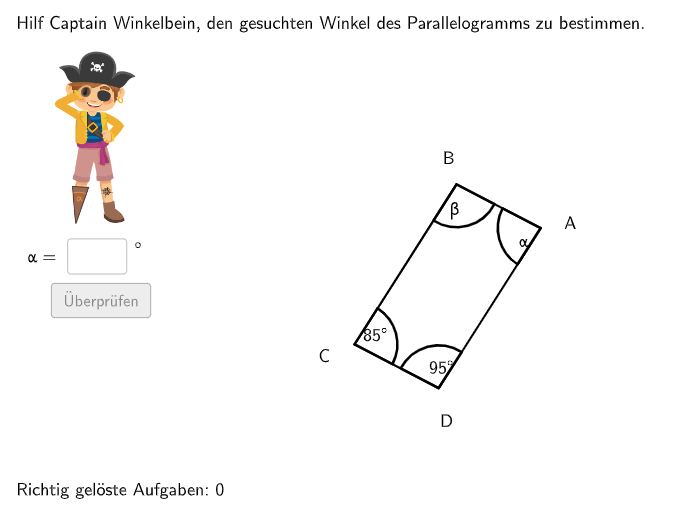
This example demonstrates the angle properties of a parallelogram. Key mathematical concepts include the diagonals, angle relationships, and rotation. GeoGebra commands such as Random, Rotate, Angle, and Textfield are used in construction. Suitable for 5-6 grade students to learn about the properties of special quadrilaterals.
GeoGebra Commands & Parameters
Random(1, 360) → randomgradShuffle(Sequence[i, i, 60, 100] \ {90}) → alphaList, {85, 73, 96, 89, 69, 63, 65, 78, 81, 61, 80, 66, 79, 87, 91, 95, 71, 64, 62, 82, 70, 84, 93, 100, 76, 94, 74, 86, 75, 77, 72, 83, 97, 68, 67, 99, 60, 98, 92, 88}Shuffle(Sequence[minbeta + 40, maxbeta - 30, 10]) → betaList, {100, 90}Shuffle(2…4) → radlist, {2, 3, 4}Rotate(MKreis + (0, b), randomgrad°, MKreis) → ALine(A, MKreis) → jRotate(SenkP, (-(α / 2)) + randomgrad°, A) → SenkP'_{1}Ray(A, SenkP'_{1}) → fCircle(A, rad1) → cIntersect(c, f) → B,Rotate(A, (-β), B) → B'Ray(B, B') → iShuffle({1, 2, 3, 4}) → gesuchtListe, {4, 2, 3, 1}If(questionCount ≟ 1, 1, questionCount ≟ 2, 2, gesuchtListe(1)) → gesuchtRotate(SenkP, α / 2 + randomgrad°, A) → SenkP'Ray(A, SenkP') → gShuffle(2…4) → radlist2, {4, 2, 3}Circle(A, rad2) → pIntersect(p, g) → D,Angle(B, A, D) → alpRotate(A, β, D) → A'Ray(D, A') → hCircle(B, rad2) → eIntersect(e, i) → F,Angle(D, C, B) → gamTextfield(input1) → InputBox1Textfield(input2) → InputBox2Polygon(PtopLeftCornerFeedback, PtopRightCornerFeedback, PbottomRightCornerFeedback, PbottomLeftCornerFeedback) → rectangleCorrect, rectangleCorrectS3, rectangleCorrectS4, rectangleCorrectS2, rectangleCorrectS1Shuffle(Sequence[Random[0, 10], i, 1, 100]) → randomNosForX, {4, 7, 0, 0, 2, 9, 5, 9, 9, 3, 7, 3, 6, 3, 10, 6, 0, 6, 10, 10, 5, 8, 9, 6, 7, 9, 6, 3, 5, 7, 8, 10, 3, 9, 5, 0, 8, 2, 0, 0, 9, 8, 4, 0, 9, 7, 10, 2, 1, 1, 0, 5, 5, 1, 5, 9, 10, 2, 9, 6, 5, 2, 2, 1, 6, 6, 7, 5, 7, 8, 6, 3, 7, 2, 9, 3, 0, 3, 5, 0, 5, 4, 4, 1, 7, 1, 1, 7, 2, 1, 1, 2, 2, 1, 2, 1, 0, 2, 2, 4}Element(randomNosForX, Mod[questionCount, 100] + 1) → numXShuffle(Sequence[Random[0, 10], i, 1, 100]) → randomNosForY, {9, 7, 1, 0, 4, 5, 2, 8, 2, 2, 7, 0, 3, 9, 2, 9, 9, 0, 9, 1, 8, 10, 9, 5, 8, 6, 6, 8, 2, 0, 7, 0, 3, 10, 9, 3, 10, 6, 6, 3, 7, 4, 9, 10, 5, 9, 0, 3, 9, 7, 7, 10, 10, 6, 9, 5, 8, 4, 2, 7, 1, 3, 10, 0, 2, 4, 0, 10, 0, 10, 10, 8, 9, 2, 8, 2, 6, 4, 8, 7, 0, 10, 7, 2, 9, 7, 9, 0, 5, 6, 7, 7, 3, 1, 5, 6, 4, 8, 3, 7}Element(randomNosForY, Mod[questionCount, 100] + 1) → numYAppend(true, Sequence[If[randomNosForX(i) ≟ randomNosForX(i - 1), false, true], i, 2, 100]) → stayXAppend(true, Sequence[If[randomNosForY(i) ≟ randomNosForY(i - 1), false, true], i, 2, 100]) → stayYRemove(Sequence[If[stayX(i), randomNosForX(i), 0], i, 1, 100], Sequence[0, i, 1, 100]) → randomNosForXwithoutRepeatRemove(Sequence[If[stayY(i), randomNosForY(i), 0], i, 1, 100], Sequence[0, i, 1, 100]) → randomNosForYwithoutRepeatElement(randomNosForXwithoutRepeat, Mod[questionCount, Length[randomNosForXwithoutRepeat]] + 1) → numXwithoutRepeatElement(randomNosForYwithoutRepeat, Mod[questionCount, Length[randomNosForYwithoutRepeat]] + 1) → numYwithoutRepeatDefined(input1) → fixedAngle(SenkP, A, SenkP') → SantasLittleHelper2Angle(SenkP'_{1}, A, SenkP) → SantasLittleHelper1Angle(A, D, C) → delAngle(C, B, A) → betIf(questionCount ≟ 1, 2, questionCount ≟ 2, 4, gesucht ≟ 1 ∨ gesucht ≟ 3, RandomElement[{2, 4}], gesucht ≟ 2, RandomElement[{1, 3, 4}], gesucht ≟ 4, RandomElement[{1, 2, 3}]) → gesucht2Midpoint(A, C) → ECircle(MKreis, 4) → dRotate(A + (0, 0.65), randomgrad°, A) → BeschPosARotate(C + (0, -0.65), randomgrad°, C) → BeschPosCRotate(B + (-0.65, 0), randomgrad°, B) → BeschPosBRotate(D + (0.65, 0), randomgrad°, D) → BeschPosDMidpoint(B, D) → MDeltText(BeschriftungAlpha, BeschPosAlpha, false, true, 0, 0) → Text10Text(BeschriftungBeta, BeschPosBeta, false, true, 0, 0) → Text11Text(BeschriftungGamma, BeschPosGamma, false, true, 0, 0) → Text12Text(BeschriftungDelta, BeschPosDelta, false, true, 0, 0) → Text13Text(BeschA, BeschPosA, false, true, 0, 0) → Text14Text(BeschB, BeschPosB, false, true, 0, 0) → Text15Text(BeschC, BeschPosC, false, true, 0, 0) → Text16Text(BeschD, BeschPosD, false, true, 0, 0) → Text17Segment(A, B) → kSegment(B, C) → l
AI Drawing Prompt Reference
Draw a parallelogram to demonstrate its angle properties, diagonals, and rotational symmetry. Start by creating a parallelogram with random angles, then draw its diagonals and mark their intersection point. Next, rotate one of the angles to show the rotational symmetry of the parallelogram, labeling the rotation angle. Finally, add text annotations explaining that the diagonals bisect each other, opposite angles are equal, and adjacent angles are supplementary.
The prompt above was compiled from the original drawing commands and is for reference only.