
Angles Formed by a Transversal Intersecting Parallel Lines
Loading the math board and drawing, please wait…
In collections
Angle Congruence Intros
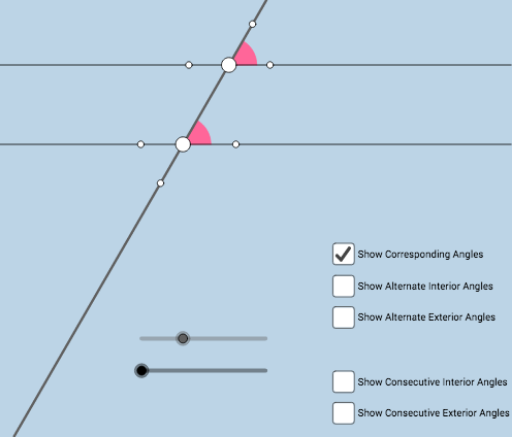
This applet demonstrates the relationships between angles formed when a transversal intersects two parallel lines. Key mathematical concepts include vertical angles, corresponding angles, alternate interior angles, and same-side interior angles. Using GeoGebra commands such as Point, Intersect, Rotate, and Angle, students can explore these angle relationships. Suitable for middle school and above students learning geometry.
GeoGebra Commands & Parameters
Point(f) → ACircle(A, 2) → cIntersect(c, f, 2) → BRotate(B, (a * π / 180), A) → B'Rotate(f, (b * π / 180), A) → f'Intersect(c, f', 2) → FRotate(F, (a * π / 180), A) → F'Angle(F, A, F') → αLine(A, F') → gIntersect(c, g, 1) → CRay(A, F') → hRay(A, C) → iIntersect(c, f', 1) → DRay(A, F) → jRay(A, C) → kRay(A, D) → lPoint(l) → EPoint(h) → GPoint(k) → HPoint(j) → ILine(G, j) → mCircle(G, 1) → dIntersect(d, m) → J, KIntersect(d, h) → L, MRay(G, K) → nRay(G, J) → pPoint(n) → OPoint(p) → PIntersect(d, h, 2) → QRay(G, Q) → qSegment(A, G) → rPoint(q) → NCircle(G, 1.5) → c_1Circle(A, 1.5) → d_1Intersect(c_1, n, 1) → RIntersect(c_1, q, 1) → SIntersect(c_1, p, 1) → TIntersect(c_1, r, 1) → UIntersect(d_1, j, 1) → VIntersect(d_1, r, 1) → WIntersect(d_1, l) → Z,Intersect(d_1, k, 1) → A_1CircleSector(G, R, S) → e_1CircleSector(G, S, T) → f_1CircleSector(G, T, U) → g_1CircleSector(G, U, R) → h_1CircleSector(A, V, W) → k_1CircleSector(A, W, Z) → p_1CircleSector(A, Z, A_1) → q_1CircleSector(A, A_1, V) → r_1
AI Drawing Prompt Reference
Draw two parallel lines and a transversal line crossing them. Mark the vertical angles, corresponding angles, alternate interior angles, and same-side interior angles. Start by taking a point A on one line and drawing two circles with radius 2 centered at A. Then, select points on these circles and use rotation and intersection to construct the other angles. Finally, connect the relevant points to form the arc regions of the angles.
The prompt above was compiled from the original drawing commands and is for reference only.