
Binomial Rectangle 1
Loading the math board and drawing, please wait…
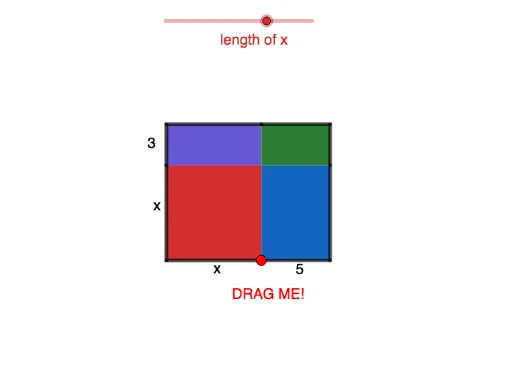
This example demonstrates the construction of a binomial rectangle. Key mathematical concepts include rectangles, random variables, and reflection. Using GeoGebra commands such as OrthogonalLine, Intersect, and Segment, a binomial rectangle can be constructed. Suitable for middle school and above students to learn geometric construction.
GeoGebra Commands & Parameters
OrthogonalLine(A, xAxis) → fOrthogonalLine(D, xAxis) → gOrthogonalLine(C, yAxis) → hOrthogonalLine(B, yAxis) → iIntersect(f, i) → EIntersect(f, h) → FIntersect(g, h) → GIntersect(g, i) → HIntersect(xAxis, yAxis) → ISegment(I, B) → jSegment(B, C) → kSegment(C, F) → lSegment(F, E) → mSegment(E, A) → nSegment(A, I) → pSegment(F, G) → qSegment(H, E) → rSegment(H, D) → sSegment(D, A) → tSegment(G, H) → bSegment(E, B) → cPolygon(I, B, E, A) → q1, i_1, b_1, e, a_1Polygon(B, C, F, E) → q2, b_2, c_1, f_1, e_1Polygon(F, G, H, E) → q3, f_2, g_1, h_1, e_2Polygon(E, H, D, A) → q4, e_3, h_2, d, a_2
AI Drawing Prompt Reference
Draw a complex geometric shape composed of four rectangles connected by reflections and intersections. Start by drawing two vertical lines and two horizontal lines, then find their intersections. Use these intersections to construct the four rectangles and finally connect their sides to form the shape.
The prompt above was compiled from the original drawing commands and is for reference only.