
Angles and Polygons
Loading the math board and drawing, please wait…
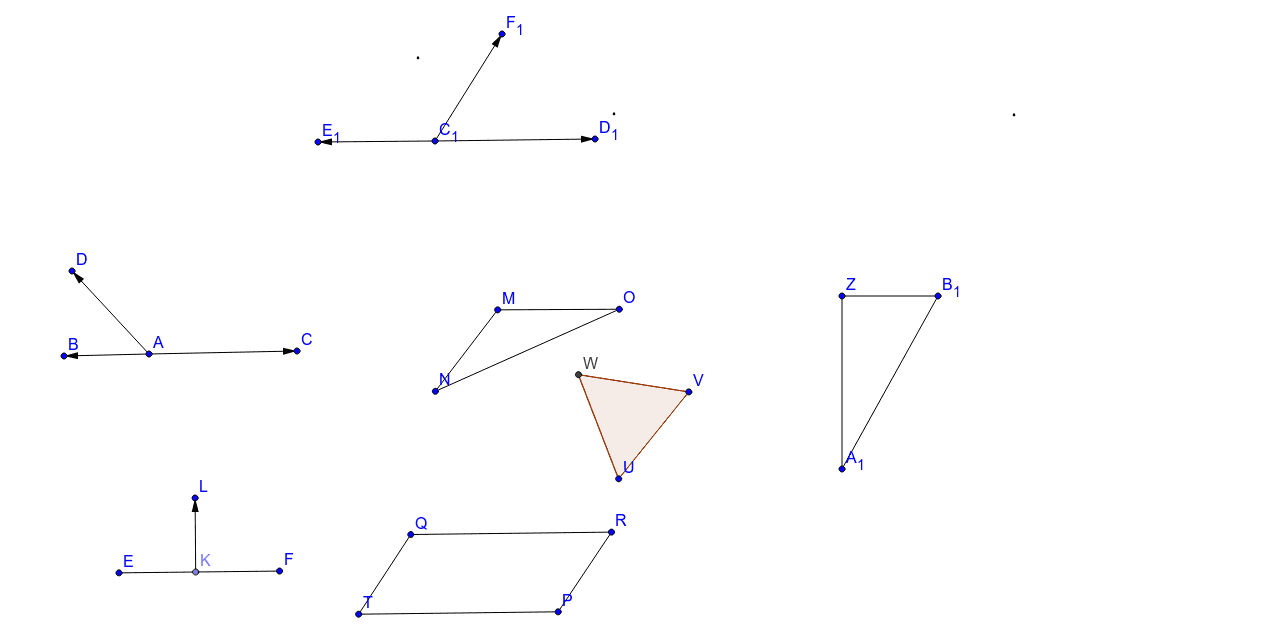
This example demonstrates the geometric relationships and construction methods between angles and polygons. Core math concepts include angle measurement, polygon definition, vector application, and coordinate geometry. Construction highlights involve commands like Segment, Point, Vector, and Polygon from GeoGebra. Suitable for high school mathematics teaching or for geometry enthusiasts learning polygon properties and angle calculations.
GeoGebra Commands & Parameters
Segment(E, F) → cPoint(c) → KVector(K, L) → wSegment(M, N) → dSegment(M, O) → eSegment(O, N) → fAttachCopyToView(PolyLine[(4.0600000000000005, 5.14), true], 1, (-4.3, -9.4), (24.5, 6.3), (0, 785), (1440, 0)) → stroke1Polygon(U, V, 3) → poly2, k, l, m, WAttachCopyToView(PolyLine[(14.82, 0.48), (NaN, NaN), (20.32, -0.08), (NaN, NaN), (15.44, 1.08), (NaN, NaN), (14, 0.46), (NaN, NaN), (14.040000000000001, 0.6), true], 1, (-4.3, -9.4), (24.5, 6.3), (0, 785), (1440, 0)) → stroke4AttachCopyToView(PolyLine[(15.98, 4), (NaN, NaN), (7.98, 4.0200000000000005), true], 1, (-4.3, -9.4), (16.5, 6.3), (0, 785), (1040, 0)) → stroke5Segment(Q, T) → jSegment(T, P) → gSegment(Q, R) → hSegment(R, P) → iSegment(Z, A_1) → nSegment(A_1, B_1) → pSegment(B_1, Z) → qVector(C_1, D_1) → uVector(C_1, E_1) → sVector(C_1, F_1) → tVector(A, B) → vVector(A, C) → aVector(A, D) → b
AI Drawing Prompt Reference
Draw a quadrilateral ABCD by connecting points A to B, B to C, C to D, and D to A. Then construct a triangle DEF inside the quadrilateral by connecting points D to E, E to F, and F to D. Next, draw a triangle XYZ outside the quadrilateral by connecting points X to Y, Y to Z, and Z to X. Finally, draw some vectors, such as from point C to D, from point C to E, from point C to F, from point A to B, from point A to C, and from point A to D.
The prompt above was compiled from the original drawing commands and is for reference only.