
Angle Sum Theorem with Rotations
Loading the math board and drawing, please wait…
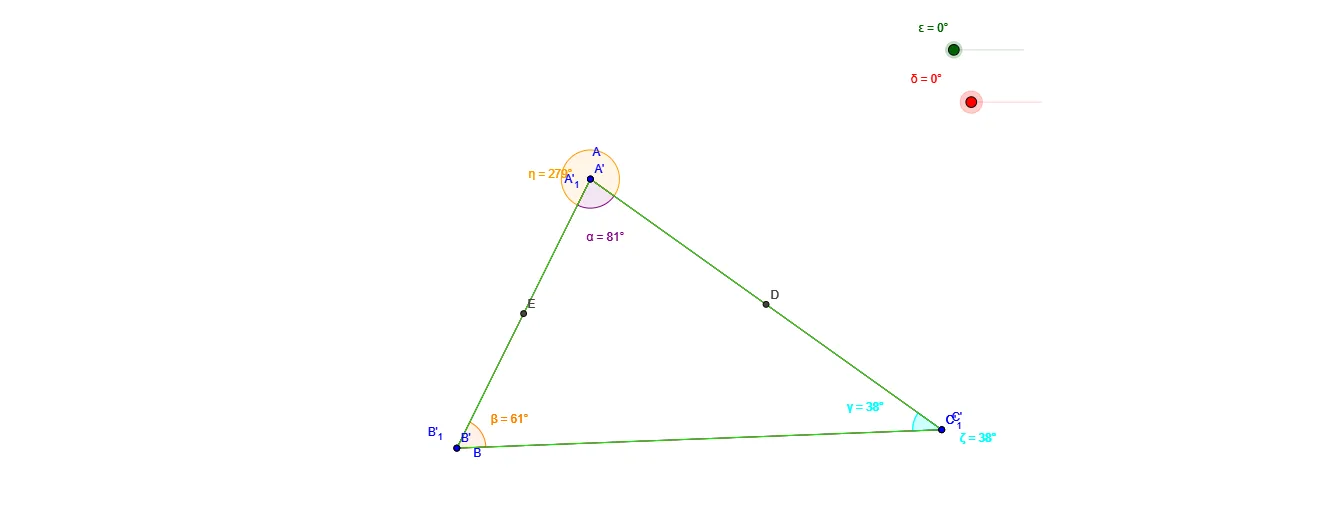
This example demonstrates the angle sum theorem with rotations. Key mathematical concepts include angles and rotations. Using GeoGebra commands such as Polygon, Angle, Midpoint, and Rotate, a triangle is constructed and its angle changes after rotation are observed. Suitable for middle and high school students learning geometric transformations.
GeoGebra Commands & Parameters
Polygon(A, B, C) → poly1, c, a, bAngle(B, A, C) → αAngle(C, B, A) → βAngle(A, C, B) → γMidpoint(A, C) → DMidpoint(A, B) → ERotate(A, (-δ), D) → A'Rotate(B, (-δ), D) → B'Rotate(C, (-δ), D) → C'Polygon(A', B', C') → poly1', c', a', b'Rotate(A, ε, E) → A'_1Rotate(B, ε, E) → B'_1Rotate(C, ε, E) → C'_1Polygon(A'_1, B'_1, C'_1) → poly1'_1, c'_1, a'_1, b'_1Angle(C'_1, A, B) → ηAngle(A', C', B') → ζ
AI Drawing Prompt Reference
Draw a triangle and label its three interior angles. Take the midpoints of two sides, and rotate the entire triangle around each midpoint by a certain angle, producing two rotated triangles. These rotated triangles, together with the original, show how the angles relate, with one angle from a rotated triangle adjacent to an original angle and another angle from the other rotated triangle adjacent to another original angle, visually demonstrating the angle sum theorem.
The prompt above was compiled from the original drawing commands and is for reference only.