
Angle Relationships in Geometric Figures
Loading the math board and drawing, please wait…
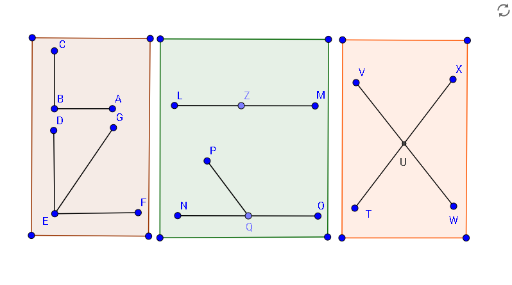
This GeoGebra example demonstrates the intricate angle relationships within complex geometric configurations, highlighting the interplay of angles, tangent lines, and polygonal structures. Core mathematical concepts include angle properties, geometric means, rotational transformations, and geometric invariants. To construct this dynamic model, key GeoGebra commands such as Rotate, Angle, Segment, Polygon, Point, and Intersect were utilized to define points A through K, polygons poly1 and poly2, and auxiliary functions f through s linked by parameters alpha and beta. It is highly suitable for high school and early college students studying geometry, coordinate geometry, or preparing for math competitions, serving as an interactive tool for visual proof and geometric exploration.
GeoGebra Commands & Parameters
Rotate(C, (-(90°)), B) → AAngle(A, B, C) → αSegment(C, B) → fSegment(B, A) → gRotate(D, (-(90°)), E) → FAngle(F, E, D) → βSegment(F, E) → hSegment(E, D) → iSegment(E, G) → jPolygon(H, I, J, K) → poly1, h_1, i_1, j_1, kSegment(L, M) → lSegment(N, O) → mPoint(m) → QSegment(P, Q) → nPolygon(R, S, T_1, U_1) → poly2, r, s, t, uSegment(V, W) → pSegment(X, T) → qAngle(G, E, D) → γPolygon(C_1, D_1, E_1, F_1) → poly3, c_1, d_1, e_1, f_1Intersect(p, q) → UAngle(O, Q, P) → δRotate(O, 125°, Q) → O'Angle(O, Q, O') → εAngle(X, U, V) → ζPoint(l) → Z
AI Drawing Prompt Reference
Create a geometric figure demonstrating complex angle relationships. First, construct a rotation structure: rotate one point 90 degrees counterclockwise around another point to create a new point, and mark the angle formed by these three points. Then build a similar 90-degree rotation structure at a different location and label its corresponding angle. Next, draw several line segments, including two intersecting lines that create an intersection point. Add a quadrilateral formed by four points, then construct another quadrilateral in a different region. Finally, mark several key angles including a 125-degree angle created by rotating a point around another point, along with angles formed by the intersection point and surrounding points.
The prompt above was compiled from the original drawing commands and is for reference only.