
Angle Parts, Notation and Degree Measure
Loading the math board and drawing, please wait…
In collections
Wiederholung Winkel: Bezeichnung, Arten, Messen & Zeichnen
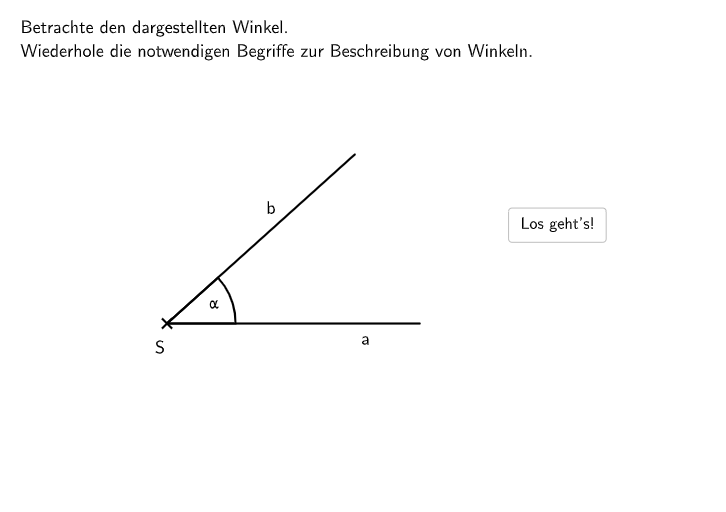
This example demonstrates the fundamental concepts and components of angles. It visually presents the vertex, arms, and measurement of angles through dynamic graphics. Key mathematical concepts covered include the definition of angle, degree system, classification of angles (acute, right, obtuse, etc.), and angle notation. Construction uses Point commands for vertices, Segment commands for angle arms, Angle commands to create angle objects, Rotate commands for angle rotation animations, with Textfield and DropDown for interactive input, Polygon commands for auxiliary polygons, color coding (color1-5) and text labels (TextZ1-5) to identify each part. Suitable for middle school mathematics, used for angle recognition teaching, angle measurement practice, or as an interactive introduction to geometry.
GeoGebra Commands & Parameters
UnicodeToText(Remove[TextToUnicode[input9], Sequence[32, m, 1, 100]]) → input9cleanSelectedIndex(DropDown61) → input61Midpoint(Corner[TextZ1, 1], Corner[TextZ1, 3]) → M1Midpoint(Corner[TextZ2, 1], Corner[TextZ2, 3]) → M2Midpoint(Corner[TextZ3, 1], Corner[TextZ3, 3]) → M3Midpoint(Corner[TextZ4, 1], Corner[TextZ4, 3]) → M4Midpoint(Corner[TextZ5, 1], Corner[TextZ5, 3]) → M5Polygon(V1a, (x(V1a), y(V1b)), V1b, (x(V1b), y(V1a))) → v1, h, i, j, kPolygon(V2a, (x(V2a), y(V2b)), V2b, (x(V2b), y(V2a))) → v2, v2_{2}, v2_{3}, v2_{4}, v2_{5}Polygon(V3a, (x(V3a), y(V3b)), V3b, (x(V3b), y(V3a))) → v3, l, m, n, pPolygon(V4a, (x(V4a), y(V4b)), V4b, (x(V4b), y(V4a))) → v4, v4_{2}, v4_{3}, v4_{4}, v4_{5}Polygon(V5a, (x(V5a), y(V5b)), V5b, (x(V5b), y(V5a))) → v5, v5_{2}, v5_{3}, v5_{4}, v5_{5}TextToUnicode(input6) → input6unicodeKeepIf(M ≠ 32, M, input6unicode) → input6unicodecleanCountIf(X ∈ v3, X, {M1, M2, M3, M4, M5}) → inv3CountIf(X ∈ v1, X, {M1, M2, M3, M4, M5}) → inv1CountIf(X ∈ v2, X, {M1, M2, M3, M4, M5}) → inv2CountIf(X ∈ v4, X, {M1, M2, M3, M4, M5}) → inv4CountIf(X ∈ v5, X, {M1, M2, M3, M4, M5}) → inv5Point(Line[S, xAxis]) → ARotate(A, alpha, S) → BPolygon(V0a, (x(V0a), y(V0b)), V0b, (x(V0b), y(V0a))) → v0, v0a, f, vb, gCountIf(X ∈ v0, X, {M1, M2, M3, M4, M5}) → inv0Textfield() → Eingabefeld6Textfield(input2) → Eingabefeld2Segment(S, A) → aSegment(S, B) → bAngle(A, S, B) → w1Angle(B, S, A) → w2Angle(A, S, B) → w3Point(Segment[S, A]) → PAPoint(Segment[S, B]) → PBTextfield(input7) → Eingabefeld7Angle(A, S, B) → αTextfield(input9) → Eingabefeld8
AI Drawing Prompt Reference
Draw an angle with vertex S and two rays SA and SB. Create point S on the x-axis and rotate points A and B around S to form angle w1. Use text fields to input the angle's degree and dynamically adjust the angle size. Use auxiliary polygons to mark different parts of the angle, color-code and label vertices M1 to M5.
The prompt above was compiled from the original drawing commands and is for reference only.