
Angle Pairing with Complementary Angles: Building and Solving Degrees (GeoGebra)
Loading the math board and drawing, please wait…
In collections
Besondere Winkelpaare
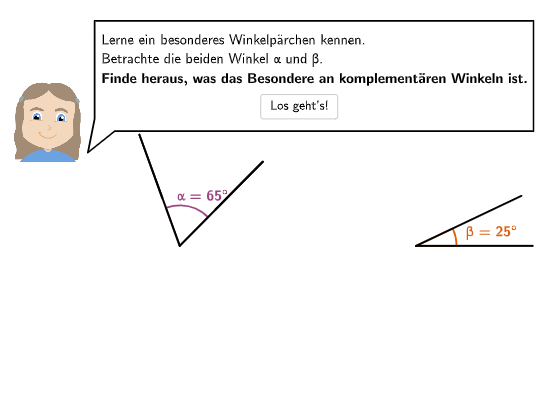
This GeoGebra example demonstrates how angle pairs constrained by complementary/complement relationships can be represented visually and then solved computationally. Students see given angle measures (e.g., 13°, 134°) and are asked to determine the complementary angle, compute unknown angle sizes from algebraic conditions, or explain why a requested complementary angle cannot exist under certain constraints. The key math ideas are angle measurement in degrees, complementary angles (sum to 90°) / complementary vs. supplementary relationships, and reasoning from angle-sum constraints to find unknown degrees. Construction and visualization rely on GeoGebra commands and objects such as SpeechBubble for guided prompts, Point/Segment/Angle to define and measure angles, OrthogonalLine and Intersect for right-angle/constraint geometry, Arc/CircleArc to render angle arcs, and transform tools like Mirror/Rotate/Translate to position angle pairs consistently. Textfield and angle/text objects (e.g., α and labeled primes like B') are used to input and display degree information and results, while the highlighted complementary arc (e.g., complArc) links the geometric model directly to the calculation task. Suitable for Grade 5–6 geometry lessons and classroom assessments focused on interpreting and computing angle measures.
GeoGebra Commands & Parameters
SpeechBubbleLeft(PBubble - (0, 1), 12.4, 2.9) → poly1SpeechBubbleLeft(PBubble, 11.5, 1.3) → poly2SpeechBubbleLeft(PBubble, 5, 1) → poly3Circle(A, 3.5) → cPoint(c) → BSegment(A, B) → s11OrthogonalLine(A, s11) → perpLineIntersect(c, perpLine, 2) → MCOMArc(c, B, MCOM) → complArcPoint(complArc) → B'Angle(B, A, B') → αSegment(A, B') → s12Circle(A, 2.3) → cExtMirror(B, cExt) → B'_{2}Segment(B, B'_{2}) → sv11Mirror(B', cExt) → B''_{1}Segment(B', B''_{1}) → sv12Vector(C, V) → uRotate(D, 90° - α, C) → D'Segment(C, D) → s21Segment(C, D') → s22Vector(A, V) → vTranslate(A, Vector[(transSli1 * v)]) → A'Translate(D', Vector[(transSli2 * u)]) → D''Translate(B, Vector[(transSli1 * v)]) → B'_{1}Angle(D'', V, B'_{1}) → angRotate(A', (rotAng * rotSli), V) → A''Translate(A, Vector[(transSli1 * v)]) → A'_{1}Translate(B', Vector[(transSli1 * v)]) → B''Rotate(B'', (rotAng * rotSli), V) → B'''Translate(B', Vector[(transSli1 * u)]) → B''_{2}Translate(B', Vector[(transSli1 * v)]) → B''_{3}Translate(B, Vector[(transSli1 * u)]) → B'_{3}Translate(B, Vector[(transSli1 * v)]) → B'_4Rotate(B, α - 15°, A) → BFTranslate(C, u) → C'Translate(C, u) → C'_{1}Translate(C, Vector[(transSli2 * u)]) → C'_{2}Translate(C, Vector[(transSli2 * u)]) → C'_{3}Translate(D, Vector[(transSli2 * u)]) → D'_{1}Point(s11) → EPoint(s21) → FRotate(A'_{1}, (rotAng * rotSli), V) → GRotate(B'_{1}, (rotAng * rotSli), V) → HRotate(B'_4, (rotAng * rotSli), V) → SRotate(B''_{3}, (rotAng * rotSli), V) → TSegment(G, H) → s11''Segment(A'', B''') → s12''Segment(C'_{2}, D'_{1}) → s21'Segment(C'_{3}, D'') → s22'Angle(D'_{1}, C'_{2}, D'') → βAngle(H, A', B''') → α'Angle(D'_{1} + (2, 0), A', B''' + (0, 2)) → γSelectedIndex(dropdown) → indexCircleArc(A', D'_{1} - (0.4, 0), B''') → dPoint(d) → ISegment(A', I) → segCircleArc(A', D'_{1} - (0.23, 0), B''') → eMirror(I, e) → I'Segment(I, I') → seg2Angle(I', A', B''') → α''Angle(D'_{1}, A', I') → β'SpeechBubbleLeft(PBubble, 12.4, 1.9) → poly1_1Textfield(input1) → InputBox1Segment(G + (Distance[G, I] * (cos(Angle[G + (1, 0), G, I] + arrowCircleDistance + arrowCircleAngle), sin(Angle[G + (1, 0), G, I] + arrowCircleDistance + arrowCircleAngle))), G + (Distance[G, I] * (cos(Angle[G + (1, 0), G, I] + arrowCircleDistance + arrowCircleAngle), sin(Angle[G + (1, 0), G, I] + arrowCircleDistance + arrowCircleAngle))) + (arrowCircleLength * UnitOrthogonalVector[Vector[G, G + (Distance[G, I] * (cos(Angle[G + (1, 0), G, I] + arrowCircleDistance + arrowCircleAngle), sin(Angle[G + (1, 0), G, I] + arrowCircleDistance + arrowCircleAngle)))]])) → arrowCircleArrow01_{1}Segment(G + (Distance[G, I] * (cos(Angle[G + (1, 0), G, I] - arrowCircleDistance - arrowCircleAngle), sin(Angle[G + (1, 0), G, I] - arrowCircleDistance - arrowCircleAngle))), G + (Distance[G, I] * (cos(Angle[G + (1, 0), G, I] - arrowCircleDistance - arrowCircleAngle), sin(Angle[G + (1, 0), G, I] - arrowCircleDistance - arrowCircleAngle))) - (arrowCircleLength * UnitOrthogonalVector[Vector[G, G + (Distance[G, I] * (cos(Angle[G + (1, 0), G, I] - arrowCircleDistance - arrowCircleAngle), sin(Angle[G + (1, 0), G, I] - arrowCircleDistance - arrowCircleAngle)))]])) → arrowCircleArrow01
AI Drawing Prompt Reference
Draw a right triangle with one right angle at A and the other right angle at B. Construct a circle with A and B as endpoints of a diameter, and find point B' on the circle such that angles BAC and B'AC are complementary. Use reflection, rotation, and translation tools to construct a series of angles and segments around points A and B', forming a figure with multiple complementary angles.
The prompt above was compiled from the original drawing commands and is for reference only.