
Angle From 2 Secants Interactive Exploration
Loading the math board and drawing, please wait…
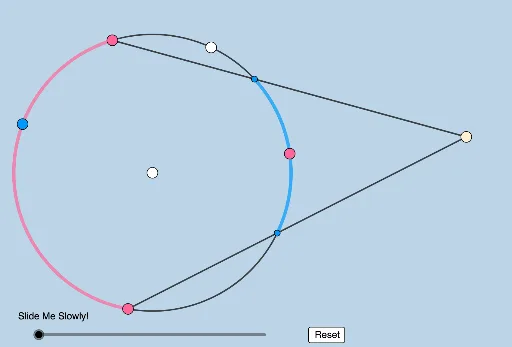
This example demonstrates the dynamic angle formed by two secant segments drawn from outside a circle. Key math concepts include circles, secant lines, angles, and interactive geometric exploration. It uses commands like PointIn, Semicircle, Circle, Intersect, CircleArc, Point, Segment, Min, Dilate, Angle, Rotate, Vector, CircleSector, Translate, Line, and Midpoint. Suitable for high school geometry teaching to understand the secant theorem and dynamic geometric relationships.
GeoGebra Commands & Parameters
PointIn(a) → CSemicircle(C, A) → eSemicircle(A, C) → dCircle(A, B) → cIntersect(c, e, 1) → EIntersect(c, d, 1) → DCircleArc(A, E, D) → gCircleArc(A, D, E) → fPoint(f) → FSegment(C, F) → iIntersect(g, i, 1) → HCircleArc(A, F, E) → hPoint(h) → GSegment(C, G) → jIntersect(g, j, 1) → ICircleArc(A, H, I) → h_2Min({Distance[A, B], Distance[C, H], Distance[C, I]}) → kCircle(A, (0.4 * k)) → pSegment(A, F) → lSegment(A, G) → mIntersect(p, l, 1) → JSegment(A, I) → nSegment(A, H) → qIntersect(p, n, 1) → KIntersect(p, q, 1) → LDilate(A, If[0 < b ≤ 1, 1 - b, 0], F) → A'Dilate(A, If[0 < b ≤ 1, 1 - b, 0], G) → A'_1Dilate(A, If[0 < b ≤ 1, 1 - b, 0], H) → A'_2Dilate(A, If[0 < b ≤ 1, 1 - b, 0], I) → A'_3Angle(F, C, G) → εRotate(J, If[8 < b ≤ 9, ((b - 8) * ε), ε], A) → J'_1Dilate(A, If[10 < b ≤ 11, 11 - b, 0], C) → A'_7Vector(A, A'_7) → uCircleArc(A, F, G) → t_1CircleArc(A, I, H) → c_2CircleArc(A, H, F) → d_2CircleArc(A, G, I) → e_2CircleArc(A, G, F) → f_2Point(h_2) → RPoint(f_2) → QSegment(R, H) → a_1Segment(R, I) → b_1Segment(Q, F) → g_2Segment(Q, G) → i_2Min({Distance[Q, G], Distance[Q, F], Distance[R, F], Distance[R, G], Distance[C, H], Distance[C, I]}) → oCircle(R, (0.5 * o)) → k_2Circle(Q, (0.5 * o)) → p_2Intersect(p_2, g_2, 1) → SIntersect(k_2, b_1, 1) → PAngle(P, R, H) → ζAngle(S, Q, G) → μAngle(H, C, I) → κDilate(Q, If[0 < b ≤ 1, 1 - b, 0], G) → Q'Dilate(Q, If[0 < b ≤ 1, 1 - b, 0], F) → Q'_1Segment(Q, Q') → sSegment(Q, Q'_1) → tDilate(R, If[1 < b ≤ 2, 2 - b, 0], H) → R'Dilate(R, If[1 < b ≤ 2, 2 - b, 0], I) → R'_1Segment(R, R') → rSegment(R, R'_1) → f_1Rotate(S, If[2 < b ≤ 3, ((b - 2) * μ), μ], Q) → S'_1Rotate(P, If[3 < b ≤ 4, ((b - 3) * ζ), ζ], R) → P'CircleSector(R, P, P') → c_1CircleSector(Q, S, S'_1) → d_1Dilate(R, If[5 < b ≤ 6, 6 - b, 0], Q) → R'_2Vector(R, R'_2) → vTranslate(c_1, v) → e_1Line(Q, r) → g_1Point(g_1) → MIntersect(p_2, i_2) → N,Rotate(N, (-ζ), Q) → N'Angle(M, Q, N) → αRotate(e_1, If[5 < b ≤ 6, ((b - 5) * α), α], R'_2) → h_1Rotate(S, If[6 < b ≤ 7, ((b - 6) * (μ - ζ)), μ - ζ], Q) → S'CircleSector(Q, S, S') → k_1Midpoint(Q, C) → ORotate(Q, If[8 < b ≤ 9, ((-(b - 8)) * π), (-π)], O) → Q'_2Vector(Q, Q'_2) → wTranslate(k_1, w) → p_1Line(C, t) → i_1Point(i_1) → TAngle(T, C, F) → βRotate(p_1, If[8 < b ≤ 9, ((-(b - 8)) * ((2 * π) - β)), β - (2 * π)], Q'_2) → q_1CircleArc(A, H, F) → r_1CircleArc(A, G, I) → s_1
AI Drawing Prompt Reference
Draw a circle with a point outside it. From this external point, draw two secant lines that intersect the circle at two points each. Place two movable points on the circle's arcs. Connect the external point to these movable points with segments, which cross the circle again. Use arcs to connect the intersection points on the circle, creating dynamic regions. Inside the circle, construct a smaller circle to display angles. Draw rays from the external point to the movable points, marking their intersections with the small circle. Connect the intersection points with segments to form a draggable figure that shows how the angle between the two secants changes.
The prompt above was compiled from the original drawing commands and is for reference only.