
Angle Bisector Construction and Geometric Properties
Loading the math board and drawing, please wait…
In collections
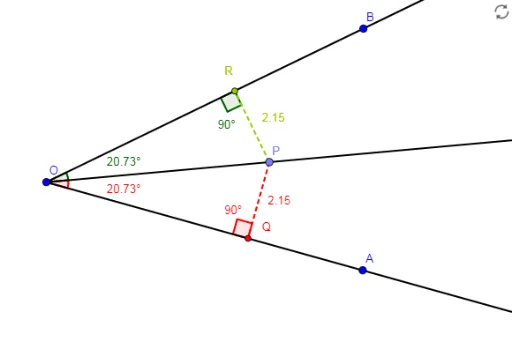
Angle Bisector as a locus. The Incenter of a Triangle
This GeoGebra example demonstrates how to precisely construct an angle bisector and then build related geometric figures to visually explore its properties and connections with triangles and circles. The core mathematical concepts include the definition of an angle bisector, the angle bisector theorem (points on the bisector are equidistant from the two sides), and the relationship between the bisector and the incenter or circumcircle of a triangle. The construction uses commands such as Ray to create rays, AngularBisector to generate the bisector directly, Point to mark key points, OrthogonalLine to construct perpendiculars, Intersect to find intersection points, Segment to connect segments, and Angle to measure angles. Key objects include points O, A, B, P, R, Q; rays f, g, h; segments i, j, k, l, m; and angles α, β, γ, δ. This example is suitable for middle and high school geometry instruction, helping students understand the construction method, verify properties, and explore geometric theorems through dynamic software. It can be used for teacher demonstrations or student self-directed investigation.
GeoGebra Commands & Parameters
Ray(O, A) → fRay(O, B) → gAngularBisector(A, O, B) → hPoint(h) → PRay(O, P) → iOrthogonalLine(P, g) → jOrthogonalLine(P, f) → kIntersect(j, g) → RIntersect(k, f) → QSegment(P, R) → lSegment(P, Q) → mAngle(P, O, R) → αAngle(Q, O, P) → βAngle(P, Q, O) → γAngle(O, R, P) → δ