
Angle Bisector and Perpendicular Bisector Construction
Loading the math board and drawing, please wait…
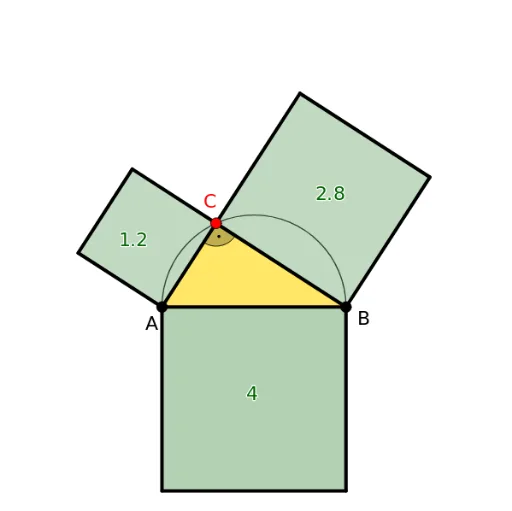
This example demonstrates how to construct angle bisectors and perpendicular bisectors of a triangle using GeoGebra. Key math concepts include angle bisectors, perpendicular bisectors, medians, rotations, reflections, etc. Construction highlights involve commands like LineBisector, Segment, Rotate, Line, OrthogonalLine, Intersect, Mirror, CircleArc, Circle, Point, Polygon, Angle, PointIn, and Midpoint. Suitable for high school geometry construction lessons and learning.
GeoGebra Commands & Parameters
LineBisector(A, B) → l_4Segment(A, B) → fRotate(B, gam, A) → B'Line(A, B') → m_4OrthogonalLine(A, m_4) → n_4Intersect(l_4, n_4) → QMirror(Q, f) → Q'CircleArc(Q', B, A) → c_4Circle((A + B) / 2, B) → cPoint(c_4) → CLine(C, yAxis) → gLine(G, F) → hIntersect(g, h) → E_1Line(A, B) → iIntersect(i, g) → G_1Polygon(G, E_1, G_1, A) → ct1, d, e, g_1, a_1Polygon(E_1, F, B, G_1) → ct2, e_1, f_1, b_1, g_2Segment(A, G) → jSegment(B, F) → kLine(A, C) → lLine(C, B) → mOrthogonalLine(C, l) → nOrthogonalLine(A, l) → pOrthogonalLine(C, m) → qOrthogonalLine(B, m) → rPolygon(A, C, 4) → mnohoúhelník1, h_1, i_1, j_1, k_1, D, ELine(E, D) → l_1OrthogonalLine(B, l) → sOrthogonalLine(A, m) → tIntersect(s, l) → HIntersect(m, t) → IIntersect(l_1, s) → LPolygon(A, H, L, E) → ct3, a_2, h_2, l_2, k_2Polygon(H, C, D, L) → ct4, h_3, c_1, j_2, l_3Polygon(C, B, 4) → mnohoúhelník2, m_1, n_1, p_1, q_1, M, NLine(N, M) → r_1Intersect(t, r_1) → OPolygon(I, B, M, O) → ct5, i_2, b_2, m_2, oPolygon(C, I, O, N) → ct6, c_2, i_3, o_1, n_2Segment(A, H) → s_1Segment(H, C) → t_1Segment(C, D) → d_1Segment(D, L) → f_2Segment(L, E) → p_2Segment(E, A) → q_2Segment(L, H) → r_2Segment(G_1, E_1) → s_2Segment(G, E_1) → t_2Segment(E_1, F) → d_2Segment(C, I) → e_2Segment(I, B) → f_3Segment(B, M) → g_3Segment(M, O) → j_3Segment(O, I) → k_3Segment(N, O) → m_3Segment(N, C) → n_3Segment(G_1, A) → p_3Segment(C, G_1) → q_3Segment(H, B) → r_3Segment(A, I) → s_3Angle(A, C, B) → αPolygon(A, B, C) → t1, c_3, a_3, b_3PointIn(ct1) → Bodct1PointIn(ct6) → Bodct6_1PointIn(ct6) → Bodct6Segment(G, F) → t_3Segment(E, D) → d_3Segment(N, M) → e_3Segment(E, B) → f_4Segment(C, G) → g_4Segment(D, B) → h_4Segment(Bodct6, A) → i_4Segment(A, M) → j_4Segment(C, F) → k_4Midpoint(Bodct6, B) → KMidpoint(L, A) → PAngle(B, A, B') → βPolygon(B, A, 4) → mnohoúhelník3, p_4, q_4, r_4, s_4, R, SPolygon(C, B, 4) → mnohoúhelník4, t_4, a_4, b_4, d_4, T, UPolygon(A, C, 4) → mnohoúhelník5, e_4, f_5, g_5, h_5, V, WPolygon(C, B, 4) → mnohoúhelník6, i_5, j_5, k_5, l_5, Z, A_1Polygon(A, C, 4) → mnohoúhelník7, m_5, n_5, p_5, q_5, B_1, C_1
AI Drawing Prompt Reference
Draw a triangle ABC and construct angle bisectors and perpendicular bisectors. First, construct angle bisectors AD and BE, then construct perpendicular bisector DE. Next, find the circumcenter Q and construct a circular arc and a circle through Q. Then, construct medians and altitudes, and their related perpendiculars and intersections. Finally, based on these lines and points, construct multiple triangles and quadrilaterals, including the mid-point quadrilateral, the orthic quadrilateral, and the circumcircle.
The prompt above was compiled from the original drawing commands and is for reference only.