
Angle Between Vectors: Visualization and Calculation in GeoGebra
Loading the math board and drawing, please wait…
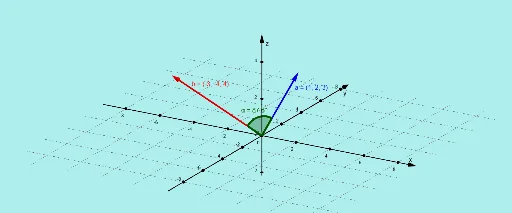
This example demonstrates the geometric meaning and numerical calculation of the angle between two vectors, a and b. Core concepts involve vector algebra, angle measurement, and planar geometry relationships. Construction utilizes the GeoGebra Angle command to define vector objects a and b, automatically calculating and displaying the angle α. Suitable for high school or university mathematics courses, aiding in vector teaching, homework assistance, and intuitive understanding of vector angle properties, helping learners master spatial direction and magnitude relationships.
GeoGebra Commands & Parameters
Angle(a, b) → α
AI Drawing Prompt Reference
Draw two vectors and calculate the angle between them, visually representing the geometric meaning of the angle and displaying the calculated angle value, suitable for teaching and understanding vector direction and magnitude relationships.
The prompt above was compiled from the original drawing commands and is for reference only.