
Angle Between Two Planes by skv
Loading the math board and drawing, please wait…
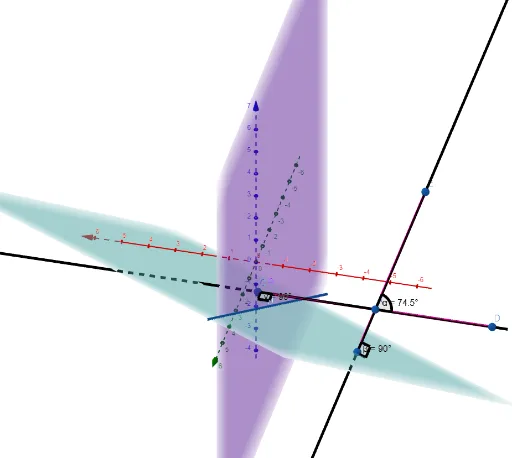
This example demonstrates how to calculate the angle between two planes using geometric construction methods. Key mathematical concepts include plane geometry and trigonometry. Using GeoGebra commands such as OrthogonalLine, Angle, IntersectPath, etc., the formation of the angle can be visually demonstrated. Suitable for high school and above students or teachers to help understand the concept of angles in solid geometry.
GeoGebra Commands & Parameters
OrthogonalLine(A, p) → fOrthogonalLine(A, p) → gOrthogonalLine(A, eq1) → hAngle(h, g) → αIntersectPath(eq1, p) → iAngle(h, eq1) → βAngle(g, p) → γPoint(h) → BPoint(g) → CSegment(C, A) → jSegment(B, A) → kPoint(g) → DAngle(k, h) → δSegment(C, D) → lPoint(h) → ESegment(B, E) → m
AI Drawing Prompt Reference
Draw the angle between two planes. First, construct two perpendicular lines f and g through point A to plane p, then calculate the angle α between f and g. Next, find the intersection line i of plane eq1 and plane p, and calculate the angles β between f and i, and γ between i and p. Construct line segments j and k through points B and C, then find the angle δ between k and f. Finally, connect points C and D, and B and E to form line segments l and m.
The prompt above was compiled from the original drawing commands and is for reference only.