
Angle between a Line and a Plane by Alex CHIK
Loading the math board and drawing, please wait…
In collections
Projections and Angles
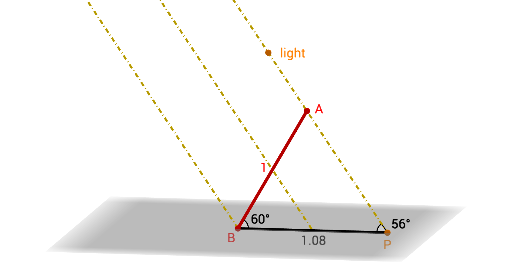
This example illustrates the concept of the angle between a line and a plane, showing the relationship between a line and a plane through geometric construction. Key mathematical concepts include the line-plane angle, projection, and geometric transformations. It utilizes commands such as Sequence, Point, Rotate, CircumcircleArc, Intersect, Segment, Angle, Ray, Translate, and Midpoint in GeoGebra. Suitable for high school geometry and solid geometry education.
GeoGebra Commands & Parameters
Sequence((0, (-cos(i°)), sin(i°)), i, 1, 179) → list2Point(list2) → ASequence((x(A), y(A) - (0.5 * cos(i°)), z(A) + (0.5 * sin(i°))), i, 1, 179) → list1Point(list1) → SRotate(S, phi, OrthogonalLine[A, xOyPlane]) → S'CircumcircleArc((0, -1, 0), (0, 0, 1), (0, 1, 0)) → cIntersect(xAxis, yAxis) → BSegment(B, A) → aIntersect(Ray[S', A], xOyPlane) → PSegment(B, P) → pAngle(A, P, B) → αAngle(P, B, A) → βRay(P, S') → bTranslate(B, Vector[A, S']) → B'Ray(B, B') → dMidpoint(B, A) → DMidpoint(B, P) → ERay(E, D) → g
AI Drawing Prompt Reference
Draw a line and a plane to illustrate the angle between them. Start by plotting a line in space and defining a plane. Take a point on the line, rotate it to find its projection on the plane. Use the intersection of the line with the plane and the projection point to form the angle's sides. Measure the angle and apply geometric transformations to clearly show the relationship between the line and the plane's angle.
The prompt above was compiled from the original drawing commands and is for reference only.