
Angle Addition Formula Visualization
Loading the math board and drawing, please wait…
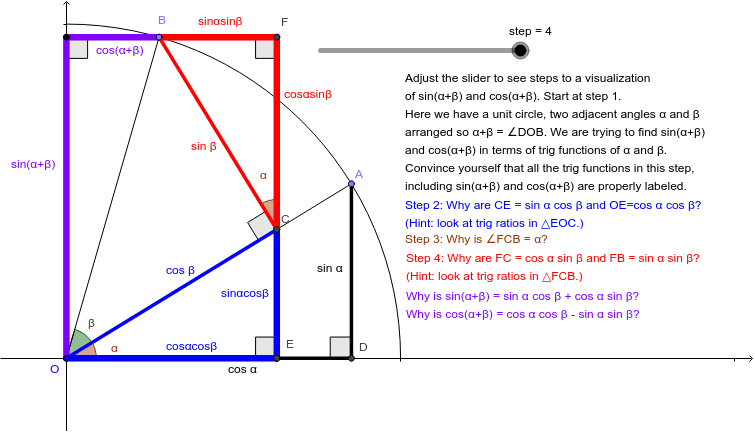
This example demonstrates the geometric interpretation of the angle addition formula sin(α+β)=sinαcosβ+cosαsinβ. Key mathematical concepts include trigonometric functions, angle operations, and geometric transformations. Construction involves GeoGebra commands like Circle, Point, Angle, and OrthogonalLine. Suitable for high school students learning trigonometry and geometric transformations.
GeoGebra Commands & Parameters
Circle(O, 1) → cPoint(c) → ASegment(O, A) → aPoint(c) → BSegment(B, O) → bAngle(A, O, B) → βOrthogonalLine(B, a) → dIntersect(d, a) → CAngle(B, C, O) → γOrthogonalLine(A, xAxis) → eIntersect(e, xAxis) → DOrthogonalLine(C, xAxis) → fIntersect(f, xAxis) → ESegment(C, E) → sinαcosβSegment(A, D) → hSegment(C, O) → iOrthogonalLine(B, f) → jIntersect(f, j) → FAngle(F, C, B) → δSegment(B, C) → kSegment(F, C) → cosαsinβIntersect(j, yAxis) → GSegment(G, O) → sinαpβAngle(C, E, O) → εAngle(A, D, O) → ζAngle(B, F, C) → ηSegment(F, B) → sinαsinβAngle(D, O, A) → αSegment(F, C) → pCircleArc(O, M, N) → qSegment(O, D) → cosαSegment(E, O) → cosαcosβSegment(B, F) → gSegment(G, B) → cosαpβAngle(O, G, B) → θ
AI Drawing Prompt Reference
Draw a unit circle centered at the origin. Place two movable points on the circle, each connected to the center by a radius, with the angle between the radii labeled β. From one point, draw a perpendicular to the other radius, intersecting it at a point; from this intersection, drop a perpendicular to the horizontal axis. From the other point, drop a perpendicular to the horizontal axis. Connect relevant points to form segments representing products of sine and cosine. Add right-angle marks and an arc to indicate angles. The final figure shows several right triangles and perpendiculars inside the unit circle, illustrating the sine addition formula.
The prompt above was compiled from the original drawing commands and is for reference only.