
Altitudes and Orthocenter of a Triangle by Brian Meeron
Loading the math board and drawing, please wait…
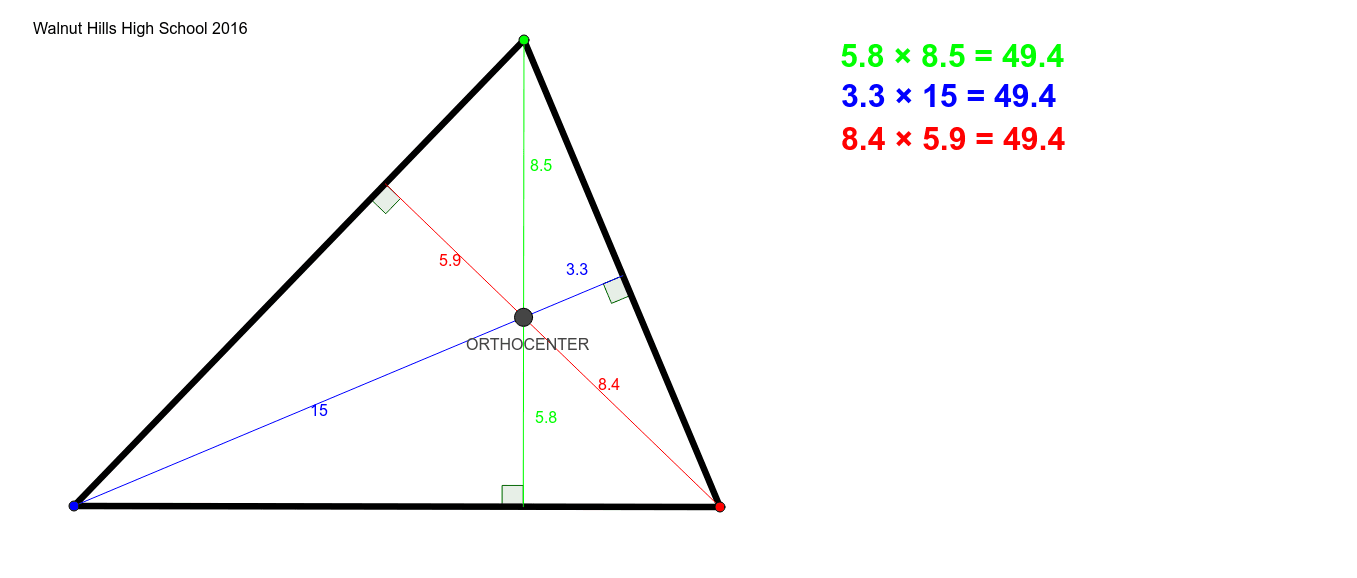
① This example demonstrates the geometric construction and properties of the three altitudes of an arbitrary triangle and their common intersection point, the orthocenter. ② Core mathematical concepts include altitudes, orthocenter, pedal triangle, angle relationships, and distances from the orthocenter to vertices and sides, along with symmetry and geometric inequalities. ③ Construction details: Using GeoGebra commands such as Segment, OrthogonalLine, Intersect, Angle, and Distance, the triangle ABC is built with its three altitudes, the feet D, E, F are marked, and the orthocenter H is found; auxiliary segments, angles α, β, γ, and distances like distanceIORTHOCENTER and distanceORTHOCENTERC are measured, with color-coded elements (green, red, blue). ④ Suitable for middle and high school geometry classes, this interactive figure helps students visualize the existence and location of the orthocenter (inside for acute triangles, at a vertex for right triangles, outside for obtuse triangles) and explore metric relationships, as well as connections to the circumcenter, centroid, and incenter.
GeoGebra Commands & Parameters
Segment(A, B) → fSegment(A, C) → gSegment(C, B) → hOrthogonalLine(C, f) → iOrthogonalLine(A, h) → jOrthogonalLine(B, g) → kIntersect(k, g) → DIntersect(j, h) → EIntersect(i, f) → FIntersect(j, i) → ORTHOCENTEROrthogonalLine(C, j) → lIntersect(l, j) → GSegment(C, G) → mOrthogonalLine(C, k) → nIntersect(n, k) → HSegment(H, C) → pOrthogonalLine(A, i) → qIntersect(i, q) → ISegment(A, I) → rAngle(C, I, B) → αAngle(B, I, C) → βAngle(A, G, B) → γAngle(B, G, A) → δAngle(A, H, B) → εAngle(B, H, A) → ζDistance(I, ORTHOCENTER) → distanceIORTHOCENTERDistance(ORTHOCENTER, C) → distanceORTHOCENTERCSegment(ORTHOCENTER, C) → green2Segment(ORTHOCENTER, I) → green1Segment(A, ORTHOCENTER) → red1Segment(G, ORTHOCENTER) → red2Segment(H, ORTHOCENTER) → blue1Segment(ORTHOCENTER, B) → blue2
AI Drawing Prompt Reference
Draw an arbitrary triangle and construct its three altitudes, which intersect at a common point called the orthocenter. Mark the feet of the altitudes on the opposite sides. Connect the orthocenter to each vertex, and also draw segments from the orthocenter to the altitude feet and to certain points on the sides. Label several angles formed by these segments)Skip and measure distances from the orthocenter to specific points. Use different colors (green, red, blue) for different segments to clearly show the relationships among the orthocenter, vertices, and sides.
The prompt above was compiled from the original drawing commands and is for reference only.