
Algebra Balance: Solve the Equation Balance
Loading the math board and drawing, please wait…
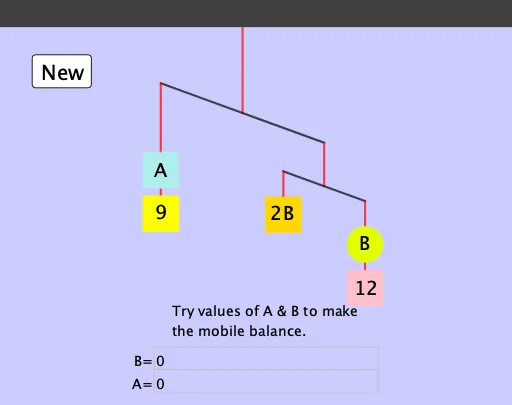
① This interactive GeoGebra example presents a balance scale model that visually demonstrates the fundamental idea of maintaining equality when solving algebraic equations; users adjust unknowns or weights to make the scale balance. ② Core mathematical concepts include constructing and solving linear equations in one variable, properties of equality (adding, subtracting, multiplying, dividing both sides), equivalent transformations of algebraic expressions, and randomized problem generation for varied practice. ③ Construction highlights: from the summary, commands such as Random, Element, If, Rotate, Mirror, Segment, Polygon, Circle, and Textfield are used; objects like lhs, rhs1, rhs2 represent left and right sides of equations, poly1-poly4 form the scale structure, and text1/text2 display prompts and feedback. ④ Suitable for middle school students (grades 7-9) learning algebra, as well as for classroom demonstrations or self-paced exploration, helping learners grasp the intuitive meaning of equation balance and develop problem-solving strategies.
GeoGebra Commands & Parameters
Random(1, 5) → oRandom(1, 12) → cRandom(c, c + 10) → pRandom(1, 4) → bRandom(1, 12) → aElement({c + 2, p, ua, (2 * ua), (2 * ub)}, o) → rhs1If(rhs1 > rhs2, 20°, If[rhs1 < rhs2, (-(20°)), 0°]) → FangIf(lhs > rhs1 + rhs2, 20°, If[lhs < rhs1 + rhs2, (-(20°)), 0°]) → CangRotate(B - (2, 0), Cang, B) → CMirror(C, B) → C'Rotate(E - (1, 0), Fang, E) → FMirror(F, E) → F'Segment(B, A) → fSegment(C, C') → gSegment(C', E) → hSegment(F, F') → iSegment(F', G) → jSegment(G, I) → kSegment(F, H) → lSegment(C, D) → mSegment(D, J) → nPolygon(D - 0.4, D + (0.4, -0.4), 4) → poly1Polygon(J - 0.4, J + (0.4, -0.4), 4) → poly2Polygon(H - 0.4, H + (0.4, -0.4), 4) → poly3Polygon(I - 0.4, I + (0.4, -0.4), 4) → poly4Circle(G, 0.4) → dTextfield(ua) → InputBox1Textfield(ub) → InputBox2Element({Text[c + 2], Text[p], "A", "2A", "2B"}, o) → text3
AI Drawing Prompt Reference
Draw a balance scale model for demonstrating equation solving. The scale has a horizontal beam, a central support, and four pans, two on each side. The beam tilts based on comparing the left and right side values. Each pan holds a circular or square weight, with counts determined by random unknowns or constants. Below the scale, two input boxes allow entering unknown values. A text label shows the current equation form, such as 'x+2' or '2x'. The layout is clear and suitable for middle school algebra learning.
The prompt above was compiled from the original drawing commands and is for reference only.