
AJO Sequences and Graphs: Iterated Functions and Visual Patterns
Loading the math board and drawing, please wait…
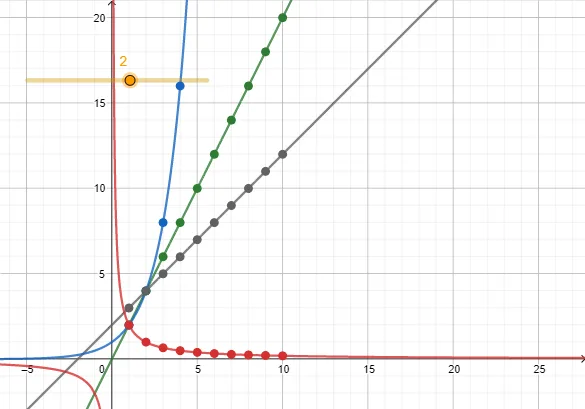
This GeoGebra example visualizes an AJO-type sequence by constructing several linked function objects (f1–f4) and using a parameter k to drive how the sequence-related values are plotted. It demonstrates how discrete sequence behavior can be interpreted through corresponding function graphs, highlighting differences among common function families (e.g., polynomial, exponential/power) via their distinct curve shapes. The core mathematical concepts include sequences, parameterized function evaluation/iteration, and graph-based pattern recognition rather than purely symbolic derivations. From the construction summary, the key entities are k (the controlling parameter) and f1, f2, f3, f4 (the constructed functions whose values generate the displayed graphs/points). The intended use fits secondary to early university levels for teaching functions and sequences, conducting interactive graphing explorations, and supporting lessons on how parameter changes affect graphical outcomes.
GeoGebra Commands & Parameters
Numeric k(2)f1(x) = k + xf2(x) = (k * x)f3(x) = k^(x)f4(x) = k / x
AI Drawing Prompt Reference
Create a graph showing four function curves controlled by a parameter k: a line with slope 1 (k plus x), a line through origin (k times x), an exponential curve (k to the power x), and a reciprocal curve (k divided by x). All curves share the same coordinate system with clear axes. Use distinct colors for each curve and indicate the current value of k. The graph should highlight how the shapes differ as k varies, especially contrasting linear, exponential, and reciprocal behaviors. Keep the layout clean and focus on the geometric patterns.
The prompt above was compiled from the original drawing commands and is for reference only.