
Adjustable Rhombus and Sine Relationship Exploration
Loading the math board and drawing, please wait…
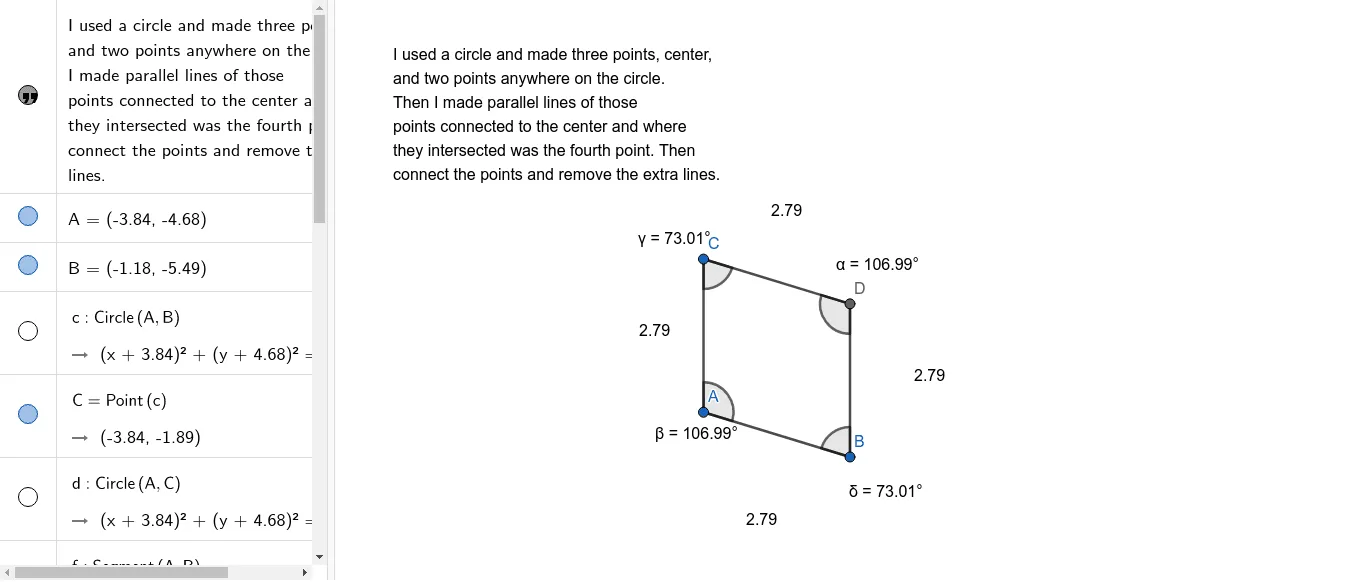
① This GeoGebra example dynamically constructs an adjustable rhombus, using the sine function and right triangles to reveal the mathematical relationships among area, side length, and angles. ② Core concepts include rhombus properties, sine in right triangles, real-number parameter variation, and inequality constraints. ③ Construction uses commands such as Circle, Point, Segment, Line, Intersect, and Angle, with objects text1, A, B, c, C, d, f, g, h, i, D, j, k, and angles α, β, γ, δ, allowing interactive adjustment. ④ Suitable for middle-to-high school mathematics, ideal for teaching geometry and trigonometry integration, or for student-led exploration of dynamic shapes and inequalities.
GeoGebra Commands & Parameters
Circle(A, B) → cPoint(c) → CCircle(A, C) → dSegment(A, B) → fSegment(A, C) → gLine(B, g) → hLine(C, f) → iIntersect(h, i) → DSegment(C, D) → jSegment(D, B) → kAngle(C, D, B) → αAngle(B, A, C) → βAngle(A, C, D) → γAngle(D, B, A) → δ
AI Drawing Prompt Reference
Draw an adjustable rhombus using the sine function and right triangles to explore the relationships between area, side length, and angles. First, draw a circle, then take point C on the circle, draw another circle with A and C, connect points A and B, and A and C to form two lines, find their intersection point D, connect C and D, then connect D and B to form the rhombus ABCD. Finally, measure the four angles α, β, γ, and δ.
The prompt above was compiled from the original drawing commands and is for reference only.