
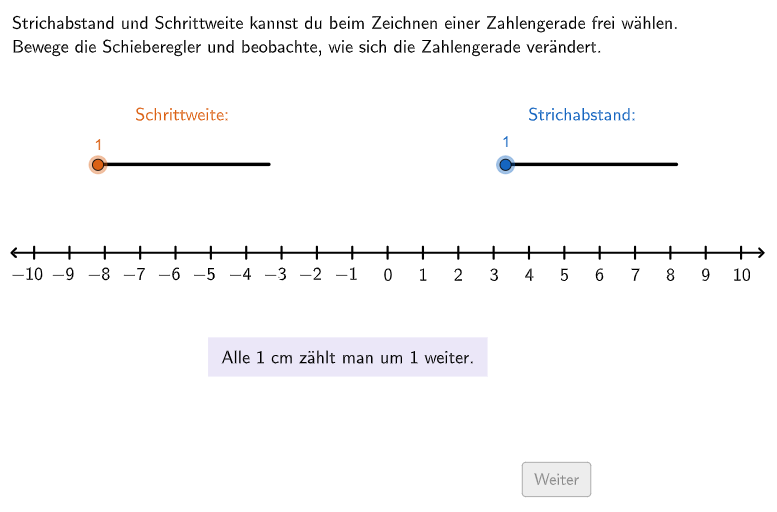
Adjust Step Size and Tick Spacing on a Number Line
Loading the math board and drawing, please wait…
In collections
Ganze Zahlen & Arbeiten mit der Zahlengerade
This GeoGebra example demonstrates how to dynamically adjust the unit step size and tick spacing of a number line so that given integers can be accurately placed. The core mathematical concepts involve the number line, integers, ordering and comparison of numbers, and visual representation of negatives. Construction highlights include using sliders to control step width (schrittweite) and tick distance (strichabs), generating the axis and ticks with commands like Sequence, Point, Segment, and If, and using Text objects to display tasks and feedback. Check points (P1correct, etc.) verify student placements. This resource is suitable for grades 5-6, helping students practice comparing and ordering integers on a number line, and can be used for classroom demonstration or independent exploration.
GeoGebra Commands & Parameters
Join(Shuffle[{{1, 2, 3, 4, 5, 6}, {2, 1, 5, 4, 3, 6}, {3, 5, 4, 6, 1, 2}, {4, 2, 1, 5, 3, 6}, {5, 2, 1, 6, 4, 3}, {6, 1, 2, 5, 4, 3}, {1, 5, 3, 6, 2, 4}, {2, 4, 5, 1, 6, 3}, {3, 2, 1, 5, 4, 6}, {4, 5, 2, 1, 6, 3}, {5, 1, 6, 2, 3, 4}, {6, 4, 3, 2, 1, 5}}]) → listExCountsPoint(Line[O, xAxis]) → OEPSegment(O, OEP) → strahlPIf(step ≟ 1, 0.9, 0.9) → widthFlatten(Join[{Sequence[Sequence[O + (m * ((width * strichabs), 0)) + (j * (0, width)), m, 0, length / ((width * strichabs))], j, 0, 1], Sequence[Sequence[O + (m * (((-width) * strichabs), 0)) + (j * (0, width)), m, 0, length / ((width * strichabs))], j, 0, 1]}]) → listCoordsPoint(listCoords) → P3Point(listCoords) → P2Point(listCoords) → P1Sequence(O + (((strichabs * width) * m), 0), m, 0, length / ((strichabs * width))) → listPointsPZip(Segment[P + (0, (-linelength)), P + (0, linelength)], P, listPointsP) → listLinesPSegment(O + (0, 0.3), O + (0, -0.3)) → lineSequence(O + ((((-strichabs) * width) * m), 0), m, 1, length / ((strichabs * width))) → listPointsNSegment(O, OEN) → strahlNSequence(Text["\textsf{" + ((m * schrittweite)) + "}", O + (((m * width) * strichabs), -1), true, true, -0, 1], m, 0, Length[listPointsP] - 1) → listTextsPZip(Segment[P + (0, (-linelength)), P + (0, linelength)], P, listPointsN) → listLinesNSequence(Text["\textsf{\(-\)" + ((m * schrittweite)) + "}", O + ((((-m) * width) * strichabs) - 0.17, -1), true, true, -0, 1], m, 1, Length[listPointsP] - 1) → listTextNText((("\textsf{\textcolor{#6557d2}{\(" * numY) * "\)}}"), P2 + (If[numY < 0, -0.165, 0], 0.15), false, true, 0, 1) → CapP2Text((("\textsf{\textcolor{#2e7d32}{\(" * numX) * "\)}}"), P1 + (If[numX < 0, -0.165, 0], 0.15), false, true, 0, 1) → CapP1Text((("\textsf{\textcolor{#9c4381}{\(" * numZ) * "\)}}"), P3 + (If[numZ < 0, -0.165, 0], 0.15), false, true, 0, 1) → CapP3
AI Drawing Prompt Reference
Draw an adjustable number line with both positive and negative sides. The line has a central origin point, extending rightward for positive numbers and leftward for negative numbers. Number labels appear above or below the line, showing regular numbers on the positive side and negative numbers with minus signs on the left side. Vertical tick marks are evenly distributed along the entire number line. There may be control sliders below the number line for adjusting parameters. The graphic clearly shows the correspondence between the axis, tick marks, and number labels, suitable for teaching integer comparison and ordering.
The prompt above was compiled from the original drawing commands and is for reference only.