
Addition to One Hundred
Loading the math board and drawing, please wait…
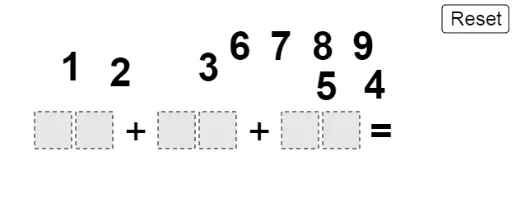
This example demonstrates the process of addition up to one hundred through a graphical approach. It involves core mathematical concepts such as addition, conditional probability, combinatorics, exponents, fractions, and equilateral triangles. The construction utilizes GeoGebra commands and objects like Polygon, If, Mod, Div, and Sequence. Suitable for middle school and above, it helps learners understand basic mathematical concepts and geometric constructions.
GeoGebra Commands & Parameters
Polygon((0, 0), (0.9, 0), 4) → poly1Polygon((2, 0), (2.9, 0), 4) → poly3Polygon((1, 0), (1.9, 0), 4) → poly2Polygon((-2, 0), (-1.1, 0), 4) → poly5Polygon((-1, 0), (-0.1, 0), 4) → poly6Polygon((0, 1), (0.9, 1), 4) → poly4Polygon((-5, 0), (-4.1, 0), 4) → poly8Polygon((-4, 0), (-3.1, 0), 4) → poly9Polygon((0, 2), (0.9, 2), 4) → poly7If(IsInRegion[A, poly9], 1, If[IsInRegion[B, poly9], 2, If[IsInRegion[C, poly9], 3, If[IsInRegion[D, poly9], 4, If[IsInRegion[E, poly9], 5, If[IsInRegion[F, poly9], 6, If[IsInRegion[G, poly9], 7, If[IsInRegion[H, poly9], 8, If[IsInRegion[I, poly9], 9, 0]]]]]]]]) → nineSumIf(IsInRegion[A, poly8], 1, If[IsInRegion[B, poly8], 2, If[IsInRegion[C, poly8], 3, If[IsInRegion[D, poly8], 4, If[IsInRegion[E, poly8], 5, If[IsInRegion[F, poly8], 6, If[IsInRegion[G, poly8], 7, If[IsInRegion[H, poly8], 8, If[IsInRegion[I, poly8], 9, 0]]]]]]]]) → eightSumIf(IsInRegion[A, poly6], 1, If[IsInRegion[B, poly6], 2, If[IsInRegion[C, poly6], 3, If[IsInRegion[D, poly6], 4, If[IsInRegion[E, poly6], 5, If[IsInRegion[F, poly6], 6, If[IsInRegion[G, poly6], 7, If[IsInRegion[H, poly6], 8, If[IsInRegion[I, poly6], 9, 0]]]]]]]]) → sixSumIf(IsInRegion[A, poly5], 1, If[IsInRegion[B, poly5], 2, If[IsInRegion[C, poly5], 3, If[IsInRegion[D, poly5], 4, If[IsInRegion[E, poly5], 5, If[IsInRegion[F, poly5], 6, If[IsInRegion[G, poly5], 7, If[IsInRegion[H, poly5], 8, If[IsInRegion[I, poly5], 9, 0]]]]]]]]) → fiveSumIf(IsInRegion[A, poly3], 1, If[IsInRegion[B, poly3], 2, If[IsInRegion[C, poly3], 3, If[IsInRegion[D, poly3], 4, If[IsInRegion[E, poly3], 5, If[IsInRegion[F, poly3], 6, If[IsInRegion[G, poly3], 7, If[IsInRegion[H, poly3], 8, If[IsInRegion[I, poly3], 9, 0]]]]]]]]) → threeSumIf(IsInRegion[A, poly2], 1, If[IsInRegion[B, poly2], 2, If[IsInRegion[C, poly2], 3, If[IsInRegion[D, poly2], 4, If[IsInRegion[E, poly2], 5, If[IsInRegion[F, poly2], 6, If[IsInRegion[G, poly2], 7, If[IsInRegion[H, poly2], 8, If[IsInRegion[I, poly2], 9, 0]]]]]]]]) → twoSumMod(onesPlace, 10) → SAoneMod(tensPlace + Div[onesPlace, 10], 10) → SAtenDiv(onesPlace, 10) → SAtensCarryDiv(tensPlace + Div[onesPlace, 10], 10) → SAhundredsCarrySequence(Point[{i, 2.5}], i, -5, 3) → anchorsPolygon(L, M, N, O) → q1, l, m, n, o
AI Drawing Prompt Reference
Draw a grid of squares representing numbers from 0 to 100, showing the addition process. Each square contains a number determined by the point's position within specific regions. The squares are arranged in rows and columns, with the top row representing units, the middle tens, and the bottom hundreds. Connect the squares to illustrate the addition and carry-over process between digits.
The prompt above was compiled from the original drawing commands and is for reference only.