
Addition on Number Line
Loading the math board and drawing, please wait…
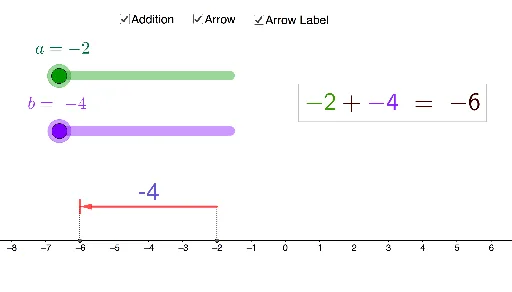
This example demonstrates addition on a number line. Key mathematical concepts include the number line, vectors, and addition operations. Using GeoGebra commands such as Segment and Vector, the process of addition is visually illustrated. Suitable for students from upper elementary to middle school learning addition and number line concepts.
GeoGebra Commands & Parameters
Segment(D, (a + b, 0)) → gSegment((a + b, 0.8), (a + b, 1.2)) → hVector(C, D) → vSegment((a + b, 0.8), (a + b, 1.2)) → iSegment(C, (a, 0)) → fVector(C, D) → u
AI Drawing Prompt Reference
Draw a number line, start from the origin and draw a vector to represent number a, then draw another vector to the right from the position of a to represent number b, then draw a line segment upwards from the position of a+b to indicate the addition result, and finally draw an arrow to represent vector v.
The prompt above was compiled from the original drawing commands and is for reference only.