
Adding Vectors: Parallelogram and Triangle Law Interactive Demo
Loading the math board and drawing, please wait…
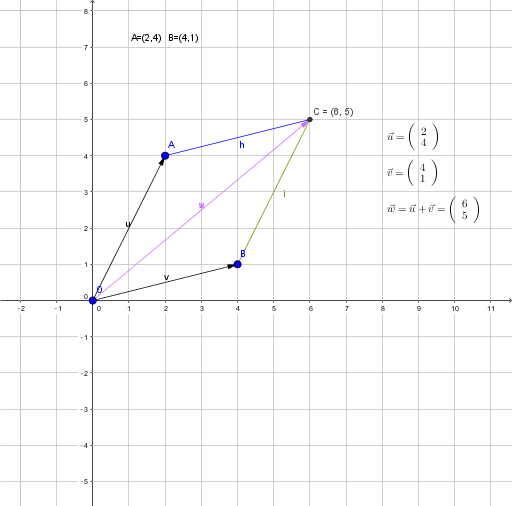
① This GeoGebra example interactively demonstrates the addition of two vectors u and v, showing the geometric meaning of the resultant vector w. ② Core mathematical concepts include vector addition via the parallelogram law (forming a parallelogram with u, v, and their translated segments) and the triangle law (placing vectors head-to-tail), involving vectors, lines, intersections, and segments. ③ Construction details: uses Vector command to create u and v, Line to draw auxiliary lines, Intersect to find point C, Segment to connect edges, and text1-text5 labels to annotate vector names and results, allowing dynamic manipulation. ④ Suitable for high school or early college students learning vector operations, and for teachers demonstrating vector addition visually, reinforcing the connection between geometric intuition and algebraic rules, and preparing for topics like vector decomposition and linear combinations.
GeoGebra Commands & Parameters
Vector(O, A) → uVector(O, B) → vLine(B, u) → fLine(A, v) → gIntersect(g, f) → CSegment(A, C) → hSegment(B, C) → iVector(O, C) → w
AI Drawing Prompt Reference
Draw two vectors u and v starting from the same point O, pointing to points A and B respectively. Construct auxiliary lines parallel to u and v from the endpoints of u and v, which intersect at point C. Connect O to C to form vector w, and also connect A to C and B to C to form two line segments. Label the vectors u, v, and w with text, and display the auxiliary lines and intersection point to demonstrate the parallelogram and triangle laws of vector addition.
The prompt above was compiled from the original drawing commands and is for reference only.