
Adding Fractions with Different Denominators (NS2-03-P1-Q2)
Loading the math board and drawing, please wait…
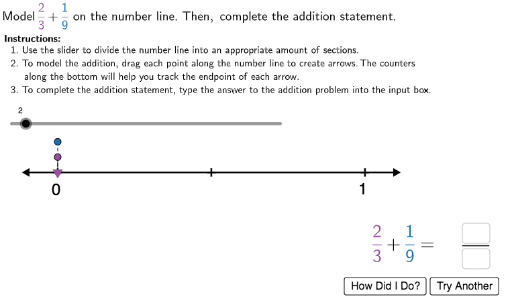
This interactive GeoGebra example demonstrates how to add fractions with different denominators using a number line and visual aids. It helps students understand the process of finding a common denominator, converting fractions, and performing addition. Core math concepts include fraction equivalence, least common multiple, number line representation, and fraction addition. The construction uses GeoGebra commands such as Point, Segment, Random, Sequence, Textfield, Element, Midpoint, and Vector to create a dynamic number line, fraction points, input boxes, check marks, and random question generators. Key objects include num1, num2, den1, den2, NumberLine, FracValue, InputBox1, and CheckMark components. Suitable for upper elementary or middle school students learning fraction operations, and useful for classroom demonstrations or self-paced practice.
GeoGebra Commands & Parameters
Point(point2height) → Num2PointSegment(StartPoint, EndPoint) → NumberLineRandom(-15, -1) → negintRandom(1, 15) → posintLaTeX(Text["\checkmark"]) → RightCheckLaTeX(Text["×"]) → WrongCheckSequence((i, 0), i, -30, 30, 1) → SmallTicksTextfield(inputnum) → InputBox1Point(point1height) → Num1PointElement(UnitsList, den - 2) → unitsSequence((i, 0), i, x(StartPoint) + 0.1, x(EndPoint) - 0.1, 1 / studentden) → TicksTextfield(inputden) → InputBox2Midpoint((0, -0.08), Num1Point) → num1labelpositionMidpoint((x(Num1Point), -0.16), Num2Point) → num2labelpositionSequence(Text["\dfrac{" + ((i * studentden)) + "}{" + studentden + "}", (i - 0.02, 0.11), true, true], i, x(StartPoint) + 0.1 + 1 / studentden, x(EndPoint) - 0.1 - 1 / studentden, 1 / studentden) → scaleSegment((1.3179688433266583, -0.23882702772215378), (1.4034488433266583, -0.23882702772215378)) → fraclineLaTeX(Text[num]) → correctnumVector((0, 0.05), (x(Num1Point), 0.05)) → negvectorVector((x(Num1Point), 0.1), (x(Num2Point), 0.1)) → posvectorSegment(Origin, (0, 0.05)) → connect1Segment((x(Num1Point), 0.05), (x(Num1Point), 0)) → connect2Segment((x(Num2Point), 0.1), Solution) → connect3LaTeX(Text["\dfrac{" + position1 + "}{" + studentden + "}"]) → H1DisplayLaTeX(Text["\dfrac{" + position2 + "}{" + studentden + "}"]) → H2Display
AI Drawing Prompt Reference
Draw a horizontal number line from -30 to 30 with small tick marks. Place two fraction points on the line representing fractions with different denominators, and connect them with arrows and segments to show addition. Above the line, display fraction labels; below, provide input boxes for numerator and denominator. Add a checkmark and a cross for answer validation. Show converted fractions with common denominator above the line, and use vectors to indicate the addition direction.
The prompt above was compiled from the original drawing commands and is for reference only.