
Adding by Quick Tens
Loading the math board and drawing, please wait…
In collections
Elementary School Applets
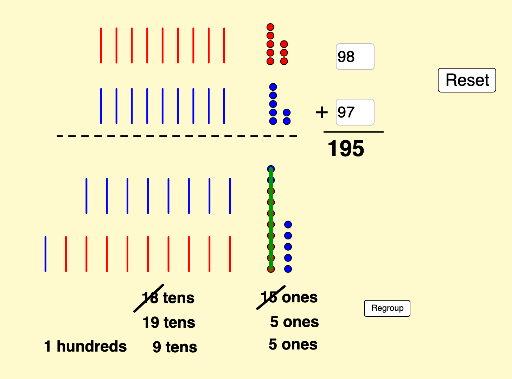
This example demonstrates the method of adding by quick tens. Key mathematical concepts include addition and the decimal system. Using GeoGebra commands such as Sequence, Flatten, Textfield, Mod, and Segment, the addition process is visually constructed. Suitable for high-grade elementary or low-grade middle school students to learn addition techniques.
GeoGebra Commands & Parameters
Sequence(Sequence[(x(A) + (i * horizontalspacing), y(A) + (j * verticalspacing)), j, 0, verticaldots - 1], i, 0, horizontaldots - 1) → destinationarraydotsbigFlatten(destinationarraydotsbig) → destinationonesflatTextfield(firsttext) → InputBox1Textfield(secondtext) → InputBox2Mod(firstnumber, 10) → firstonesMod(secondnumber, 10) → secondonesSequence(Sequence[(x(B) + (i * smallhorizontalspacing), y(B) + (j * smallverticalspacing)), j, 0, smallverticaldots - 1], i, 0, smallhorizontaldots - 1) → smallarrayfirstbigSequence(Sequence[(x(C) + (i * smallhorizontalspacing), y(C) + (j * smallverticalspacing)), j, 0, smallverticaldots - 1], i, 0, smallhorizontaldots - 1) → smallarraysecondbigFlatten(smallarrayfirstbig) → smallonesfirstflatFlatten(smallarraysecondbig) → smallonessecondflatSequence(Element[smallonesfirstflat, i], i, 1, firstones) → showfirstonesSequence(Element[smallonessecondflat, i], i, 1, secondones) → showsecondonesSequence(Sequence[(x(D) - (i * smalltenswidth), y(D) + (j * smalltensheight)), j, 0, smalltensrows - 1], i, 0, smalltenscolumns - 1) → smalltensfirstbigSequence(Sequence[(x(E) - (i * smalltenswidth), y(E) + (j * smalltensheight)), j, 0, smalltensrows - 1], i, 0, smalltenscolumns - 1) → smalltenssecondbigFlatten(smalltensfirstbig) → smalltensfirstflatFlatten(smalltenssecondbig) → smalltenssecondflatSequence(Segment[Element[smalltensfirstflat, (2 * i) + 1], Element[smalltensfirstflat, (2 * i) + 2]], i, 0, firsttens - 1) → showfirsttensSequence(Segment[Element[smalltenssecondflat, (2 * i) + 1], Element[smalltenssecondflat, (2 * i) + 2]], i, 0, secondtens - 1) → showsecondtensFlatten(Sequence[Sequence[(x(F) - (i * destinationtenswidth), y(F) + (j * destinationtensheight)), i, 0, destinationtenscolumns - 1], j, 0, destinationtensrows - 1]) → destinationtensflatSequence(Translate[Element[showfirstones, i], Vector[(Vector[Element[smallonesfirstflat, i], Element[destinationonesflat, i]] * slideit)]], i, 1, firstones) → swooponesfirstSequence(Translate[Element[showsecondones, i], Vector[(Vector[Element[smallonessecondflat, i], Element[destinationonesflat, i + firstones]] * slideit)]], i, 1, secondones) → swooponessecondSegment(G, H) → fSegment(I, J) → gMod(total, 10) → totalonesMod(total, 10) → finalonesSegment(Element[destinationonesflat, 1], Element[destinationonesflat, (10 * regroupit)]) → hSegment(K, L) → iSegment(M, N) → jSequence(Vector[Element[smalltensfirstflat, (2 * i)], Element[destinationtensflat, i]], i, 1, firsttens) → slidefirsttensvectorsSequence(Vector[Element[smalltenssecondflat, (2 * i)], Element[destinationtensflat, i + firsttens]], i, 1, secondtens) → slidesecondtensvectorsSequence(Translate[Element[showfirsttens, i], Vector[(Element[slidefirsttensvectors, i] * slideit)]], i, 1, firsttens) → swooptensfirstSequence(Translate[Element[showsecondtens, i], Vector[(Element[slidesecondtensvectors, i] * slideit)]], i, 1, secondtens) → swooptenssecond
AI Drawing Prompt Reference
Draw a tens addition diagram with two input boxes for numbers, where the units are shown with small squares and tens with long rectangles. Connect the units and tens to the target position using sliding segments, and represent the total sum with large rectangles. Finally, show the units of the total sum.
The prompt above was compiled from the original drawing commands and is for reference only.