
Add Mixed Numbers
Loading the math board and drawing, please wait…
In collections
Erstes Rechnen mit Brüchen - Addieren
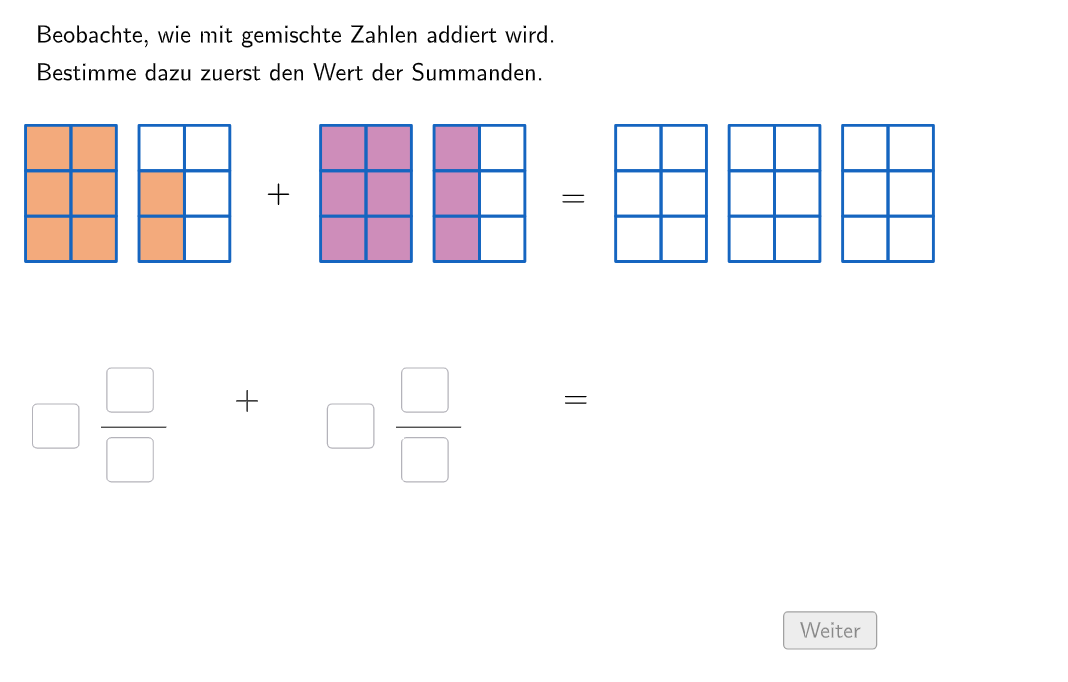
This example demonstrates how to calculate and simplify the addition of mixed numbers using GeoGebra. Key math concepts include adding fractions. GeoGebra commands used include Join, If, Translate, Textfield, Sequence, and LaTeX. Suitable for 5th to 6th grade students learning to add fractions.
GeoGebra Commands & Parameters
Join({{4}, Join[Sequence[Shuffle[{2, 3, 4}], i, 1, 100]]}) → randomCasesJoin({{8}, Sequence[Random[nenner, nenner + 2], i, 1, 100] \ {nenner}}) → randomzaehler1Join({{9}, Sequence[Random[1, (3 * nenner) - zaehler1 - 1], i, 1, 100] \ {nenner - zaehler1, (2 * nenner) - zaehler1, nenner, zaehler1}}) → randomzaehler2If(bruch3 ≟ 3, bruch3 ≟ input7, bruch3 ≟ input7 + input8 / input9 ∧ (¬inputUnechterBruch3)) → correct3If(case ≥ 3, Pos1, Pos2) → PosJoin({Sequence[Translate[UnitSquare, Vector[(i * (0, dy))]], i, 0, If[nenner ≟ 4, 2, If[nenner ≥ 3, 3, nenner]] - 1], Sequence[Translate[Translate[UnitSquare, (dxQuadrat, 0)], Vector[(i * (0, dy))]], i, 0, If[nenner ≟ 4, 5, nenner] - 3 - 1]}) → bruch11If(case ≥ 3, (0.65 * 2.5), (0.65 * 1.5)) → dxTranslate(bruch11, (dx + dxPart2 + If[bruch2 < 1, 1, 0], 0)) → bruch21Translate(bruch21, (dx + dxPart2, 0)) → bruch31Translate(bruch31, (dx, 0)) → bruch32Translate(bruch32, (dx, 0)) → bruch33Translate(PosInput1, (dx + dxPart2, 0)) → PosInput2If(nenner ∈ {2, 4}, 2, 3) → zeilenTranslate(bruch11, (dx, 0)) → bruch12Translate(bruch21, (dx, 0)) → bruch22Join({bruch11, bruch12}) → Bruch1Join({bruch21, bruch22}) → Bruch2Textfield(input1) → Eingabefeld1Textfield(input2) → Eingabefeld2Textfield(input3) → Eingabefeld3Textfield(input4) → Eingabefeld4Textfield(input5) → Eingabefeld5Textfield(input6) → Eingabefeld6Textfield(input7) → Eingabefeld7Textfield(input8) → Eingabefeld8Textfield(input9) → Eingabefeld9Translate(PosInput2, (dx + dxPart2 + dxDritterBruch, 0)) → PosInput3Join({bruch31, bruch32, bruch33}) → Bruch3Sequence(Bruch2(i, 1), i, 1, (bruch2 * nenner)) → showBruch2, {0.4225, 0.4225, 0.4225, 0.4225, 0.4225, 0.4225, 0.4225, 0.4225, 0.4225}Sequence(Bruch3(i, 1), i, 1, zaehler3) → showBruch3, {0.4225, 0.4225, 0.4225, 0.4225, 0.4225, 0.4225, 0.4225, 0.4225, 0.4225, 0.4225, 0.4225, 0.4225, 0.4225, 0.4225, 0.4225, 0.4225, 0.4225}If(bruch1 ≟ 1, Defined[input1], bruch1 > 1, Defined[((input1 * input2) * input3)], Defined[(input2 * input3)]) → fixed1Sequence(Bruch3(i, 1), i, 1, zaehler1) → showBruch41, {0.4225, 0.4225, 0.4225, 0.4225, 0.4225, 0.4225, 0.4225, 0.4225}Sequence(Bruch3(i, 1), i, zaehler1 + 1, zaehler3) → showBruch42, {0.4225, 0.4225, 0.4225, 0.4225, 0.4225, 0.4225, 0.4225, 0.4225, 0.4225}Sequence(Bruch3(i, 1), i, 1, zaehler2) → showBruch51, {0.4225, 0.4225, 0.4225, 0.4225, 0.4225, 0.4225, 0.4225, 0.4225, 0.4225}If(bruch2 ≟ 1, Defined[input4], bruch2 > 1, Defined[((input4 * input5) * input6)], Defined[(input5 * input6)]) → fixed2LaTeX(bruch1, true, true) → Text2LaTeX(bruch2, true, true) → Text3Vertex(bruch11(CountIf[x ≠ 0, bruch11], 1), 3) → BVertex(bruch11(1, 1), 1) → AVertex(bruch21(1, 1), 1) → CVertex(bruch21(CountIf[x ≠ 0, bruch21], 1), 3) → DSequence(Bruch1(i, 1), i, 1, (bruch1 * nenner)) → showBruch1, {0.4225, 0.4225, 0.4225, 0.4225, 0.4225, 0.4225, 0.4225, 0.4225}If(bruch3 ∈ {1, 2, 3}, Defined[input7], bruch3 > 1, Defined[((input7 * input8) * input9)], Defined[(input8 * input9)]) → fixed3Sequence(Bruch1(i, 1), i, 1, (bruch1 * nenner)) → showBruch1part1, {0.4225, 0.4225, 0.4225, 0.4225, 0.4225, 0.4225, 0.4225, 0.4225}Sequence(Bruch2(i, 1), i, 1, (bruch2 * nenner)) → showBruch2part1, {0.4225, 0.4225, 0.4225, 0.4225, 0.4225, 0.4225, 0.4225, 0.4225, 0.4225}Join({{txtQuestion1, txtQuestion2, txtQuestion3, txtQuestion4, txtHint1, txtHint2, txtHint3}, {Eingabefeld1, Eingabefeld2, Eingabefeld3, Eingabefeld4, Eingabefeld5, Eingabefeld6, Eingabefeld7, Eingabefeld8, Eingabefeld9}, {btnFixBruch, btnMoveableObjects, btnNew, btnSolution, btnValidate, btnZurück}}) → tabOrder
AI Drawing Prompt Reference
Draw a graph containing two mixed numbers, represented by two movable squares, with the size and position of the squares determined by the user's input of the numerator and denominator. The graph also includes a question area where the user needs to input the sum of the two mixed numbers. The background of the graph has a hint area that guides the user on how to input the correct answer.
The prompt above was compiled from the original drawing commands and is for reference only.