
AB2008_1c Volume square cross section
Loading the math board and drawing, please wait…
In collections
AP Calculus volume problems
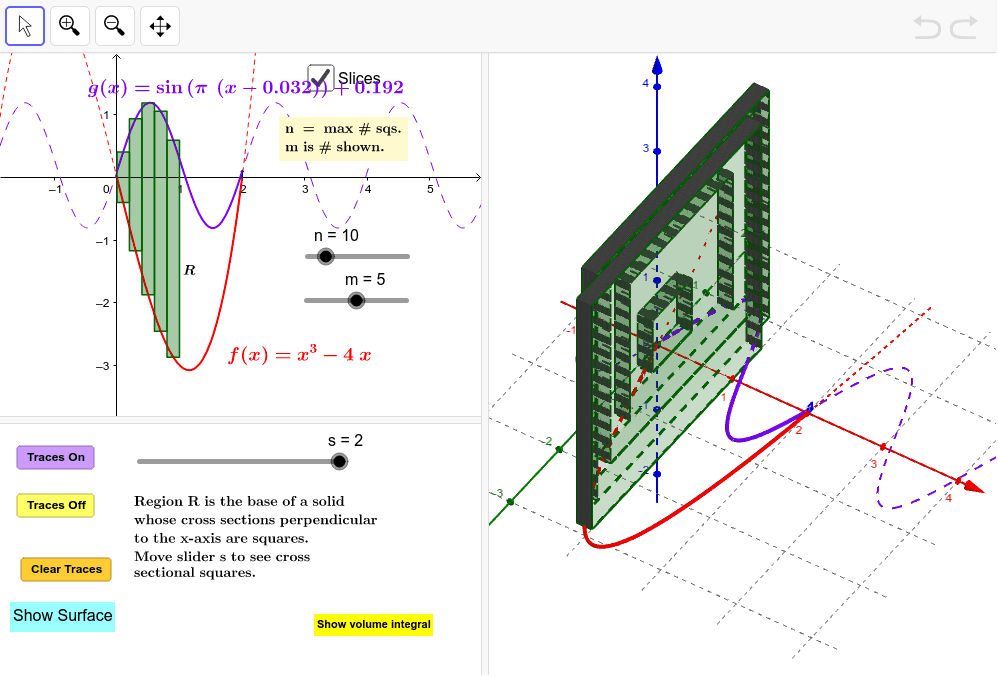
This example demonstrates how to calculate the volume of a solid with a square cross-section using integration. It involves core math concepts like calculus, volume, quadratic functions, equations, histograms, median value, and expected value. Constructed with GeoGebra commands such as Segment, Integral, If, Surface, Locus, etc., it is suitable for high school and above students to explore the integration of solid geometry and calculus.
GeoGebra Commands & Parameters
Segment(A, B) → ABIntegral((g(x) - f(x))^(2), 0, 2) → IntegIf(togDF ≟ 1, "Show Instructions", "Show volume integral") → ToggleDirectionVolumeIntegralIf(togS ≟ 0, "Show Surface", "Hide Surface") → ShowSurfaceSurface(u, (v * g(u)) + ((1 - v) * f(u)), g(u) - f(u), u, 0, 2, v, 0, 1) → TopSurface(u, f(u), (v * (g(u) - f(u))), u, 0, 2, v, 0, 1) → FrontSurface(u, g(u), (v * (g(u) - f(u))), u, 0, 2, v, 0, 1) → BackLocus(C, s) → loc1Locus(D, s) → loc2Angle(B, A, D) → αPolygon(A, B, C, D) → Square, a, b, c, dSequence(Polygon[((k * h), f(((k + p) * h)), 0), ((k * h), g(((k + p) * h)), 0), ((k * h), g(((k + p) * h)), ht(((k + p) * h))), ((k * h), f(((k + p) * h)), ht(((k + p) * h)))], k, 0, m - 1) → SidesLeftSequence(Polygon[(((k + 1) * h), f(((k + p) * h)), 0), (((k + 1) * h), g(((k + p) * h)), 0), (((k + 1) * h), g(((k + p) * h)), ht(((k + p) * h))), (((k + 1) * h), f(((k + p) * h)), ht(((k + p) * h)))], k, 0, m - 1) → SicesRightSequence(Surface[((k + u) * h), (v * f(((k + p) * h))) + ((1 - v) * g(((k + p) * h))), ht(((k + p) * h)), u, 0, 1, v, 0, 1], k, 0, m - 1) → TopsSequence(Surface[((k + u) * h), f(((k + p) * h)), (v * ht(((k + p) * h))), u, 0, 1, v, 0, 1], k, 0, m - 1) → SidesFrontSequence(Surface[((k + u) * h), g(((k + p) * h)), (v * ht(((k + p) * h))), u, 0, 1, v, 0, 1], k, 0, m - 1) → SidesBackSequence(Polygon[((k * h), f(((k + p) * h)), 0), ((k * h), g(((k + p) * h)), 0), (((k + 1) * h), g(((k + p) * h)), 0), (((k + 1) * h), f(((k + p) * h)), 0)], k, 0, m - 1) → BottomsSequence(Area[Element[SidesLeft, k]], k, 1, m) → AreasSurface(u, (v * f(u)) + ((1 - v) * g(u)), 0, u, 0, 2, v, 0, 1) → Base
AI Drawing Prompt Reference
Create a 3D solid with a horizontal base bounded by two curves defined from x=0 to x=2, one upper and one lower. Every cross-section perpendicular to the x-axis is a square whose side length equals the vertical distance between the curves. Include a semi-transparent top, front, and back surface, plus a series of thin slab-like cross-sections along the x-axis to illustrate the integral approximation. Also show an integral value, an angle, and a segment to indicate the construction relationship.
The prompt above was compiled from the original drawing commands and is for reference only.