
AAS Congruence Test via Rotation: Angle–Angle–Side on Two Sides
Loading the math board and drawing, please wait…
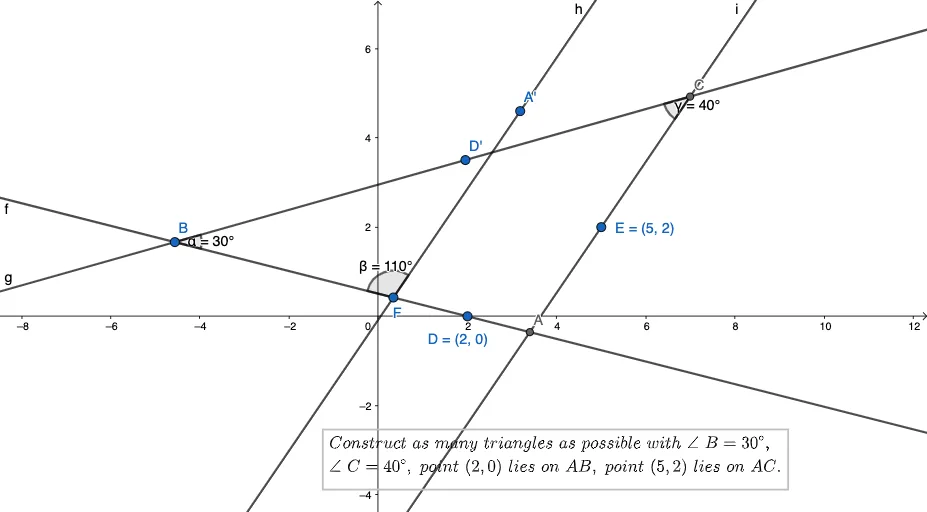
This GeoGebra example demonstrates an angle-based congruence construction using the idea of matching an angle–angle configuration together with a side constraint placed on the corresponding sides of the two angles. It helps verify whether two triangles (or triangle fragments) are congruent by enforcing consistent angle measures and directionality, producing corresponding points that close the construction. Key concepts include triangle congruence criteria (AAS/ASA-style reasoning), angle construction and comparison, and how the relative placement of the side on the two angle rays (same-side/as-positioned constraints) affects the validity of the congruence. The construction uses GeoGebra commands and objects such as Rotate (to align one angle and its adjacent side direction), Angle (to define and track angles α, β, γ), Line (to create the rays/lines forming the triangle sides), Point (to place original and corresponding points like D, E, A, C and their primed images such as A′, D′), and Intersect (to compute the intersection points that determine the final mapped vertices). Suitable for middle/high school geometry instruction, congruence test practice, and students learning construction-based proof techniques through dynamic geometry.
GeoGebra Commands & Parameters
Rotate(D, 30°, B) → D'Angle(D, B, D') → αLine(B, D) → fLine(B, D') → gPoint(f) → FRotate(B, (-(110°)), F) → A'Angle(A', F, B) → βLine(F, A') → hLine(E, h) → iIntersect(g, i) → CIntersect(f, i) → AAngle(B, C, A) → γ
AI Drawing Prompt Reference
On the plane, place points B, D, and E, and draw a ray from B passing through D to represent one side direction. Rotate point D around B by the given angle to get the corresponding point D′, then draw the ray from B through D′ to represent the second angle direction. Define and track angle α as ∠DBD′. Next, determine a second corresponding point F from the ray through D and the rotated configuration, and rotate F around B by the second given angle to obtain point A′. Form the side through F and A′, and use the direction line through E and that side-direction to create an auxiliary line. Compute intersections so that one intersection gives C from the appropriate auxiliary line with the ray directions, and another gives A from the remaining ray with the same auxiliary line. Finally, use the constructed points to define angle γ as ∠BCA, completing the angle–angle–side correspondence check.
The prompt above was compiled from the original drawing commands and is for reference only.