
90° Clockwise Rotation Demonstration
Loading the math board and drawing, please wait…
In collections
Rotations in the coordinate plane
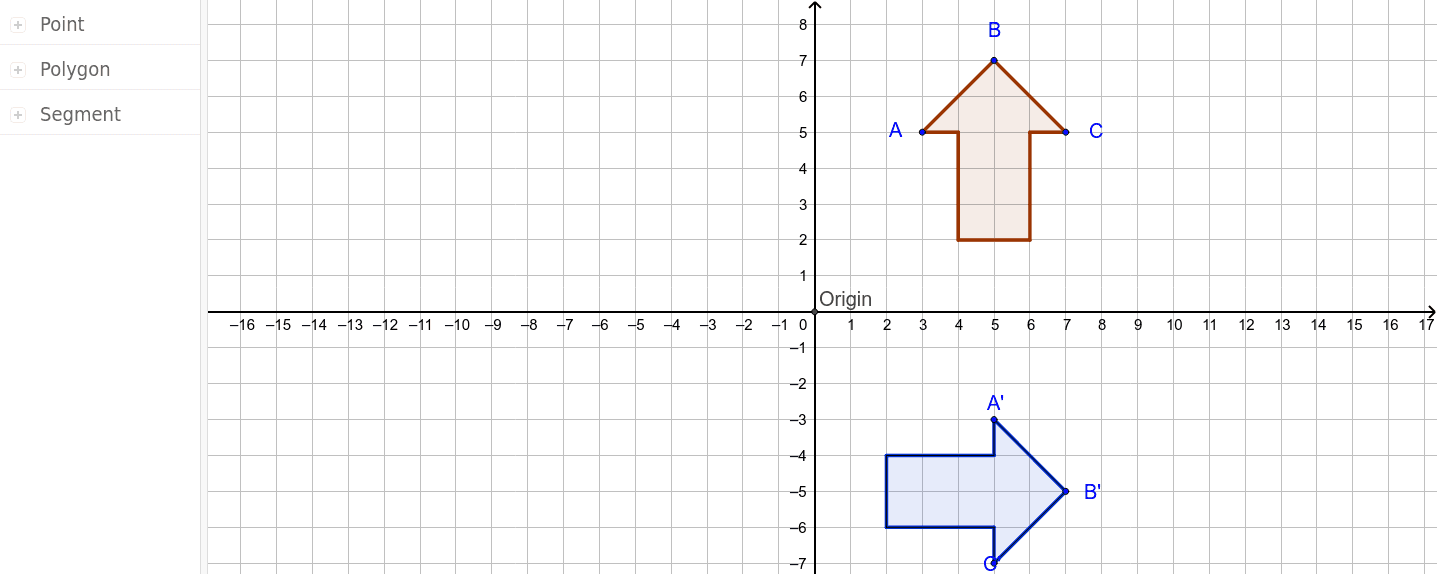
This GeoGebra example demonstrates how to rotate an object 90 degrees clockwise around the origin. By constructing polygons or segments and using the Rotate command, users can explore similarity transformations and the geometric properties of rotations. Key mathematical concepts include rotation transformations, coordinate geometry, angle measurement, and the relationship between rotation matrices and geometric figures. The construction involves creating basic shapes with Segment and Polygon commands, finding intersections with Intersect, and applying the Rotate command. It is suitable for middle school and high school students learning geometry, transformations, and coordinate systems.
GeoGebra Commands & Parameters
Segment(A, B) → aSegment(B, C) → bSegment(C, F) → cSegment(F, D) → dSegment(D, E) → eSegment(E, G) → fSegment(G, A) → gPolygon(G, A, B, C, F, D, E) → poly1, g_1, a_1, b_1, c_1, f_1, d_1, e_1Intersect(xAxis, yAxis) → OriginRotate(G, 90*°, Origin) → G'Rotate(A, 90*°, Origin) → A'_1Rotate(B, 90*°, Origin) → B'_1Rotate(C, 90*°, Origin) → C'_4Rotate(F, 90*°, Origin) → F'Rotate(D, 90*°, Origin) → D'Rotate(E, 90*°, Origin) → E'Polygon(G', A'_1, B'_1, C'_4, F', D', E') → poly1', g', a', b', c', f', d', e'Rotate(G, 270*°, Origin) → G'_1Rotate(A, 270*°, Origin) → A'Rotate(B, 270*°, Origin) → B'Rotate(C, 270*°, Origin) → C'Rotate(F, 270*°, Origin) → F'_1Rotate(D, 270*°, Origin) → D'_1Rotate(E, 270*°, Origin) → E'_1Polygon(G'_1, A', B', C', F'_1, D'_1, E'_1) → poly1'_1, g'_1, a'_1, b'_1, c'_1, f'_1, d'_1, e'_1Rotate(A, 270*°, Origin) → A'_2Rotate(B, 270*°, Origin) → B'_2Segment(A'_2, B'_2) → a'_2Rotate(B, 270*°, Origin) → B'_3Rotate(C, 270*°, Origin) → C'_2Segment(B'_3, C'_2) → b'_2Rotate(C, 270*°, Origin) → C'_3Rotate(F, 270*°, Origin) → F'_2Segment(C'_3, F'_2) → c'_2Rotate(F, 270*°, Origin) → F'_3Rotate(D, 270*°, Origin) → D'_2Segment(F'_3, D'_2) → d'_2Rotate(D, 270*°, Origin) → D'_3Rotate(E, 270*°, Origin) → E'_2Segment(D'_3, E'_2) → e'_2Rotate(E, 270*°, Origin) → E'_3Rotate(G, 270*°, Origin) → G'_2Segment(E'_3, G'_2) → f'_2Rotate(G, 270*°, Origin) → G'_3Rotate(A, 270*°, Origin) → A'_3Segment(G'_3, A'_3) → g'_2
AI Drawing Prompt Reference
On a coordinate plane, draw an irregular heptagon with vertices connected in order to form a closed shape. First, outline its sides. Then rotate the entire heptagon 90 degrees clockwise around the origin, producing a second heptagon, and distinguish it with a different color or line style. Next, rotate the original heptagon 270 degrees clockwise (i.e., 90 degrees counterclockwise) around the origin to create a third heptagon. Finally, draw the sides of this 270-degree-rotated heptagon separately to highlight the correspondence between its edges and vertices. All rotations are centered at the origin, preserving the shape's size and form.
The prompt above was compiled from the original drawing commands and is for reference only.