
Exploring Rotations by dietramckinney
Loading the math board and drawing, please wait…
In collections
Rotations in the coordinate plane
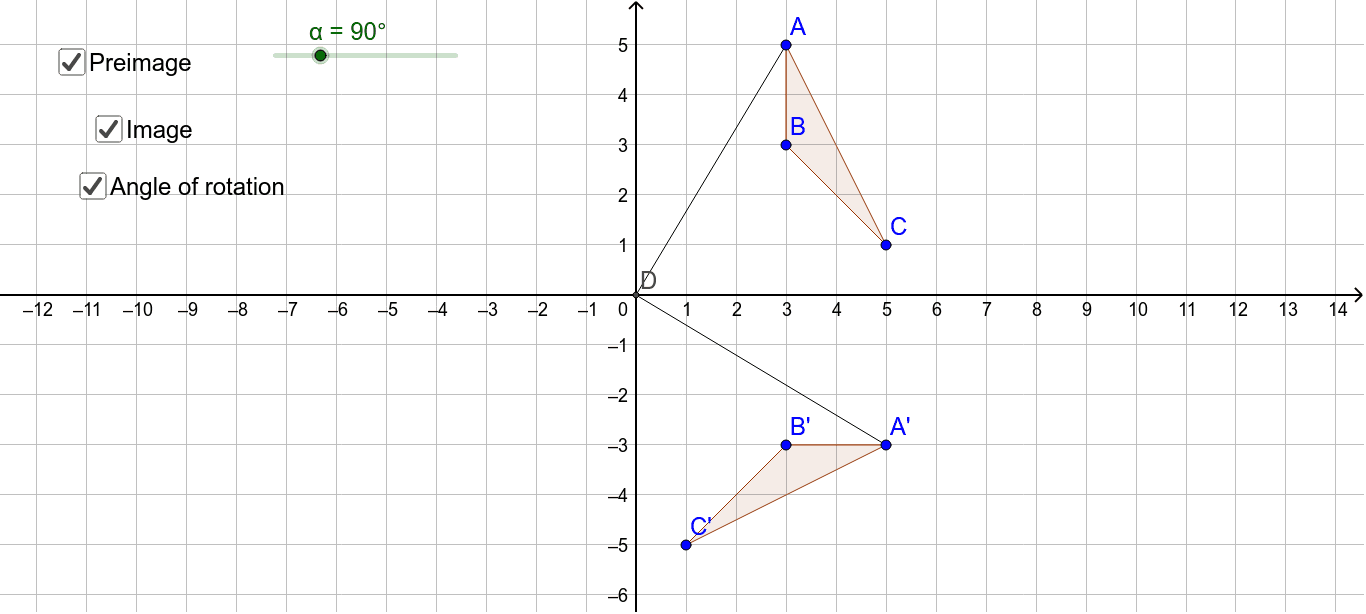
This example demonstrates how to perform rotations using GeoGebra. The core mathematical concepts include geometric transformations, specifically rotations. Using commands like Polygon, Intersect, Rotate, and Segment, the construction of rotated figures is illustrated. Suitable for middle school and above students or teachers for teaching and learning geometric transformations.
GeoGebra Commands & Parameters
Polygon(A, B, C) → poly1, c, a, bIntersect(xAxis, yAxis) → DRotate(A, (-α), D) → A'Rotate(B, (-α), D) → B'Rotate(C, (-α), D) → C'Polygon(A', B', C') → poly1', c', a', b'Segment(A', D) → dSegment(D, A) → e
AI Drawing Prompt Reference
Draw a triangle ABC, then rotate it -α degrees around the origin to create a new triangle A'B'C'. First, find the intersection point D of the x-axis and y-axis. Use the Polygon command to draw triangle ABC. Then, rotate triangle ABC around point D by -α degrees to create the rotated triangle A'B'C'. Finally, draw line segments from point A' to point D and from point D to point A.
The prompt above was compiled from the original drawing commands and is for reference only.