
5-Piece Puzzle
Loading the math board and drawing, please wait…
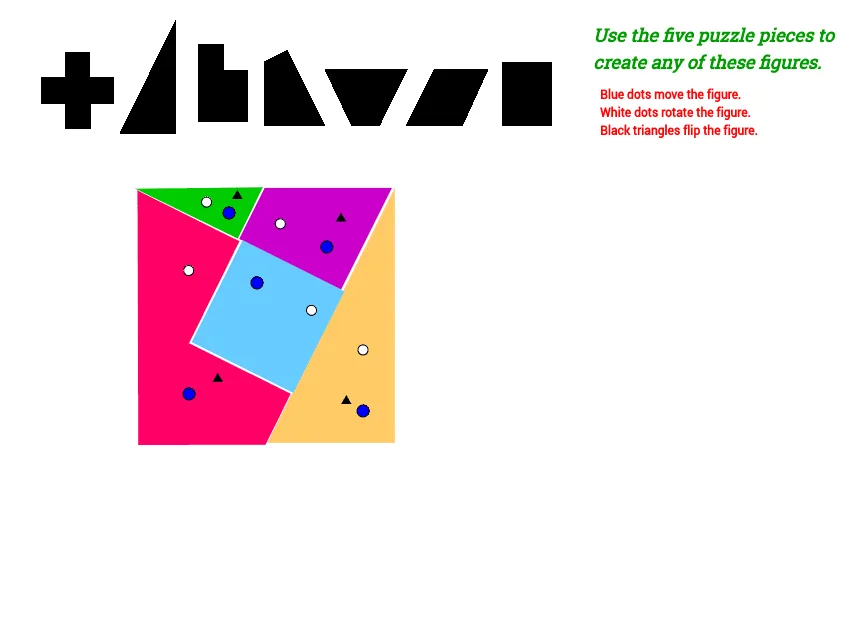
Move the five pieces to create any of the figures shown. This example involves geometric construction using commands such as Circle, Point, Line, Vector, Translate, Polygon, and Rotate. Suitable for middle school and above students to practice geometric shape assembly and transformation.
GeoGebra Commands & Parameters
Circle(M, m) → pCircle(M, n) → qPoint(q) → NLine(M, N) → rOrthogonalLine(M, r) → sIntersect(p, s, 1) → OIntersect(p, r, 1) → PLine(O, r) → tLine(P, s) → f_1Intersect(t, f_1) → QVector(P, M) → uTranslate(Q, Vector[8 * u]) → Q'_1Vector(Q, P) → vTranslate(Q, Vector[4 * v]) → Q'_2Polygon(Q'_2, Q, Q'_1) → poly7, q'_1, q', q_1Circle(R, m) → h_1Circle(R, o) → p_1Point(p_1) → SLine(S, R) → m_1OrthogonalLine(R, m_1) → n_1Intersect(h_1, n_1, 1) → TIntersect(h_1, m_1, 2) → ULine(U, n_1) → r_1Line(T, m_1) → s_1Intersect(r_1, s_1) → VVector(T, R) → wTranslate(V, Vector[3.576 * w]) → V'_1Vector(U, R) → zTranslate(V, Vector[3.576 * z]) → V'_2Translate(V'_2, Vector[1.7888 * w]) → V''_1Polygon(V''_1, V'_2, V, V'_1) → poly8, v'', v', v_1, v'_1Circle(W, m) → t_1Circle(W, n) → f_2Point(f_2) → ZLine(Z, W) → a_2OrthogonalLine(W, a_2) → b_2Intersect(t_1, b_2, 1) → A_1Intersect(t_1, a_2, 2) → B_1Line(A_1, a_2) → h_2Line(B_1, b_2) → i_2Intersect(i_2, h_2) → C_1Vector(A_1, W) → u_1Translate(C_1, Vector[3.576 * u_1]) → D_1Vector(B_1, W) → w_1Translate(C_1, Vector[3.576 * w_1]) → E_1Translate(D_1, Vector[3.576 * w_1]) → F_1Polygon(E_1, C_1, D_1, F_1) → poly9, e_3, c_3, d_3, f_3Circle(G_1, a_4) → k_2Circle(G_1, b_4) → p_2Point(p_2) → H_1Line(H_1, G_1) → j_2OrthogonalLine(G_1, j_2) → m_2Intersect(k_2, j_2, 2) → I_1Intersect(k_2, m_2, 1) → J_1Line(I_1, m_2) → n_2Line(J_1, j_2) → q_2Intersect(n_2, q_2) → K_1Point(n_2) → L_1Rotate(L_1, 63.43*°, I_1) → M_1Angle(L_1, I_1, M_1) → γSegment(I_1, L_1) → r_2Vector(I_1, M_1) → z_1Rotate(I_1, 270*°, M_1) → N_1Angle(N_1, M_1, I_1) → δVector(M_1, N_1) → u_2Vector(J_1, G_1) → v_2Vector(I_1, G_1) → w_2Translate(K_1, Vector[2.5 * v_2]) → O_1Translate(K_1, Vector[5 * w_2]) → P_1Translate(O_1, Vector[1.118 * z_1]) → Q_1Translate(Q_1, Vector[2.235 * u_2]) → R_1Translate(R_1, Vector[2.235 * z_1]) → S_1Polygon(P_1, K_1, O_1, Q_1, R_1, S_1) → poly10, p_3, k_3, o_1, q_3, r_3, s_2Circle(T_1, a) → t_2Circle(T_1, b) → g_3Point(g_3) → U_1Line(U_1, T_1) → h_3OrthogonalLine(T_1, h_3) → i_3Intersect(t_2, i_3, 1) → V_1Intersect(t_2, h_3, 2) → W_1Line(V_1, h_3) → j_3Line(W_1, i_3) → m_3Intersect(j_3, m_3) → Z_1Vector(V_1, T_1) → z_2Vector(W_1, T_1) → u_3Translate(Z_1, Vector[2.9813 * z_2]) → A_2Translate(Z_1, Vector[5.96 * u_3]) → B_2Polygon(B_2, Z_1, A_2) → poly11, a_5, b_5, z_3Mirror(V''_1, m_1) → V'''Mirror(V'_2, m_1) → V''Mirror(V, m_1) → V'Mirror(V'_1, m_1) → DPolygon(V''', V'', V', D) → poly8', v''', v''_1, v'_2, dIntersect(h_1, n_1) → A, BCircleSector(U, B, A) → cPoint(c) → CAngle(C, U, B) → αIntersect(t_2, i_3, 2) → ECircleSector(W_1, E, V_1) → ePoint(e) → FAngle(E, W_1, F) → βMirror(B_2, h_3) → GMirror(Z_1, h_3) → HMirror(A_2, h_3) → IPolygon(G, H, I) → poly11', i, g, hIntersect(k_2, m_2, 2) → JCircleSector(I_1, J, J_1) → fPoint(f) → KAngle(J, I_1, K) → εMirror(P_1, j_2) → LMirror(K_1, j_2) → C_2Mirror(O_1, j_2) → D_2Mirror(Q_1, j_2) → E_2Mirror(R_1, j_2) → F_2Mirror(S_1, j_2) → G_2Polygon(L, C_2, D_2, E_2, F_2, G_2) → poly10', l, c_2, d_2, e_2, f_4, g_2Intersect(p, s, 2) → H_2CircleSector(P, O, H_2) → kPoint(k) → I_2Angle(O, P, I_2) → ζMirror(Q'_2, r) → Q''Mirror(Q, r) → Q'Mirror(Q'_1, r) → J_2Polygon(Q'', Q', J_2) → poly7', j_1, q'', q'_2
AI Drawing Prompt Reference
Draw a 5-piece puzzle made of geometric shapes. The shapes include a circle, a triangle, a square, and a rhombus. These shapes are connected through rotation and translation to form a complete puzzle. The puzzle should show the relative positions and transformation relationships between the shapes.
The prompt above was compiled from the original drawing commands and is for reference only.