
4 Moments: Page 80 (Polynomial Functions & Geometric Construction)
Loading the math board and drawing, please wait…
In collections
Pearson Maths A level Statistics and Mechanics 2
Pearson Maths A level Statistics and Mechanics 2
Pearson Maths A level Statistics and Mechanics 2
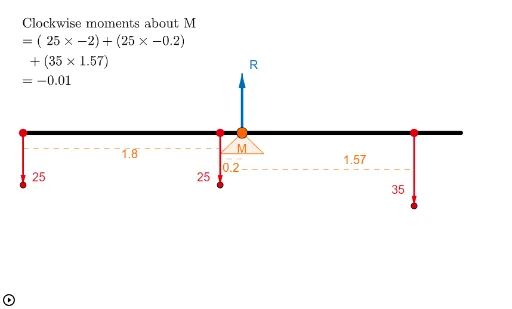
① This GeoGebra example dynamically demonstrates the geometric construction of '4 Moments' on page 80, likely from a mathematics textbook or workbook, focusing on polynomial functions and their associated geometric features. ② Core mathematical concepts include polynomial functions, special points (such as extrema and zeros), perimeter calculations, and the application of LCM and GCD to geometric objects, along with transformations like translation, rotation, and vectors. ③ Construction highlights: Based on the summary, the construction uses GeoGebra commands such as Point, Segment, Circle, Intersect, Polygon, OrthogonalLine, Vector, Translate, Textfield, Midpoint, If, and Rotate, creating multiple points (A, B, C', D, E, etc.), segments, circles, polygon poly1, and auxiliary lines, with text fields for dynamic parameter adjustment. ④ Suitable for high school or early college students to explore the geometric meaning of polynomial functions, the relationship between function graphs and geometric elements, and to understand the concept of moments through dynamic construction. It can also serve as a classroom demonstration or self-study resource for teachers and learners.
GeoGebra Commands & Parameters
Point(xAxis) → ASegment(A, B) → aPoint(a) → RPoint(a) → R_2Circle(R_2, 3.02) → cIntersect(c, b) → D, EPolygon(D, R_2, E) → poly1, e, d, c_1Point(a) → FPoint(a) → GPoint(a) → HOrthogonalLine(F, a) → fOrthogonalLine(H, a) → gOrthogonalLine(G, a) → iPoint(f) → IPoint(g) → JPoint(i) → KVector(F, I) → uVector(H, J) → vVector(G, K) → wTranslate(R, h) → C'Vector(R_2, C') → jSegment(C', R) → kSegment(F, I) → lSegment(H, J) → mSegment(G, K) → nVector(R, C') → pPoint(p) → LOrthogonalLine(L, p, xOyPlane) → qPoint(p) → M_1OrthogonalLine(M_1, p, xOyPlane) → rIntersect(r, l) → NIntersect(r, m) → OIntersect(r, n) → P_1Segment(M_1, N) → tSegment(N, O) → a_1Segment(O, P_1) → b_1Textfield(len) → InputBox1Midpoint(F, I) → R_1Midpoint(H, J) → TMidpoint(G, K) → USegment((x(R), y(R_1)), R_1) → j_1Segment((x(R), y(U)), U) → h_1Segment((x(R), y(T)), T) → i_1Segment(S, V) → k_1Midpoint(S, V) → WIf(g_1 ≟ 0, 0°, If[g_1 < 0, (-α), α]) → βRotate(S, (-β), W) → S'Rotate(V, (-β), W) → V'Segment(S', V') → l_1Polygon(R, P, Z) → M, z_1, m_1, p_1Point(l) → COrthogonalLine(C, w, xOyPlane) → n_1Intersect(n, n_1) → A_1Segment(C, A_1) → q_1
AI Drawing Prompt Reference
Draw a geometric construction of a polynomial function, including points A, B, R, R_2, D, E, F, G, H, I, J, K, and their segments and circles. Construct a circle c with point R as the center and a radius of 3.02, intersecting line b to get points D and E, forming polygon poly1. Construct perpendicular lines f, g, i to line a, getting points I, J, K, then construct vectors u, v, w from points F, I, H, J, G, K, translate point R to C', construct auxiliary line q, r, intersecting lines l, m, n to get points N, O, P_1, forming segments t, a_1, b_1. Finally, construct lines j_1, h_1, i_1 from points R, R_1, T, U, and rotate points S, V to get S', V'.
The prompt above was compiled from the original drawing commands and is for reference only.