
2015 AP Calculus Problem 2b: Volume of Square Cross Section
Loading the math board and drawing, please wait…
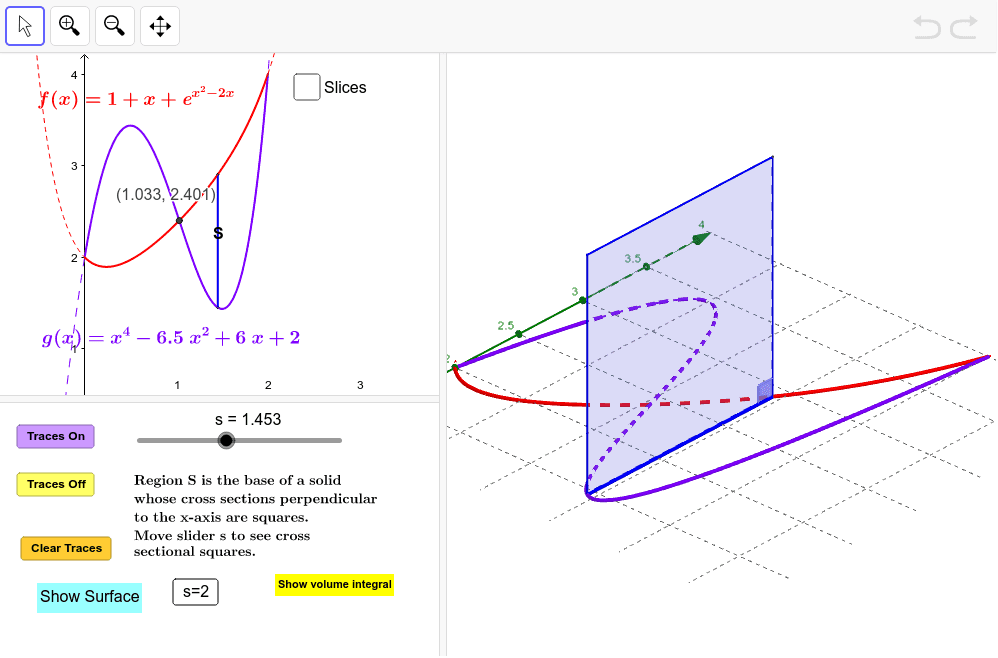
This example demonstrates how to calculate the volume of a square cross-section using an ellipse through GeoGebra, involving core calculus concepts like integral computation, ellipse geometry, and volume determination. It utilizes commands such as Intersect, Polygon, Segment, Locus, Integral, If, Angle, Surface, and Sequence for construction, making it suitable for high school and above students learning calculus volume calculations, geometric constructions, and ellipse applications.
GeoGebra Commands & Parameters
Intersect(f, g, (1.0328318883641743, 2.401108092689728)) → LPolygon(B, A, C, D) → Square, c, d, e, iSegment(A, B) → bLocus(D, s) → loc1Integral(ht(x)^(2), a, 2) → IntegIf(togDF ≟ 1, "Show Instructions", "Show volume integral") → ToggleDirectionVolumeIntegralLocus(C, s) → loc2Angle(B, A, C) → αIf(togS ≟ 0, "Show Surface", "Hide Surface") → ShowSurfaceSurface(u, f(u), (v * (f(u) - g(u))), u, xl, 2, v, 0, 1) → BackSurface(u, (v * g(u)) + ((1 - v) * f(u)), 0, u, xl, 2, v, 0, 1) → BaseSurface(u, g(u), (v * (f(u) - g(u))), u, xl, 2, v, 0, 1) → FrontSurface(u, (v * g(u)) + ((1 - v) * f(u)), f(u) - g(u), u, xl, 2, v, 0, 1) → TopSequence(Polygon[(a + (k * h), g(a + ((k + p) * h)), 0), (a + (k * h), f(a + ((k + p) * h)), 0), (a + (k * h), f(a + ((k + p) * h)), ht(a + ((k + p) * h))), (a + (k * h), g(a + ((k + p) * h)), ht(a + ((k + p) * h)))], k, 0, m - 1) → SlicesLeftSequence(Area[Element[SlicesLeft, k]], k, 1, m) → AreasSequence(Surface[a + u, f(a + ((k + p) * h)), (v * ht(a + ((k + p) * h))), u, (k * h), ((k + 1) * h), v, 0, 1], k, 0, m - 1) → SlicesBackSequence(Polygon[(a + (k * h), g(a + ((k + p) * h))), (a + ((k + 1) * h), g(a + ((k + p) * h))), (a + ((k + 1) * h), f(a + ((k + p) * h))), (a + (k * h), f(a + ((k + p) * h)))], k, 0, m - 1) → SlicesBaseSequence(Surface[a + u, g(a + ((k + p) * h)), (v * ht(a + ((k + p) * h))), u, (k * h), ((k + 1) * h), v, 0, 1], k, 0, m - 1) → SlicesFrontSequence(Polygon[(a + ((k + 1) * h), g(a + ((k + p) * h)), 0), (a + ((k + 1) * h), f(a + ((k + p) * h)), 0), (a + ((k + 1) * h), f(a + ((k + p) * h)), ht(a + ((k + p) * h))), (a + ((k + 1) * h), g(a + ((k + p) * h)), ht(a + ((k + p) * h)))], k, 0, m - 1) → SlicesRightSequence(Surface[a + u, (v * g(a + ((k + p) * h))) + ((1 - v) * f(a + ((k + p) * h))), ht(a + ((k + p) * h)), u, (k * h), ((k + 1) * h), v, 0, 1], k, 0, m - 1) → SlicesTop
AI Drawing Prompt Reference
Draw a solid of revolution generated by an ellipse, demonstrating volume calculation. First, plot two ellipse curves and mark their intersection point, then construct a square cross-section through these points. Next, use locus commands to generate paths of the cross-section as it moves along the curves, and calculate the area integral of the square cross-section to represent the volume. Finally, rotate the cross-section and draw multiple slice surfaces to visually exhibit the 3D shape and volume composition of the solid of revolution.
The prompt above was compiled from the original drawing commands and is for reference only.