
11a-4L Geometric Construction Demo
Loading the math board and drawing, please wait…
In collections
Geometry of Angles (Student Created)
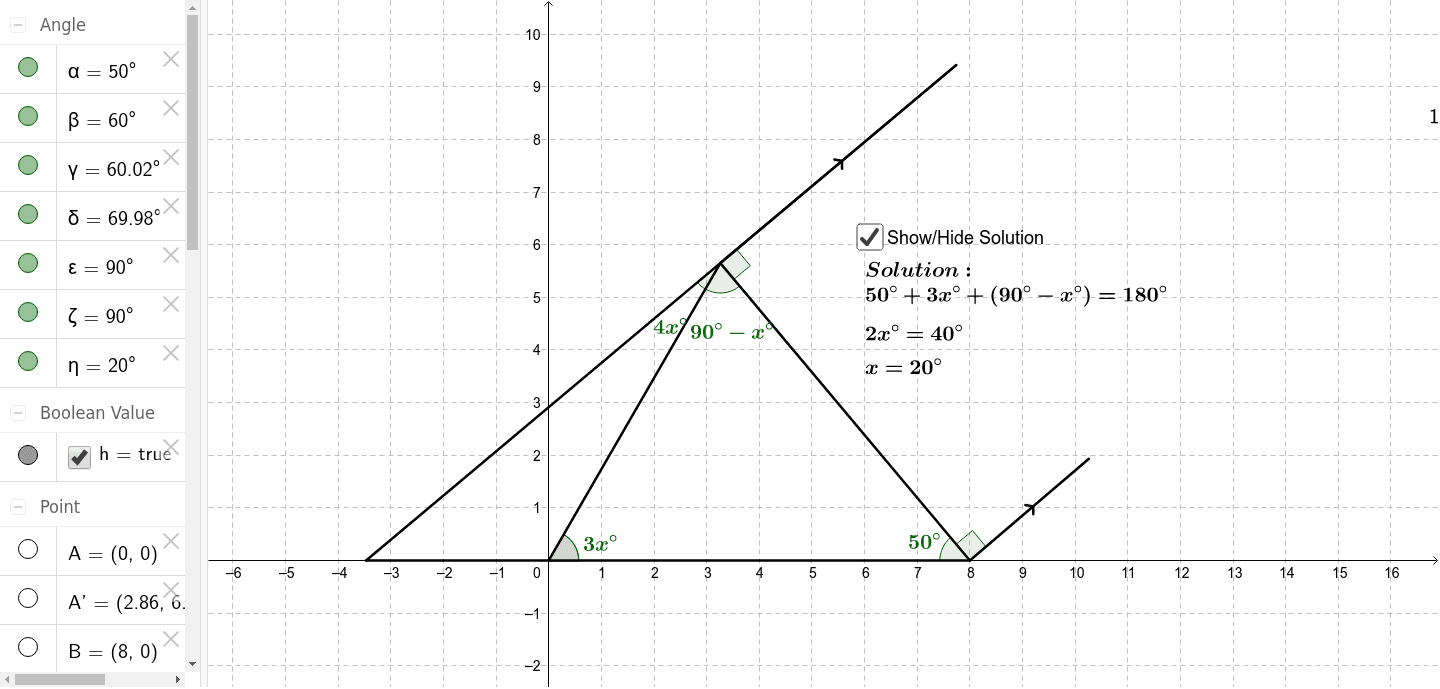
This example demonstrates the process of constructing specific geometric figures through rotation and intersection points. It involves core mathematical concepts such as intersections, rotations, angles, and triangle geometry properties. Key GeoGebra commands used in the construction include Intersect, Point, Segment, Rotate, and Angle. Suitable for high school and above students to learn geometric transformations and construction methods.
GeoGebra Commands & Parameters
Intersect(xAxis, yAxis) → APoint(xAxis) → BSegment(A, B) → aRotate(A, -50*°, B) → A'Angle(A', B, A) → αRotate(B, 60*°, A) → B'Angle(B, A, B') → βSegment(A, D) → bSegment(B, D) → cAngle(B, A, D) → γAngle(A, D, B) → δRotate(D, -90*°, B) → D'Angle(D', B, D) → εSegment(B, C) → eRotate(B, 90*°, D) → B'_1Angle(B, D, B'_1) → ζSegment(F, G) → dSegment(D, G) → fSegment(F, A) → gAngle(F, D, A) → η
AI Drawing Prompt Reference
Draw a geometric figure with coordinate axes, start by finding the intersection point of the axes and drawing a line segment from this point to a point on the x-axis, then rotate this line segment around the intersection point counterclockwise by 50 degrees to get a new line segment, next rotate another line segment around the point on the x-axis clockwise by 60 degrees, then draw three line segments connecting the intersection point to another point, and label the sizes of three angles, finally rotate the other point around the intersection point counterclockwise by 90 degrees to get a new point, draw a line segment connecting this point to another point on the x-axis, and label the sizes of two angles.
The prompt above was compiled from the original drawing commands and is for reference only.