
11 Patterns of a Cube? (Net of a Cube) by fabio
Loading the math board and drawing, please wait…
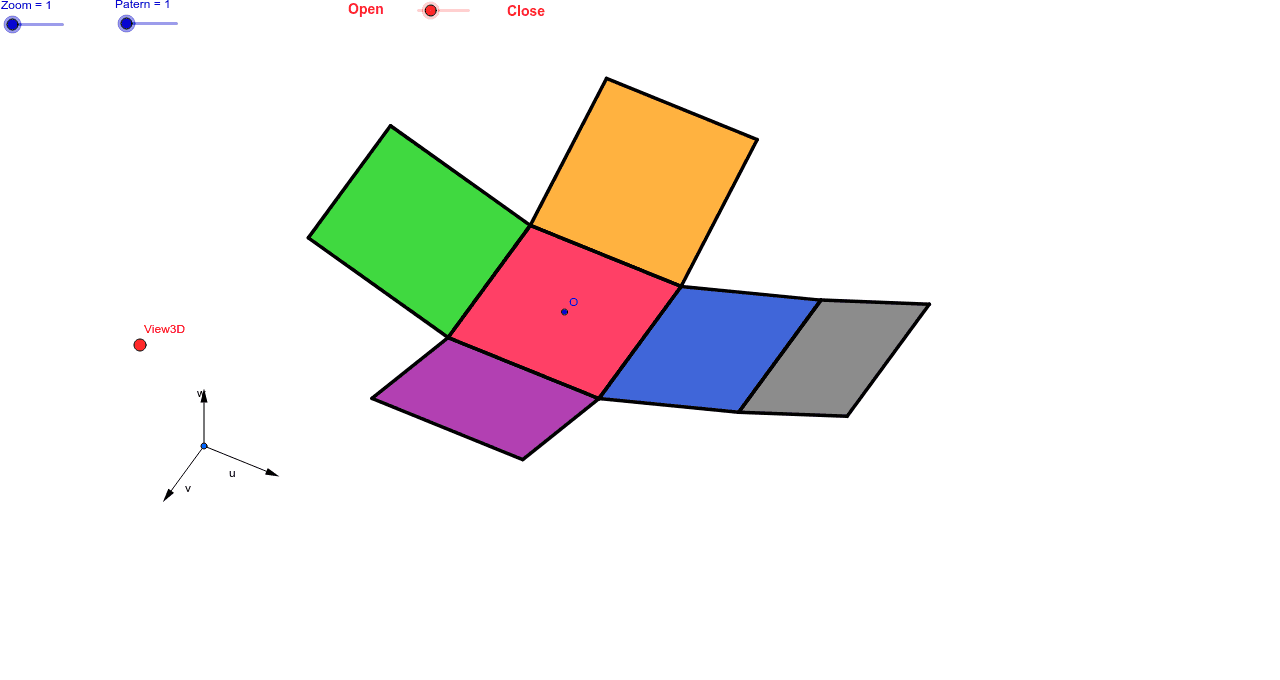
This example demonstrates 11 different patterns of a cube's net, allowing observation through sliders and 3D viewpoint. It involves core math concepts like solid geometry, spatial visualization, and geometric transformations. GeoGebra commands used include Vector, OrthogonalLine, Polygon, Midpoint, Translate, Segment, and Mirror. Suitable for high school geometry teaching and spatial reasoning development.
GeoGebra Commands & Parameters
Vector(B_1, X) → uVector(B_1, Z) → wOrthogonalLine(View3D, yAxis) → a_1OrthogonalLine(View3D, xAxis) → b_1Vector(B_1, Y) → vPolygon(L, K, N, M) → poly1, l, k_1, n, mPolygon(K, P, Q, N) → poly2, k_2, p, q, n_1Polygon(L, M, S, R) → poly3, l_1, m_1, s, rPolygon(N, V, W, M) → poly4, n_2, v_1, w_1, m_2Polygon(K, T, U, L) → poly5, k_3, t, u_1, l_2Polygon(B, Q, P, A) → poly6, b_2, q_1, p_1, a_2Midpoint(R, M) → DTranslate(S, Vector[-(2.0 * v)]) → S'Segment(S, C) → eTranslate(M, Vector[-(2.0) * v]) → M'Segment(M, E) → fSegment(E, C) → hTranslate(N, Vector[-(2.0) * v]) → N'Translate(Q, Vector[-(2.0) * v]) → Q'_1Segment(Q, F) → iSegment(N, G) → jSegment(G, F) → d_1Translate(Q, Vector[-(2.0) * v]) → Q'_2Translate(B, Vector[-(2.0) * v]) → B'_1Segment(B, I) → e_1Segment(I, H) → f_1Segment(H, Q) → g_1Translate(K, Vector[2.0 * v]) → K'Translate(P, Vector[2.0 * v]) → P'_1Segment(P, J) → h_1Segment(J, A_1) → i_1Segment(A_1, K) → j_1Segment(B, H_1) → s_1Segment(H_1, C_1) → cSegment(C_1, A) → r_1Midpoint(N, P) → D_1Midpoint(k_1) → F_1Translate(A, Vector[2.0 * v]) → A'Translate(P, Vector[2.0 * v]) → P'Segment(A, G_1) → t_1Segment(G_1, I_1) → c_2Segment(I_1, P) → d_2Segment(J, K_1) → f_2Segment(P, L_1) → e_2Segment(L_1, K_1) → g_2Segment(M, W) → h_2Mirror(L_1, F_1) → O_1Mirror(K_1, F_1) → P_1Segment(M, M_1) → i_2Segment(N_1, J_1) → j_2Segment(J_1, M_1) → p_2Polygon(M, E, C, S) → poly7, q_2, r_2, s_2, t_2Polygon(Q, N, G, F) → poly8, q_3, n_3, g_3, f_3Polygon(B, Q, H, I) → poly9, b_3, q_4, h_3, i_3Polygon(J, A_1, K, P) → poly10, j_3, a_3, k_4, p_3Polygon(C_1, A, B, H_1) → poly11, c_3, a_4, b_4, h_4Polygon(G_1, I_1, P, A) → poly12, g_4, i_4, p_4, a_5Polygon(K_1, J, P, L_1) → poly13, k_5, j_4, p_5, l_3Polygon(M, M_1, J_1, N_1) → poly14, m_3, m_4, j_5, n_4
AI Drawing Prompt Reference
Draw an unfolded pattern of a cube with 11 different designs. Start by creating the cube's vertices, then use vectors and midpoints to create each face. Next, apply translation and mirroring to position these faces correctly, forming the unfolded pattern. Finally, adjust the viewpoint to observe these patterns.
The prompt above was compiled from the original drawing commands and is for reference only.