
10B-4D
Loading the math board and drawing, please wait…
In collections
Geometry of Angles (Student Created)
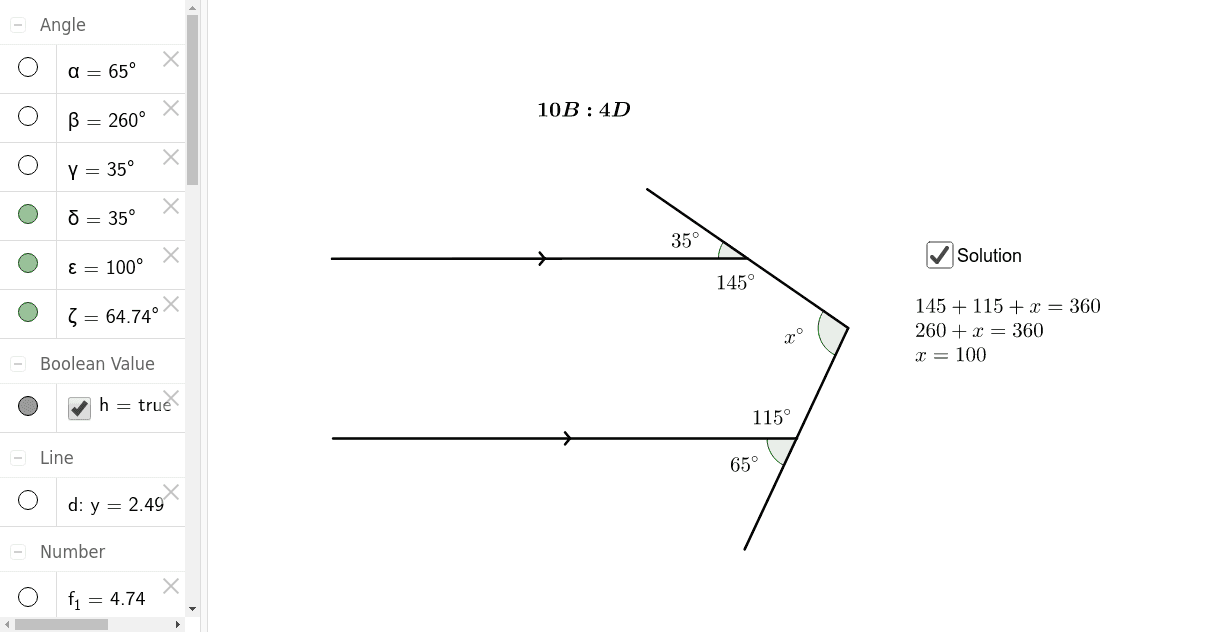
This example demonstrates geometric shapes in 10B-4D, involving trigonometry and matrices. Using GeoGebra commands such as Segment, Point, Rotate, Angle, etc., it constructs equilateral triangles and general quadrilaterals. Suitable for high school math education and learning.
GeoGebra Commands & Parameters
Segment(A, B) → aPoint(a) → CRotate(C, 65*°, B) → C'Angle(C, B, C') → αSegment(C', D) → bRotate(B, 260*°, D) → B'Angle(B, D, B') → βSegment(D, H) → cRotate(H, 35*°, B') → H'Angle(H, B', H') → γLine(E, a) → dPoint(d) → FSegment(F, B') → eIntersect(b, c) → GPoint(Circle[G, 4.74]) → ISegment(G, I) → fAngle(H, B', H') → δAngle(B', D, B) → εAngle(C, B, I) → ζPoint(e) → JIntersect(c, e) → KSegment(J, K) → g
AI Drawing Prompt Reference
Draw a figure containing multiple rotated triangles and quadrilaterals. Start by drawing line segment AB, then take point C on the segment. Rotate point C 65 degrees around point B to get C', and calculate ∠CB'C. Next, draw line segment C'D, rotate point D 260 degrees around point D to get B', and calculate ∠DB'B. Continue by drawing line segment DH, rotate point H 35 degrees around point H to get H', and calculate ∠BH'H. Draw line a, take point F, and connect FB'. Line segments b and c intersect at point G, draw a circle with G as the center, and take point I on the circle, then connect GI. Line segments c and e intersect at point K, and connect JK.
The prompt above was compiled from the original drawing commands and is for reference only.