
小数是多少?——分数与小数转换的交互式几何演示
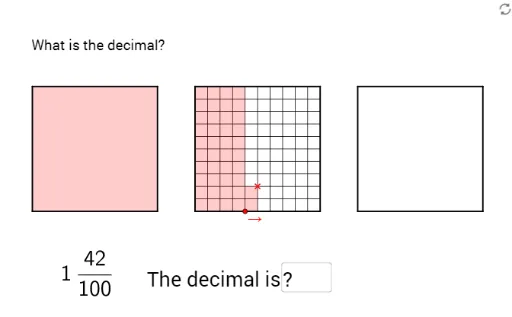
几何画板及绘图内容加载中,请稍等……
① 本范例通过一个交互式几何画板,直观演示分数与小数之间的转换关系,用户可输入或调整数值,观察对应的几何表示与数值变化。② 核心数学概念包括分数、小数、等腰三角形、角度、余弦函数以及多边形面积,将抽象的数与形结合,帮助理解分数与小数的等价性。③ 作图要点:使用GeoGebra的Corner、Point、Polygon等命令构建基础图形,通过If、Sequence、Textfield实现条件判断、序列生成和文本输入,涉及大量对象如A_1、poly3、integer、text1等,形成动态可交互的分数-小数转换模型。④ 适合小学高年级至初中学生,用于数学课堂中分数与小数的直观教学,也可作为教师制作互动课件的参考范例。
GeoGebra 命令及参数
Corner(5) → A_1Point(Sequence[(k, 0), k, 0, 3.6, 0.1]) → APoint(Sequence[(x(A) + 0.1, j), j, 0, 1, 0.1]) → BPolygon((1.3, 0), (2.3, 0), (2.3, 1), (1.3, 1)) → poly3, i, j, k, lPolygon((2.6, 0), (3.6, 0), (3.6, 1), (2.6, 1)) → poly4, m, n, p, qIf(x(A) ≥ 1 ∧ x(A) < x(Vertex[poly3, 1]) ∨ x(A) ≥ x(Vertex[poly3, 2]) ∧ x(A) < x(Vertex[poly4, 1]) ∨ x(A) ≟ x(Vertex[poly4, 2]), true, false) → integerPolygon(A, A + (0.1, 0), A + (0.1, If[integer, 0, y(B)]), A + (0, If[integer, 0, y(B)])) → poly8, j_1, k_1, l_1, m_1Polygon((0, 0), (Min[x(A), 1], 0), (Min[x(A), 1], 1), (0, 1)) → poly5, r, s, t, a_1Polygon((x(Vertex[poly3, 1]), 0), (Max[Min[x(A), x(Vertex[poly3, 1]) + 1], x(Vertex[poly3, 1])], 0), (Max[Min[x(A), x(Vertex[poly3, 1]) + 1], x(Vertex[poly3, 1])], 1), (x(Vertex[poly3, 1]), 1)) → poly6, b_1, c_1, d_1, e_1Polygon((x(Vertex[poly4, 1]), 0), (Max[Min[x(A), x(Vertex[poly4, 1]) + 1], x(Vertex[poly4, 1])], 0), (Max[Min[x(A), x(Vertex[poly4, 1]) + 1], x(Vertex[poly4, 1])], 1), (x(Vertex[poly4, 1]), 1)) → poly7, f_1, g_1, h_1, i_1Polygon((0.8187524918794742, 1.1041021645196354), (1.818752491879475, 1.1041021645196354), (1.818752491879475, 2.1041021645196336), (0.8187524918794742, 2.1041021645196336)) → poly1, a, b, c, dPolygon((0, 0), (1, 0), (1, 1), (0, 1)) → poly2, e, f, g, hSequence(Segment[(0, j), (1, j)], j, 0, 1, 0.1) → list4Sequence(Segment[(x(Vertex[poly3, 1]), j), (x(Vertex[poly3, 1]) + 1, j)], j, 0, 1, 0.1) → list5Sequence(Segment[(x(Vertex[poly4, 1]), j), (x(Vertex[poly4, 1]) + 1, j)], j, 0, 1, 0.1) → list6Sequence(Segment[(i, 0), (i, 1)], i, 0, 1, 0.1) → list1Sequence(Segment[(x(Vertex[poly3, 1]) + i, 0), (x(Vertex[poly3, 1]) + i, 1)], i, 0, 1, 0.1) → list2Sequence(Segment[(x(Vertex[poly4, 1]) + i, 0), (x(Vertex[poly4, 1]) + i, 1)], i, 0, 1, 0.1) → list3If(y(B) < 1, (100 * poly8), 0) → hundredthdigitTextfield(Text1) → Eingabefeld2
AI 绘图提示语参考
绘制一个用于分数与小数转换的交互式几何图形。画面上有三个并排的1×1正方形网格,每个网格被水平和垂直方向各分成10等份,形成小方格。第一个网格位于左侧,第二个和第三个网格依次向右排列。在第一个网格上方,有一个可拖动的点,它控制一个高亮矩形区域,该区域从网格左边缘延伸至该点的水平位置,高度随点的垂直位置变化。同时,在第二个和第三个网格中,根据第一个网格中点的位置,分别用不同颜色填充相应的小方格区域,以表示整数部分和小数部分。此外,在图形上方放置一个文本框,用于显示当前对应的数值。整体布局清晰,便于观察分数与小数之间的对应关系。
以上提示语为根据原始绘图命令整理而来,仅供参考。