
可视化三角形:判断三段能否构成三角形
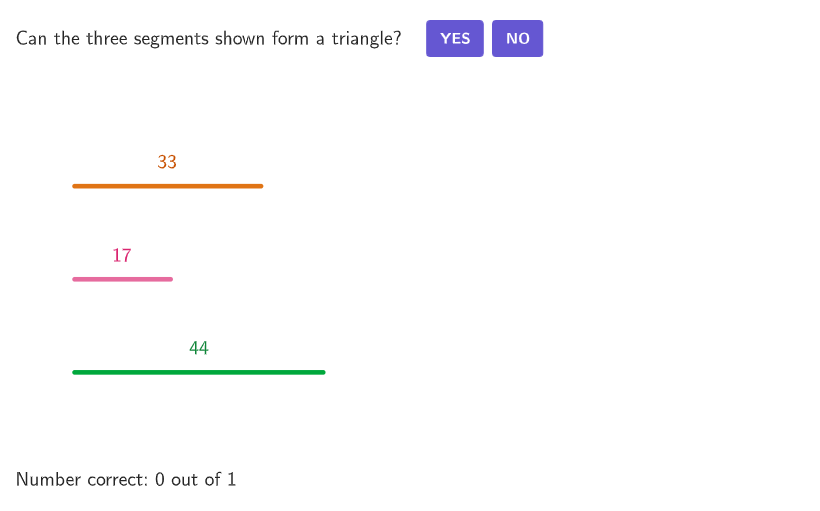
几何画板及绘图内容加载中,请稍等……
本范例通过动态几何演示,帮助学生理解三条线段能否组成三角形。核心数学概念包括三角形三边关系定理,即任意两边之和大于第三边。作图要点涉及使用GeoGebra命令如Shuffle、Element、Sort、Circle等来构造三角形图形。适合6-8年级学生用于几何学习,适用于课堂教学或在线教育平台。
GeoGebra 命令及参数
Shuffle(Sequence[Random[1, 3], i, 1, 100]) → randomOrderList, {3, 3, 1, 1, 3, 1, 1, 3, 3, 2, 2, 3, 3, 3, 3, 3, 3, 1, 2, 3, 2, 1, 1, 1, 2, 3, 3, 3, 3, 3, 2, 3, 1, 1, 1, 3, 1, 3, 3, 1, 1, 1, 3, 1, 3, 2, 3, 1, 2, 3, 2, 3, 2, 3, 1, 3, 2, 3, 3, 2, 3, 3, 1, 2, 3, 3, 2, 1, 1, 3, 2, 3, 3, 3, 1, 3, 1, 2, 3, 1, 1, 1, 3, 1, 1, 1, 1, 1, 1, 2, 1, 1, 1, 1, 3, 1, 2, 1, 3, 3}Element(randomOrderList, Mod[countQuestion, 100] + 1) → randomOrderShuffle(Sequence[Random[10, 30], i, 1, 100]) → randomSideList2, {17, 15, 30, 20, 12, 20, 24, 16, 23, 29, 25, 23, 12, 23, 19, 14, 11, 30, 25, 15, 13, 27, 22, 20, 28, 17, 11, 20, 17, 30, 20, 30, 23, 28, 23, 14, 20, 21, 24, 16, 16, 20, 25, 12, 16, 10, 30, 26, 18, 14, 25, 10, 17, 18, 22, 24, 27, 19, 13, 27, 19, 10, 25, 20, 22, 19, 11, 21, 15, 12, 28, 30, 21, 17, 17, 19, 20, 25, 17, 21, 13, 10, 22, 30, 28, 22, 14, 30, 28, 19, 24, 16, 26, 27, 20, 13, 22, 12, 26, 26}Element(randomSideList2, Mod[countQuestion, 100] + 1) → randomSide2Shuffle(Sequence[Random[20, 50], i, 1, 100]) → randomSideList1, {33, 45, 28, 50, 29, 47, 35, 35, 37, 42, 36, 42, 43, 21, 37, 40, 26, 22, 30, 50, 40, 49, 31, 29, 32, 29, 50, 43, 23, 32, 21, 42, 26, 40, 40, 23, 24, 26, 31, 35, 43, 27, 45, 24, 37, 29, 46, 25, 37, 39, 46, 29, 23, 42, 50, 33, 21, 21, 35, 30, 49, 22, 50, 35, 35, 27, 25, 29, 45, 41, 26, 26, 35, 40, 42, 25, 44, 24, 29, 45, 31, 27, 47, 43, 30, 38, 23, 27, 26, 47, 42, 21, 26, 49, 26, 49, 47, 32, 23, 44}Element(randomSideList1, Mod[countQuestion, 100] + 1) → randomSide1Shuffle(Sequence[Random[-10, 5], i, 1, 100]) → randomSideAddendList, {-6, 5, -3, -10, -9, -4, 1, 1, -3, 2, -7, -8, -8, -2, 4, -9, -10, -5, 4, 4, -9, -5, 1, -8, -4, -4, 3, 4, -7, -7, -5, 1, 0, -3, 2, 3, -4, -7, -7, 5, 5, -1, -2, -7, -1, 4, -6, -2, -4, -3, -2, 5, 0, 3, -5, -6, -5, -6, -4, 3, 2, -6, 1, 4, -2, -10, 0, -3, -10, 1, -2, -7, -7, -3, -9, -3, -1, -3, 4, -7, 4, 3, 0, 1, -4, -1, -10, -4, 1, 0, 4, 0, -1, -10, -4, -7, 5, -9, -9, -3}Sort({randomSide1, randomSide2, randomSide3}) → sideOrderElement(sideStartPoints, Mod[randomOrder + 1, 3] + 1) → PointSideStart2Element(sideStartPoints, Mod[randomOrder + 2, 3] + 1) → PointSideStart3Element(sideStartPoints, Mod[randomOrder, 3] + 1) → PointSideStart1Circle(PointSideStart1, randomSide1) → sideCircle1Ray(PointSideStart1, Vector[(1, 0)]) → sideRay1Segment(PointSideStart1, Intersect[sideCircle1, sideRay1]) → side1Min({1, ratioHeight, ratioWidth}) → ratioChoiceDistance(PointSideStart2, PointStartAnimationS1_a) → animationRange3Distance(PointSideStart3, PointStartAnimationS1_a) → animationRange1Distance(PointSideEnd1, (xAnimationEnd, y(PointStartAnimationS1_a))) → animationRange5If(animationSlider < animationStart5, 0, animationSlider < animationRange, animationSlider - (animationStart5 + 1), animationRange5) → animationSlider5PartitionPoint(PointSideStart1 + (sideOrder(2), 0), PointStartAnimationS2_a, animationSlider5, animationRange5) → PointMoveAnimation5Circle(PointMoveAnimation5, solutionLengths(1)) → circleSolution2If(animationSlider < animationStart3, 0, animationSlider < animationStart5, animationSlider - (animationStart3 + 1), animationRange3) → animationSlider3PartitionPoint(PointSideStart2, PointStartAnimationS1_a, animationSlider3, animationRange3) → PointMoveAnimation3Circle(PointMoveAnimation3, solutionLengths(2)) → circleSolution1Ray(PointSideStart2, Vector[(1, 0)]) → sideRay2Circle(PointSideStart2, randomSide2) → sideCircle2Segment(PointSideStart2, Intersect[sideCircle2, sideRay2]) → side2PartitionPoint(PointSideStart2 + (sideOrder(1), 0), PointStartAnimationS1_b, animationSlider3, animationRange3) → PointMoveAnimation3bRay(PointSideStart3, Vector[(1, 0)]) → sideRay3Circle(PointSideStart3, randomSide3) → sideCircle3Segment(PointSideStart3, Intersect[sideCircle3, sideRay3]) → side3If(sideOrder(1) + sideOrder(2) > sideOrder(3), 1, 2) → correctIndexPolygon(Zip[PixelsToPoint[Corner[1], Corner[3], Corner[5], A], A, {(pixelsLeft, pixelsTop), (pixelsLeft, y(Corner[5]) - pixelsBottom), Corner[5] - (pixelsRight, pixelsBottom), (x(Corner[5]) - pixelsRight, pixelsTop)}]) → borderBoxCorner(5) → DimsIf(animationSlider < animationRange1, animationSlider, animationRange1) → animationSlider1PartitionPoint(PointSideStart3, PointStartAnimationS1_a, animationSlider1, animationRange1) → PointMoveAnimation1If(sideOrder(1) + sideOrder(2) < sideOrder(3), "<", sideOrder(1) + sideOrder(2) > sideOrder(3), ">", "=") → textInequalityIf(sideOrder(1) + sideOrder(2) < sideOrder(3), "less than", sideOrder(1) + sideOrder(2) > sideOrder(3), "greater than", "equal to") → textInequalityWordIf(correctIndex ≟ 1, "can", "cannot") → textCanCannotPoint(circleSolution1) → PointMoveAnimation3c_{1}Polygon({(minXGrid, minYGrid), (minXGrid, maxYGrid), (maxXGrid, maxYGrid), (maxXGrid, minYGrid)}) → solutionGridAreaPartitionPoint(PointSideStart3 + (sideOrder(3), 0), PointStartAnimationS2_a, animationSlider1, animationRange1) → PointMoveAnimation1bSegment(PointMoveAnimation1, PointMoveAnimation1b) → segmentAnimation1Segment(PointMoveAnimation3, PointMoveAnimation3b) → segmentAnimation3PartitionPoint(PointSideStart1, PointStartAnimationS2_b, animationSlider5, animationRange5) → PointMoveAnimation5bSegment(PointMoveAnimation5, PointMoveAnimation5b) → segmentAnimation5Point(circleSolution2) → PointMoveAnimation7Point(circleSolution1) → PointMoveAnimation3cSegment(PointStartAnimationS1_a, PointMoveAnimation3c) → segmentAnimation6Point(circleSolution2) → PointMoveAnimation5cSegment(PointStartAnimationS2_a, PointMoveAnimation5c) → segmentAnimation7Sequence(PointStarts(n) + (((-Element[textDims2, n, 1])) / 2, (5 * Element[textDims2, n, 2] / 4)) - (Element[textDims2, n, 3], Element[textDims2, n, 4]), n, 1, 3) → PointTextStartsPointToPixels(Corner[1], Corner[3], Corner[5], PointMoveAnimation5c) → OnboardingPointonboardingTextOffset(Corner[onboardingText, 1], Corner[onboardingText, 3], onboardingCase, Corner[1], Corner[3], Corner[5]) → OnboardingTextOffsetcirclePixels(PointMoveAnimation5c, 7 + (7 * pulsing), Corner[1], Corner[3], Corner[5]) → pulsingObject
AI 绘图提示语参考
在平面直角坐标系中,给定三条线段长度参数,并从同一点出发构造三段依次相接的边,形成一个三角形的三条边。使用两侧的圆与射线来确定每条边的端点:先在第一条边的起点作以其长度为半径的圆,并取与水平射线的交点得到第一条边;再在第二条边的起点作对应半径的圆取与水平射线的交点得到第二条边;第三条边以其半径圆与水平射线交点确定端点。最后把三段首尾连接成封闭的三角形轮廓,并给出相应的三边关系文字提示(用“<、>、=”与“可以/不可以”表述),强调两边之和与第三边的大小比较。
以上提示语为根据原始绘图命令整理而来,仅供参考。