
多步运算逼近有理数
几何画板及绘图内容加载中,请稍等……
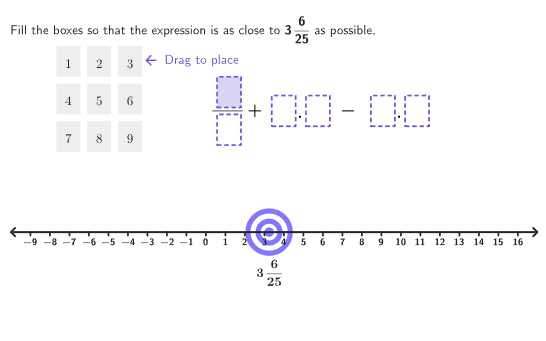
本范例演示如何通过多步运算计算接近目标值的数。涉及的核心数学概念包括有理数的正负运算、数感培养。作图要点——从下方『构造摘要』提炼用到了 Sequence, Take, PixelsToPoint, Zip, centerBox, Flatten, If, ClosestPoint, Defined, Distance, PointToPixels, Corner, expandQuad, Polygon, onboardingTextOffset, Text, Segment, Circle 等GeoGebra命令/对象。适合6-8年级学生,用于练习有理数的多步运算。
GeoGebra 命令及参数
Sequence(Random[0, 99] / 100, A, 1, 200) → allRandomSeeds, {0.51, 0.71, 0.08, 0.73, 0.35, 0.63, 0.25, 0.53, 0.94, 0.71, 0, 0.48, 0.54, 0.84, 0.55, 0.52, 0.78, 0.39, 0.9, 0.75, 0.23, 0.07, 0.18, 0.17, 0.38, 0.12, 0.35, 0.87, 0.29, 0.11, 0.5, 0.05, 0.83, 0.42, 0.92, 0.97, 0.24, 0.96, 0.16, 0.32, 0.72, 0.5, 0.22, 0.62, 0.27, 0.21, 0.74, 0.78, 0.63, 0.88, 0.12, 0.48, 0.51, 0.87, 0.67, 0.7, 0.74, 0.22, 0.9, 0.78, 0, 0.64, 0.21, 0.34, 0.35, 0.63, 0.89, 0.75, 0.56, 0.6, 0.1, 0.04, 0.57, 0.72, 0.39, 0.19, 0.61, 0.02, 0.94, 0.62, 0.08, 0.66, 0.81, 0.96, 0.17, 0.59, 0.49, 0.31, 0.77, 0.33, 0.29, 0.61, 0.85, 0.3, 0.11, 0.95, 0.88, 0.02, 0.15, 0.02, 0.37, 0.02, 0.85, 0.3, 0.72, 0.05, 0.62, 0.62, 0.75, 0.35, 0.95, 0.85, 0.83, 0.27, 0.22, 0.47, 0.97, 0.64, 0.61, 0.99, 0.08, 0.41, 0.73, 0.21, 0.09, 0.74, 0.15, 0.53, 0.71, 0.55, 0.23, 0.02, 0.89, 0.71, 0.39, 0.38, 0.05, 0.73, 0.19, 0.51, 0.78, 0.23, 0.52, 0.91, 0.78, 0.09, 0.66, 0.21, 0.1, 0.02, 0.35, 0.43, 0.16, 0.42, 0.65, 0.61, 0.88, 0.71, 0.39, 0, 0.59, 0.26, 0.53, 0, 0.16, 0.74, 0.26, 0.24, 0.08, 0.97, 0.79, 0.59, 0.5, 0.06, 0.71, 0.84, 0.32, 0.78, 0.25, 0.71, 0.61, 0.96, 0.39, 0.27, 0.11, 0.57, 0.77, 0.85, 0.25, 0.74, 0.18, 0.07, 0.55, 0.19, 0.79, 0.47, 0.39, 0.84, 0.36, 0.79}Take(allRandomSeeds, randIndex, randIndex + numRandoms - 1) → currentRandomSeedsPixelsToPoint((xMin, yMin), (xMax, yMax), (800, 500), (335, 135)) → DropPoint1Zip(IndexOf[k, DragPoints], k, First[DropPoints, 6]) → boxNumscenterBox(boxWidth, boxHeight, DragPoint3) → box3centerBox(boxWidth, boxHeight, DropPoint1) → dropBox1centerBox(boxWidth, boxHeight, DropPoint2) → dropBox2centerBox(boxWidth, boxHeight, DropPoint3) → dropBox3centerBox(boxWidth, boxHeight, DropPoint4) → dropBox4centerBox(boxWidth, boxHeight, DropPoint5) → dropBox5centerBox(boxWidth, boxHeight, DropPoint6) → dropBox6centerBox(boxWidth, boxHeight, DragPoint1) → box1centerBox(boxWidth, boxHeight, DragPoint2) → box2centerBox(boxWidth, boxHeight, DragPoint4) → box4centerBox(boxWidth, boxHeight, DragPoint5) → box5centerBox(boxWidth, boxHeight, DragPoint6) → box6centerBox(boxWidth, boxHeight, DragPoint7) → box7centerBox(boxWidth, boxHeight, DragPoint8) → box8centerBox(boxWidth, boxHeight, DragPoint9) → box9Zip(Zip[true ∈ Sequence[IsInRegion[Vertex[r, n], p], n, 1, 4], p, dropBoxes], r, dragBoxes) → boxInSequence(true ∈ Sequence[Element[boxIn, k, n], k, 1, 9], n, 1, 6) → boxHighlightZip(true ∈ Zip[n ≟ k, n, DragPoints], k, DropPoints) → boxFilledPixelsToPoint((xMin, yMin), (xMax, yMax), (800, 500), (100, 90)) → AnchorGridFlatten(Sequence[Sequence[AnchorGrid + ((A * (boxWidth + gap)), (B * ((-boxHeight) - gap))), A, 0, 2], B, 0, 2]) → PointBoxesZip(¬(n ∈ DropPoints ∨ n ≟ k), n, DragPoints, k, PointBoxes) → boxActiveIf(Defined[IndexOf[true, boxActive]], IndexOf[true, boxActive], 10) → activeBoxcenterBox(boxWidth, boxHeight, Element[DragPoints, activeBox]) → activeBoxHZip(true ∈ Sequence[IsInRegion[Vertex[activeBoxH, n], p], n, 1, 4], p, dropBoxes) → activeBoxInClosestPoint(DropPoints, DragPoints(activeBox)) → PointHighlightDefined(numResult) → allFilledPixelsToPoint((xMin, yMin), (xMax, yMax), (800, 500), (16, 340)) → AnchorLinePixelsToPoint((xMin, yMin), (xMax, yMax), (800, 500), (786, 340)) → AnchorLineEndDistance(AnchorLine, AnchorLineEnd) → lineLengthSequence(AnchorLine + ((A * lineLength / 27), 0), A, 1, 26) → numLinePointsPointToPixels(Corner[1], Corner[3], Corner[5], DragPoint3 + (boxWidth / 2, 0)) → OnboardingPointCorner(5) → layoutAppSizeexpandQuad(DragPoint3 - (boxWidth / 2, boxHeight / 2), DragPoint3 + (boxWidth / 2, ((-boxHeight)) / 2), DragPoint3 + (boxWidth / 2, boxHeight / 2), DragPoint3 + (((-boxWidth)) / 2, boxHeight / 2), (7 * pulsing), Corner[1], Corner[3], Corner[5]) → pulsingObjectPolygon({(-5, -6.5), (-5, 6.5), (6, 6.5), (6, -6.5)}) → viewboxonboardingTextOffset(Corner[onboardingText, 1], Corner[onboardingText, 3], onboardingCase, Corner[1], Corner[3], Corner[5]) → OnboardingTextOffsetZip(true ∈ Sequence[IsInRegion[Vertex[box1, n], p], n, 1, 4], p, dropBoxes) → box1InZip(k ∧ PointHighlight ≟ r ∧ n, k, boxHighlight, r, DropPoints, p, boxFilled, n, activeBoxIn) → DropIncenterBox(boxWidth, boxHeight, PointHighlight) → highlightBoxSequence(-9, 16) → numLineNumsText(fractionFormFinal, PointLine + (0, (-30 / 500 * (yMax - yMin))), true, true, 0, -1) → textStartPointZip(Defined[n], n, boxNumsLast) → boxNumsBoolText(textResult, PointResult + ((20 * (xMax - xMin) / 800), (100 / 500 * (yMax - yMin))), true, true, 1, 0) → textEndPointSequence(Vertex[activeBoxH, n], n, 1, 4) → cornersActiveIf(Defined[IndexOf[true, activeBoxIn]], IndexOf[true, activeBoxIn], 7) → fillBoxSegment(AnchorLine, AnchorLineEnd) → numLineSegZip(Segment[n, n - (0, (5 / 500 * (yMax - yMin)))], n, numLinePoints) → ticksZip(Text[k + "", n, true, true, 0, -1], k, numLineNums, n, numLinePoints) → textNumsZip(Text[("" * A), B, true, true, 0, 0], A, {1, 2, 3, 4, 5, 6, 7, 8, 9}, B, DragPoints) → gridTextCircle(PointLine, (10.5 / 800 * (xMax - xMin))) → circleTarget1Circle(PointLine, (18 / 800 * (xMax - xMin))) → circleTarget2Circle(PointLine, (25.5 / 800 * (xMax - xMin))) → circleTarget3Circle(PointLine, (33 / 800 * (xMax - xMin))) → circleTarget4Text("1", DragPoints(1), true, true, 0, 0) → text1Text("2", DragPoints(2), true, true, 0, 0) → text2Text("3", DragPoints(3), true, true, 0, 0) → text3Text("4", DragPoints(4), true, true, 0, 0) → text4Text("5", DragPoints(5), true, true, 0, 0) → text5Text("6", DragPoints(6), true, true, 0, 0) → text6Text("7", DragPoints(7), true, true, 0, 0) → text7Text("8", DragPoints(8), true, true, 0, 0) → text8Text("9", DragPoints(9), true, true, 0, 0) → text9
AI 绘图提示语参考
在画面中放置一条水平数值指示线,并在其上生成沿线分布的若干刻度点;同时在上方区域构造一个由多个同尺寸小方框组成的网格。每个小方框以四个角点围成,另有一组可拖拽的方框与一组落点方框,用圆角外观矩形样式表现;当落点靠近某个可拖拽方框的角点区域时,对应的方框会被高亮填充。再在数值指示线附近加入文字起点与文字终点,用于显示分数样式的最终目标值与计算结果。最后在视图上方框外显示引导用的脉动边框与可见布局参考区域。
以上提示语为根据原始绘图命令整理而来,仅供参考。