
截锥二十面体
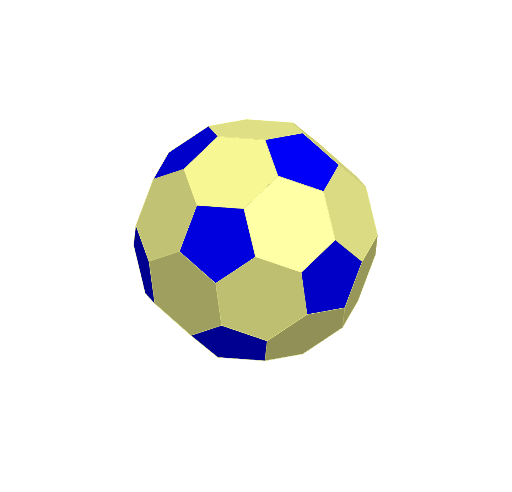
几何画板及绘图内容加载中,请稍等……
所属专题
Archimedean Solids
①本范例演示了截锥二十面体的三维几何图形及其特性;②涉及的核心数学概念包括多边形、立体几何、几何作图;③作图要点——从下方『构造摘要』提炼用到了Polygon(多边形)、Icosahedron(二十面体)、Sphere(球体)、Intersect(相交)、Line(线段)、Rotate(旋转)等GeoGebra命令/对象;④适合高中及以上学生学习和理解复杂三维几何形状的构造与性质。
GeoGebra 命令及参数
Polygon(A, B, 3, xOyPlane) → poly1, f, g, h, CIcosahedron(poly1, true) → a, D, faceACF, faceAFG, faceADG, faceABD, faceBDH, faceBEH, faceBCE, faceCEI, faceCFI, faceEHK, E, faceEIK, faceIKL, faceFIL, faceHJK, faceJKL, faceGJL, faceFGL, faceDHJ, faceDGJ, edgeAF, F, edgeCF, edgeAG, edgeFG, edgeAD, edgeDG, edgeBD, edgeBH, edgeDH, edgeBE, edgeEH, G, edgeCE, edgeCI, edgeEI, edgeFI, edgeEK, edgeHK, edgeIK, edgeIL, edgeKL, edgeFL, H, edgeJK, edgeHJ, edgeJL, edgeGL, edgeGJ, edgeDJ, I, J, K, LSphere(L, d) → cIntersect(edgeGL, c) → M,Intersect(edgeFL, c) → N,Intersect(edgeJL, c) → O,Intersect(edgeIL, c) → P,Intersect(edgeKL, c) → Q,Line(J, C) → iPolygon(O, Q, P, N, M) → poly2, o, q, p, n, mRotate(poly2, -72°, i) → poly2'Rotate(poly2, -144°, i) → poly2'_{1}Sphere(B, d) → eIntersect(edgeBE, e) → R,Intersect(g, e) → S,Intersect(edgeBH, e) → T,Intersect(edgeBD, e) → U,Intersect(f, e) → V,Polygon(V, S, R, T, U) → poly3, v, s, r, t, uRotate(poly3, 72°, i) → poly3'Rotate(poly3, 144°, i) → poly3'_{1}Rotate(poly3, -72°, i) → poly3'_{2}Sphere(J, d) → jIntersect(edgeGJ, j) → W,Intersect(edgeHJ, j) → Z,Intersect(edgeJK, j) → A_1,Intersect(edgeJL, j) → B_1,Intersect(edgeDJ, j) → C_1,Polygon(W, C_1, Z, A_1, B_1) → poly5, w, c_1, z_1, a_1, b_1Sphere(C, d) → kIntersect(g, k) → D_1,Intersect(h, k) → E_1,Intersect(edgeCE, k) → F_1,Intersect(edgeCI, k) → G_1,Intersect(edgeCF, k) → H_1,Polygon(F_1, D_1, E_1, H_1, G_1) → poly6, f_1, d_1, e_1, h_1, g_1Rotate(M, -72°, i) → M'Rotate(M, -144°, i) → M'_{1}Rotate(Q, -72°, i) → Q'Rotate(Q, -144°, i) → Q'_{1}Rotate(O, -72°, i) → O'Rotate(O, -144°, i) → O'_{1}Rotate(P, -72°, i) → P'Rotate(P, -144°, i) → P'_{1}Rotate(N, -72°, i) → N'Rotate(N', -72°, i) → N''Rotate(N'', -72°, i) → N'''Polygon(Q'_{3}, P'_{3}, N''', M'_{3}, O'_{3}) → poly7, q'_{3}, p'_{3}, n''', m'_{3}, o'_{3}Rotate(N''', -72°, i) → I_1Polygon(Q'_{2}, P'_{2}, I_1, M'_{2}, O'_{2}) → poly8, q'_{2}, p'_{2}, i_1, m'_{2}, o'_{2}Rotate(R, -72°, i) → R'Rotate(R, -144°, i) → R'_{1}Rotate(T, -72°, i) → T'Rotate(T, -144°, i) → T'_{1}Rotate(V, -72°, i) → V'Rotate(V, -144°, i) → V'_{1}Rotate(V, 72°, i) → V'_{2}Rotate(V, 144°, i) → V'_{3}Rotate(V, 72°, i) → V'_{4}Rotate(V, 144°, i) → V'_{5}Rotate(V, -72°, i) → V'_{6}Rotate(V, 72°, i) → V'_{7}Rotate(S, -72°, i) → S'Rotate(S, -72°, i) → S'_{1}Rotate(S, 72°, i) → S'_{2}Rotate(S'_{2}, 72°, i) → K_1Rotate(K_1, 72°, i) → L_1Rotate(poly3'_{2}, -72°, i) → poly4Polygon(M'_{2}, I_1, U''', T'_{1}, P, Q) → poly9, l, j_1, u''', t'_{1}, p_1, q_1Rotate(poly9, -72°, i) → poly9'Rotate(poly9, -144°, i) → poly9'_{1}Polygon(P'_{3}, T, R, V'_{6}, J_1, N''') → poly10, k_1, t_1, r_1, v'_{6}, l_1, m_1Rotate(poly10, -72°, i) → poly10'Rotate(poly10, -144°, i) → poly10'_{1}Polygon(W, O', M', Q'_{1}, O'_{1}, C_1) → poly11, w_1, o', m', q'_{1}, o'_{1}, n_1Rotate(poly11, -144°, i) → poly11'Rotate(poly11, -72°, i) → poly11'_{1}Polygon(K_1, H_1, E_1, S'_{2}, V'_{7}, R'_{3}) → poly12, s_1, f_2, g_2, s'_{2}, v'_{7}, r'_{3}Rotate(poly12, 72°, i) → poly12'Rotate(poly12, -72°, i) → poly12'_{1}Rotate(poly12'_{1}, 72°, i) → poly13Rotate(poly11', -72°, i) → poly11''Rotate(poly11'', -72°, i) → poly11'''Rotate(poly9'_{1}, -72°, i) → poly14Rotate(poly14, -72°, i) → poly14'Rotate(poly12'_{1}, -72°, i) → poly16Rotate(poly16, -72°, i) → poly16'Rotate(poly10'_{2}, -72°, i) → poly15Rotate(poly10, 72°, i) → poly10'_{3}Rotate(poly10'_{3}, 72°, i) → poly17
AI 绘图提示语参考
绘制一个截锥二十面体,首先创建一个三角形并生成二十面体,然后在其基础上绘制球体并求交点,接着通过旋转和相交操作构建多个五边形,最后将这些五边形组合起来形成截锥二十面体的完整形状。
以上提示语为根据原始绘图命令整理而来,仅供参考。