
截锥体 by Guillermo Bautista
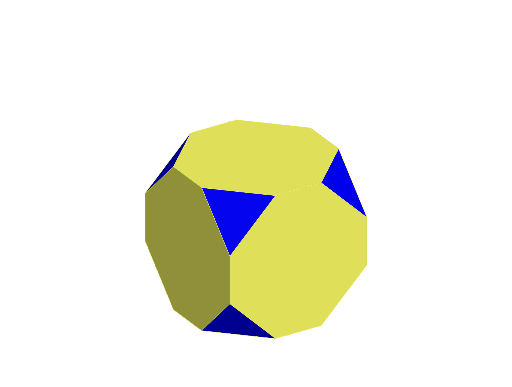
几何画板及绘图内容加载中,请稍等……
所属专题
Archimedean Solids
①本范例演示了截锥体的几何构造与性质;②涉及的核心数学概念包括多边形、立体几何、相似变换;③作图要点使用了Point, Cube, Sphere, Intersect, Polygon, Rotate等GeoGebra命令,通过构造点、立方体、球体、交点、多边形和旋转来形成截锥体;④适合高中及以上学生学习和理解多面体变换。
GeoGebra 命令及参数
Point(Circle[B, Distance[A, B], Segment[A, B]]) → CPoint(Circle[B, Distance[A, B], Segment[A, B]]) → DCube(A, B, D) → a, E, faceDEIH, faceFGHI, edgeAE, edgeAB, edgeBD, edgeDE, edgeAF, edgeEI, edgeFI, edgeFG, F, edgeBG, edgeGH, edgeDH, edgeHI, G, H, I, faceABDE, faceAEIF, faceABGF, faceBDHGSphere(F, Distance[A, B] / 3) → bIntersect(edgeFI, b, 1) → JIntersect(edgeFG, b, 1) → KIntersect(edgeAF, b, 1) → LPolygon(J, L, K) → t1, k, j, lRotate(t1, 90°, zAxis) → t1'Rotate(t1, 180°, zAxis) → t1'_{1}Rotate(t1, 270°, zAxis) → t1'_{2}Rotate(t1, -90°, xAxis) → t1'_{3}Rotate(t1'_{3}, 90°, zAxis) → t2Rotate(t1'_{3}, 180°, zAxis) → t3Rotate(t1'_{3}, 270°, zAxis) → t4Rotate(J, 90°, zAxis) → J'Rotate(L, 90°, zAxis) → L'Rotate(K, -90°, xAxis) → K'Rotate(J', -90°, xAxis) → J''Rotate(L', -90°, xAxis) → L''Rotate(J, -90°, xAxis) → J'_{1}Rotate(J, 90°, zAxis) → J'_{2}Rotate(K, 90°, zAxis) → K'_{1}Rotate(K'_{1}, -90°, xAxis) → MPolygon(K, L, J'_{1}, K', J'', M, L', J'_{2}) → poly1, k_1, l_1, j'_{1}, k', j'', m, l', j'_{2}Rotate(poly1, 90°, zAxis) → poly1'Rotate(poly1, 180°, zAxis) → poly1'_{1}Rotate(poly1, 270°, zAxis) → poly1'_{2}Rotate(poly1', 90°, yAxis) → poly1''Rotate(poly1', 270°, yAxis) → poly1''_{1}
AI 绘图提示语参考
绘制一个截角立方体,首先建立一个立方体,然后在立方体的一个顶点上画一个球,截取立方体的某些棱与球的交点,形成新的多边形,通过旋转这些多边形来构建截角立方体的各个面。
以上提示语为根据原始绘图命令整理而来,仅供参考。