
几何变换与全等:平移、旋转与反射的交互探究
几何画板及绘图内容加载中,请稍等……
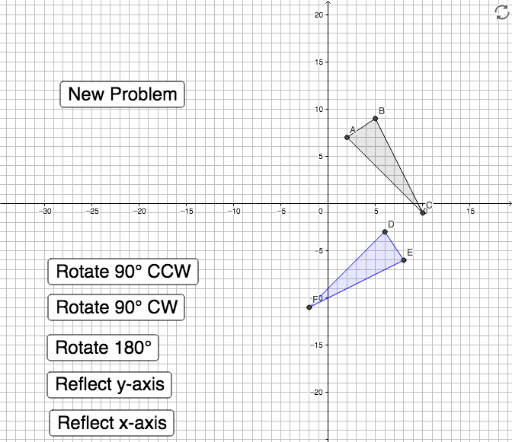
① 本范例通过GeoGebra动态演示几何图形在平移、旋转和反射等变换下的全等关系,直观展示变换前后图形形状与大小保持不变的性质。② 核心数学概念包括全等(Congruence)、几何变换(平移、旋转、反射)以及变换的复合,涉及多边形顶点坐标、向量平移和对称轴反射等基础内容。③ 作图要点:从构造摘要可见,使用了Random随机生成图形,Textfield和InputBox输入参数,Vector定义平移向量,Polygon构造多边形,Translate实现平移,ReflectR进行反射,Vertex提取顶点,并通过多个按钮(button1至button7)控制不同变换操作,同时利用If条件判断和滑块(slider)调节参数,实现交互式动态探究。④ 适合初中至高中阶段学生学习几何变换与全等概念,也可用于教师课堂演示或学生自主探索,帮助理解变换的数学本质和几何直观。
GeoGebra 命令及参数
Random(4, 6) → bRandom(6, 10) → cRandom(0, 3) → aRandom(-3, 10) → dRandom(-3, 10) → eRandom(-3, 10) → fTextfield() → InputBox1Textfield() → InputBox2Vector((0, 0), (horizontal, vertical)) → uPolygon(R, S, T) → poly2, t, r_1, s_1Random(1, 5) → problemPolygon(A, B, C) → poly1, c_1, a_1, b_1Random(-10, 10) → gRandom(-10, 10) → hVector((0, 0), (g, h)) → vIf(problem < 2, Polygon[Rotate[R, 90°, (0, 0)], Rotate[S, 90°, (0, 0)], Rotate[T, 90°, (0, 0)]], If[problem < 3, Polygon[Rotate[R, (-(90°)), (0, 0)], Rotate[S, (-(90°)), (0, 0)], Rotate[T, (-(90°)), (0, 0)]], If[problem < 4, Polygon[Rotate[R, 180°, (0, 0)], Rotate[S, 180°, (0, 0)], Rotate[T, 180°, (0, 0)]], If[problem < 5, Polygon[Mirror[R, x = 0], Mirror[S, x = 0], Mirror[T, x = 0]], Polygon[Mirror[R, y = 0], Mirror[S, y = 0], Mirror[T, y = 0]]]]]) → poly3Translate(poly3, v) → poly3'Vertex(poly3') → D, E, F