
时区与整数比较
几何画板及绘图内容加载中,请稍等……
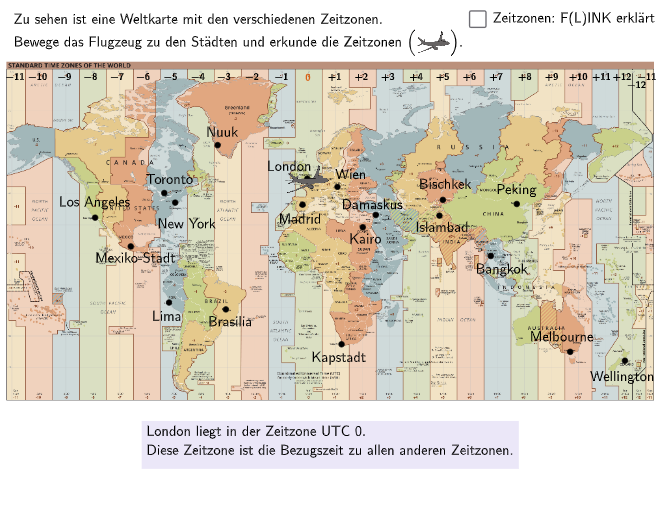
本范例通过多个选择题和开放题,帮助学生理解时区的概念及其与整数的关系。涉及的核心数学概念包括整数的比较和排序,以及在实际生活中的应用。使用了GeoGebra中的Sequence, Element, Textfield, Circle等命令进行图形构造。适合5-6年级的学生学习。
GeoGebra 命令及参数
Sequence(Random[1, 10], i, 1, 10) → randomNumbers, {10, 10, 2, 10, 5, 7, 3, 1, 10, 6}Element(randomNumbers, Mod[questionCount, Length[randomNumbers]] + 1) → randomNumberTextfield(input) → inputBoxCircle(PBangkok, 0.6) → cBangkokCircle(PBrasilia, 0.6) → cBrasiliaCircle(PKairo, 0.25) → cKairoCircle(PKapstadt, 0.6) → cKapstadtCircle(PLima, 0.6) → cLimaCircle(PLondon, 0.4) → cLondonCircle(PLosAngeles, 0.6) → cLosAngelesCircle(PMadrid, 0.4) → cMadridCircle(PMelbourne, 0.6) → cMelbourneCircle(PNewYork, 0.2) → cNewYorkCircle(PNuuk, 0.6) → cNuukCircle(PRom, 0.2) → cRomCircle(PShanghai, 0.6) → cShanghaiCircle(PWellington, 0.6) → cWellingtonCircle(PWien, 0.2) → cWienCircle(PBischkek, 0.2) → cBischkekCircle(PIslambad, 0.2) → cIslambadCircle(PDamaskus, 0.25) → cDamaskusCircle(PMexikoStadt, 0.6) → cMexikoStadtCircle(PToronto, 0.2) → cTorontoCircle(PPeking, 0.6) → cPekingMidpoint(Corner[picFlugzeug, 1], Corner[picFlugzeug, 3]) → FlugzeugIndexOf(Flugzeug, PointList) → posText(txtTimeInfo, Midpoint[PosImg11, PosImg12] + (0, -0.25), false, true, 0, -1) → txtTimeInfo02Text("\textsf{\tiny{−7}}", Corner[picKarte, 4] + (0.275 + (0.75 * 4), -0.45), false, true, 0, 0) → txt07mText("\textsf{\tiny{−6}}", Corner[picKarte, 4] + (0.275 + (0.75 * 5), -0.45), false, true, 0, 0) → txt06mText("\textsf{\tiny{−5}}", Corner[picKarte, 4] + (0.275 + (0.76 * 6), -0.45), false, true, 0, 0) → txt05mText("\textsf{\tiny{−9}}", Corner[picKarte, 4] + (0.275 + (0.73 * 2), -0.45), false, true, 0, 0) → txt09mText("\textsf{\tiny{−8}}", Corner[picKarte, 4] + (0.275 + (0.74 * 3), -0.45), false, true, 0, 0) → txt08mText("\textsf{\tiny{−10}}", Corner[picKarte, 4] + (0.275 + 0.68, -0.45), false, true, 0, 0) → txt10mText("\textsf{\tiny{−11}}", Corner[picKarte, 4] + (0.28, -0.45), false, true, 0, 0) → txt11mText("\textsf{\tiny{−4}}", Corner[picKarte, 4] + (0.275 + (0.765 * 7), -0.45), false, true, 0, 0) → txt04mText("\textsf{\tiny{−3}}", Corner[picKarte, 4] + (0.275 + (0.765 * 8), -0.45), false, true, 0, 0) → txt03mText("\textsf{\tiny{−2}}", Corner[picKarte, 4] + (0.275 + (0.77 * 9), -0.45), false, true, 0, 0) → txt02mText("\textsf{\tiny{−1}}", Corner[picKarte, 4] + (0.275 + (0.78 * 10), -0.45), false, true, 0, 0) → txt01mText("\textsf{\tiny{0}}", Corner[picKarte, 4] + (0.275 + (0.78 * 11), -0.45), false, true, 0, 0) → txt00Text("\textsf{\tiny{+1}}", Corner[picKarte, 4] + (0.275 + (0.78 * 12), -0.45), false, true, 0, 0) → txt01Text("\textsf{\tiny{+2}}", Corner[picKarte, 4] + (0.275 + (0.78 * 13), -0.45), false, true, 0, 0) → txt02Text("\textsf{\tiny{+3}}", Corner[picKarte, 4] + (0.275 + (0.78 * 14), -0.45), false, true, 0, 0) → txt03Text("\textsf{\tiny{+4}}", Corner[picKarte, 4] + (0.275 + (0.782 * 15), -0.45), false, true, 0, 0) → txt04Text("\textsf{\tiny{+5}}", Corner[picKarte, 4] + (0.275 + (0.782 * 16), -0.45), false, true, 0, 0) → txt05Text("\textsf{\tiny{+6}}", Corner[picKarte, 4] + (0.275 + (0.782 * 17), -0.45), false, true, 0, 0) → txt06Text("\textsf{\tiny{+7}}", Corner[picKarte, 4] + (0.275 + (0.782 * 18), -0.45), false, true, 0, 0) → txt07Text("\textsf{\tiny{+8}}", Corner[picKarte, 4] + (0.275 + (0.785 * 19), -0.45), false, true, 0, 0) → txt08Text("\textsf{\tiny{+9}}", Corner[picKarte, 4] + (0.275 + (0.785 * 20), -0.45), false, true, 0, 0) → txt09Text("\textsf{\tiny{+10}}", Corner[picKarte, 4] + (0.275 + (0.785 * 21), -0.45), false, true, 0, 0) → txt10Text("\textsf{\tiny{+11}}", Corner[picKarte, 4] + (0.275 + (0.78 * 22), -0.45), false, true, 0, 0) → txt11Text("\textsf{\tiny{+12}}", Corner[picKarte, 4] + (0.275 + (0.772 * 23), -0.45), false, true, 0, 0) → txt12Text("\textsf{\tiny{−12}}", Corner[picKarte, 4] + (0.275 + (0.79 * 23), -0.7), false, true, 0, 0) → txt12mText("\textsf{\tiny{−11}}", Corner[picKarte, 4] + (0.275 + (0.77 * 24), -0.45), false, true, 0, 0) → txt11m1Length(TimeList) → LengthTimeList
AI 绘图提示语参考
绘制一个展示不同城市时区整数比较的图形。图中包含多个圆形标记,代表不同城市,每个圆形旁有文本框显示对应的整数时间差,例如-7、-6等。图形中还画有一个飞机的标记,表示飞行路径。构造顺序为:先绘制所有圆形,再添加文本框,最后添加飞机标记。图形适合5-6年级学生理解整数比较与时区关系。
以上提示语为根据原始绘图命令整理而来,仅供参考。