
雪花旋转对称:多边形构造与几何变换演示
几何画板及绘图内容加载中,请稍等……
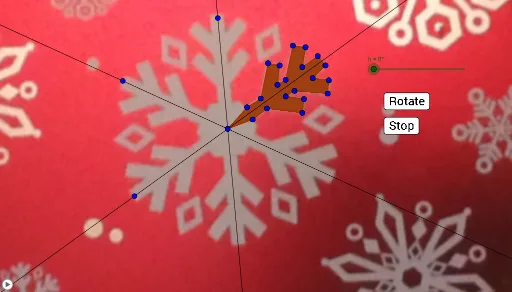
该范例演示如何用旋转变换构造“雪花”式的图案,并展示其旋转对称性。核心数学概念包括:旋转对称(围绕某点的旋转)、多边形的分段构造、几何变换(Rotate)与直线/边的组合。作图要点:基于构造摘要中的 GeoGebra 命令 Polygon、Line、Rotate,将若干关键点(如 A、B 以及一组依次生成的点)先形成一个基础多边形 poly1,再用 Rotate 将其围绕指定中心反复旋转生成多个等构成部分;同时用 Line 连接或辅助刻画边界与结构线。对象上体现为:基础多边形 poly1 以及一组旋转得到的点/线(如 c、d、e…以及对应的多边形片段 h_1、i、j、k…)。适合中学数学到大学预备课程,用于几何变换、对称性与作图能力训练,也适合课堂探究活动或教学演示。
GeoGebra 命令及参数
Polygon(C, D, M, N, O, P, Q, R, S, T, U, V, E, W, F, G, H, I, J, K, L) → poly1, c, l, m, n, o, p, q, r, s, t, u, d, v, w, e, f, g, h_1, i, j, kLine(C, Z) → aLine(C, A_1) → bLine(C, B_1) → a_1Rotate(C, h, C) → C'Rotate(D, h, C) → D'Rotate(E, h, C) → E'Rotate(F, h, C) → F'Rotate(G, h, C) → G'Rotate(H, h, C) → H'Rotate(I, h, C) → I'Rotate(J, h, C) → J'Rotate(K, h, C) → K'Rotate(L, h, C) → L'Rotate(M, h, C) → M'Rotate(N, h, C) → N'Rotate(O, h, C) → O'Rotate(P, h, C) → P'Rotate(Q, h, C) → Q'Rotate(R, h, C) → R'Rotate(S, h, C) → S'Rotate(T, h, C) → T'Rotate(U, h, C) → U'Rotate(V, h, C) → V'Rotate(W, h, C) → W'Polygon(C', D', M', N', O', P', Q', R', S', T', U', V', E', W', F', G', H', I', J', K', L') → poly1', c', l', m', n', o', p', q', r', s', t', u', d', v', w', e', f', g', h', i', j', k'Rotate(pic1, h, C) → pic1'Rotate(C', h, C) → C''Rotate(D', h, C) → D''Rotate(E', h, C) → E''Rotate(F', h, C) → F''Rotate(G', h, C) → G''Rotate(H', h, C) → H''Rotate(I', h, C) → I''Rotate(J', h, C) → J''Rotate(K', h, C) → K''Rotate(L', h, C) → L''Rotate(M', h, C) → M''Rotate(N', h, C) → N''Rotate(O', h, C) → O''Rotate(P', h, C) → P''Rotate(Q', h, C) → Q''Rotate(R', h, C) → R''Rotate(S', h, C) → S''Rotate(T', h, C) → T''Rotate(U', h, C) → U''Rotate(V', h, C) → V''Rotate(W', h, C) → W''Polygon(C'', D'', M'', N'', O'', P'', Q'', R'', S'', T'', U'', V'', E'', W'', F'', G'', H'', I'', J'', K'', L'') → poly1'', c'', l'', m'', n'', o'', p'', q'', r'', s'', t'', u'', d'', v'', w'', e'', f'', g'', h'', i'', j'', k''Rotate(C'', h, C) → C'''Rotate(D'', h, C) → D'''Rotate(E'', h, C) → E'''Rotate(F'', h, C) → F'''Rotate(G'', h, C) → G'''Rotate(H'', h, C) → H'''Rotate(I'', h, C) → I'''Rotate(J'', h, C) → J'''Rotate(K'', h, C) → K'''Rotate(L'', h, C) → L'''Rotate(M'', h, C) → M'''Rotate(N'', h, C) → N'''Rotate(O'', h, C) → O'''Rotate(P'', h, C) → P'''Rotate(Q'', h, C) → Q'''Rotate(R'', h, C) → R'''Rotate(S'', h, C) → S'''Rotate(T'', h, C) → T'''Rotate(U'', h, C) → U'''Rotate(V'', h, C) → V'''Rotate(W'', h, C) → W'''Polygon(C''', D''', M''', N''', O''', P''', Q''', R''', S''', T''', U''', V''', E''', W''', F''', G''', H''', I''', J''', K''', L''') → poly1''', c''', l''', m''', n''', o''', p''', q''', r''', s''', t''', u''', d''', v''', w''', e''', f''', g''', h''', i''', j''', k'''Rotate(C''', h, C) → C_1Rotate(D''', h, C) → D_1Rotate(E''', h, C) → E_1Rotate(F''', h, C) → F_1Rotate(G''', h, C) → G_1Rotate(H''', h, C) → H_1Rotate(I''', h, C) → I_1Rotate(J''', h, C) → J_1Rotate(K''', h, C) → K_1Rotate(L''', h, C) → L_1Rotate(M''', h, C) → M_1Rotate(N''', h, C) → N_1Rotate(O''', h, C) → O_1Rotate(P''', h, C) → P_1Rotate(Q''', h, C) → Q_1Rotate(R''', h, C) → R_1Rotate(S''', h, C) → S_1Rotate(T''', h, C) → T_1Rotate(U''', h, C) → U_1Rotate(V''', h, C) → V_1Rotate(W''', h, C) → W_1Polygon(C_1, D_1, M_1, N_1, O_1, P_1, Q_1, R_1, S_1, T_1, U_1, V_1, E_1, W_1, F_1, G_1, H_1, I_1, J_1, K_1, L_1) → poly2, c_1, l_1, m_1, n_1, o_1, p_1, q_1, r_1, s_1, t_1, u_1, d_1, v_1, w_1, e_1, f_1, g_1, h_2, i_1, j_1, k_1Rotate(C_1, h, C) → Z_1Rotate(D_1, h, C) → A_2Rotate(E_1, h, C) → B_2Rotate(F_1, h, C) → C_2Rotate(G_1, h, C) → D_2Rotate(H_1, h, C) → E_2Rotate(I_1, h, C) → F_2Rotate(J_1, h, C) → G_2Rotate(K_1, h, C) → H_2Rotate(L_1, h, C) → I_2Rotate(M_1, h, C) → J_2Rotate(N_1, h, C) → K_2Rotate(O_1, h, C) → L_2Rotate(P_1, h, C) → M_2Rotate(Q_1, h, C) → N_2Rotate(R_1, h, C) → O_2Rotate(S_1, h, C) → P_2Rotate(T_1, h, C) → Q_2Rotate(U_1, h, C) → R_2Rotate(V_1, h, C) → S_2Rotate(W_1, h, C) → T_2Polygon(Z_1, A_2, J_2, K_2, L_2, M_2, N_2, O_2, P_2, Q_2, R_2, S_2, B_2, T_2, C_2, D_2, E_2, F_2, G_2, H_2, I_2) → poly2', z_1, i_2, j_2, k_2, l_2, m_2, n_2, o_2, p_2, q_2, r_2, a_2, s_2, t_2, b_2, c_2, d_2, e_2, f_2, g_2, h_3
AI 绘图提示语参考
绘制一个以中心点C为旋转对称中心的雪花状多边形图案。先构造一个由多个顶点围成的复杂多边形,并从中心点引出三条辅助线作为结构参考。然后以中心点C为旋转中心,将整个多边形按固定角度旋转,生成第一组旋转副本,再对副本重复相同旋转,得到第二组旋转副本,最终形成三层旋转对称的雪花结构。所有旋转副本围绕中心点均匀分布,整体呈现明显的旋转对称性,适合展示几何变换与对称概念。
以上提示语为根据原始绘图命令整理而来,仅供参考。