
圆锥曲线绕圆柱旋转
几何画板及绘图内容加载中,请稍等……
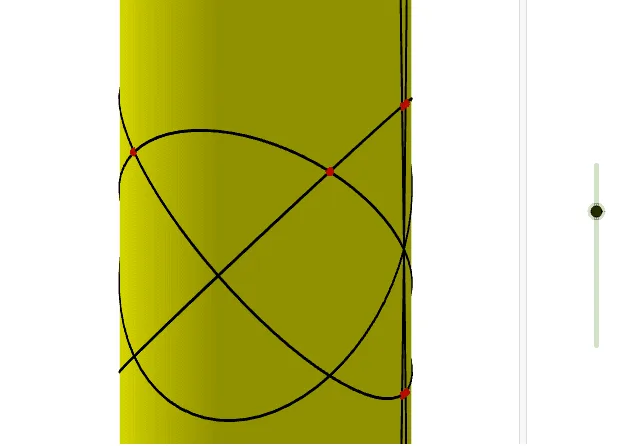
这个范例演示了圆锥曲线绕圆柱旋转的动态过程。核心数学概念包括圆柱、圆锥曲线、三角函数和变换。通过使用Cylinder、Rotate、IntersectPath等GeoGebra命令,可以构造出旋转后的圆锥曲线。适合高中数学教学和学习,特别是解析几何和三角函数部分。
GeoGebra 命令及参数
Cylinder((0, 0, -10), (0, 0, 10), 1) → a, c, d, bPlane(xAxis, yAxis) → eRotate(e, t, xAxis) → e'Rotate(e, (-t), yAxis) → e'_1Rotate(e, (-t), xAxis) → e'_2Rotate(e, t, yAxis) → e'_3IntersectPath(e', a) → fIntersectPath(e'_1, a) → gIntersectPath(e'_2, a) → hCorner(h) → A, B, C, DIntersectPath(e'_3, a) → kCorner(k) → E, F, G, HRotate(e, (2 * t), xAxis) → e'_4Rotate(e, (-((2 * t))), xAxis) → e'_5IntersectPath(e'_4, a) → pCorner(p) → E_1, F_1, G_1, H_1IntersectPath(e'_5, a) → qCorner(q) → I_1, J_1, K_1, L_1Intersect(g, p) → I, J, ,Intersect(q, k) → K, L, ,Intersect(k, p) → M, N, ,Intersect(g, b) → O, R, S, TIntersect(g, q) → P, Q, ,Intersect(h, g) → U, V, ,Intersect(h, b) → W, B_1, C_1, D_1Intersect(h, k) → Z, A_1, ,
AI 绘图提示语参考
画一个圆柱,并在其表面绘制旋转的圆锥截面。首先,创建一个垂直于圆柱轴线的平面,然后围绕轴线旋转该平面形成多个倾斜截面。接着,将这些倾斜截面与圆柱表面相交,得到多个交线。最后,将这些交线的顶点连接起来,形成旋转的圆锥截面图案,展示动态旋转过程。
以上提示语为根据原始绘图命令整理而来,仅供参考。