
罗马数字宾果:用坐标几何与几何构造驱动的数字匹配游戏
几何画板及绘图内容加载中,请稍等……
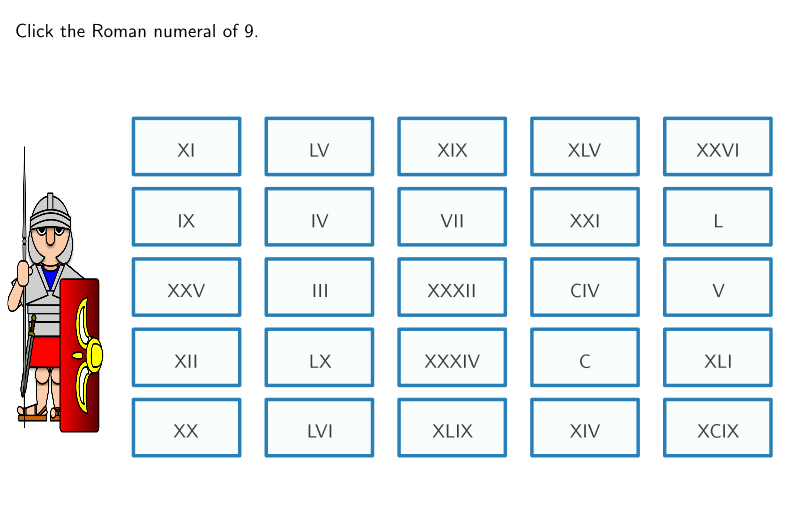
该范例以“罗马数字宾果”为载体,展示如何通过几何构造生成并打乱选择,进而实现对答案集合的可视化匹配与抽取。核心数学概念包含:解析几何中的坐标与几何关系、由长度与等分位置形成的几何结构,以及用有理数/长度计算支撑的规则判定;同时将排序、索引与随机(Shuffle/随机打乱)融入到图形对象的生成流程中。作图要点:使用 GeoGebra 命令 Intersect 产生交点,Polygon 构造多边形棋格或候选区域,Join 与 Element 用于连接并从集合中取用对象,Length 计算关键长度约束;通过 Shuffle 实现候选与标签的随机化,再用 Zip、IndexOf、Sort 等处理配对、索引定位与显示顺序;对象方面包含多组多边形 squa1 到 squa25、中心点 centers、以及所有可能选择 allChoicesN/allShuffledChoices 与其显示对象 allDisplay/allShuffledLabels 等,最终利用 step 控制流程迭代并实现“宾果”式的逐步揭示。适合中学到大学入门阶段的数学可视化、编程式几何作图与概率/随机展示教学,用于课程导入、探究活动或课堂互动演示。
GeoGebra 命令及参数
Intersect(xAxis, yAxis) → APolygon(A + (0.1, 0.1), (0.9, 0.1), 4) → squa1Join(Sequence[Sequence[Translate[squa1, Vector[(m * transX) + (n * transY)]], m, 0, 4], n, 0, 4]) → allSquaOutJoin(Sequence[Sequence[(j, k), j, 0.5, 4.5, 1], k, 0.5, 4.5, 1]) → centersElement(allSquaOut, 2) → squa2Element(allSquaOut, 3) → squa3Element(allSquaOut, 4) → squa4Element(allSquaOut, 5) → squa5Element(allSquaOut, 6) → squa6Element(allSquaOut, 7) → squa7Element(allSquaOut, 8) → squa8Element(allSquaOut, 9) → squa9Element(allSquaOut, 10) → squa10Element(allSquaOut, 11) → squa11Element(allSquaOut, 12) → squa12Element(allSquaOut, 13) → squa13Element(allSquaOut, 14) → squa14Element(allSquaOut, 15) → squa15Element(allSquaOut, 16) → squa16Element(allSquaOut, 17) → squa17Element(allSquaOut, 18) → squa18Element(allSquaOut, 19) → squa19Element(allSquaOut, 20) → squa20Element(allSquaOut, 21) → squa21Element(allSquaOut, 22) → squa22Element(allSquaOut, 23) → squa23Element(allSquaOut, 24) → squa24Element(allSquaOut, 25) → squa25Length(allChoicesN) → lenAllChoicesLength(allDisplay) → lenAllDisplayShuffle(Sequence[n, n, 1, 25]) → labelOrder, {10, 21, 18, 8, 23, 7, 22, 15, 24, 16, 12, 1, 14, 25, 3, 5, 2, 4, 11, 19, 6, 20, 9, 17, 13}Shuffle(Sequence[n, n, 1, 25]) → choicesOrder, {5, 11, 16, 6, 13, 8, 22, 1, 7, 24, 3, 2, 15, 17, 10, 9, 23, 4, 25, 20, 14, 18, 19, 21, 12}Zip(allDisplay(A), A, labelOrder) → allShuffledLabelsZip(Text[("" * A), B, false, true, 0, 0], A, allShuffledLabels, B, centers + (0, 0)) → allLabelsInPlaceZip(allChoicesN(A), A, choicesOrder) → allShuffledChoicesElement(allShuffledChoices, step) → displayedNumIndexOf(displayedNum, allChoicesN) → posOriginalIndexOf(posOriginal, labelOrder) → posDisplayedSort(RemoveUndefined[studCorrect]) → studCorrectSortedLength(studCorrectSorted) → lenStudCorrect
AI 绘图提示语参考
这是一个由25个正方形组成的网格,每个正方形都有中心点。网格上分布着标签和选择项,通过随机排序和匹配将标签与选择对应。构造顺序是:先找到坐标轴交点,创建第一个正方形,然后通过变换生成所有正方形,连接它们的中心点,最后提取每个正方形并进行随机排列和匹配。
以上提示语为根据原始绘图命令整理而来,仅供参考。