
等腰梯形的性质与识别
几何画板及绘图内容加载中,请稍等……
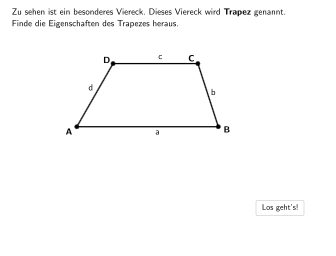
本范例演示梯形及其性质,包括等腰梯形的特殊性质。通过选择题和开放题,帮助学生理解梯形的定义、性质以及如何识别梯形。使用了Polygon, PointIn, Segment, Point, Angle, Textfield, Sequence, Midpoint, Element, Intersect, Text, If, OrthogonalLine, Rotate等GeoGebra命令。适合5-6年级学生学习几何图形的性质与识别。
GeoGebra 命令及参数
Polygon((-3, -1), (6, -1), (6, -3), (-3, -3)) → RegionBox1, j, k, l, mPointIn(RegionBox1) → A_1Polygon((x(A_1) + 1.5, 2.02), (8.56, 2.02), (8.56, 0.04), (x(A_1) + 1.5, 0.02)) → RegionBox2, c, d, e, f_1SelectedIndex(drop5) → index5SelectedIndex(drop2) → index2SelectedIndex(drop1) → index1SelectedIndex(drop3) → index3SelectedIndex(drop4) → index4Polygon((-3, 2), (7, 2), (7, 0.02), (-3, 0.02)) → RegionBox, f, g, h, iPointIn(RegionBox1) → BSegment(F, B - (0.5, 0)) → bfPointIn(RegionBox) → DSegment(D + (0.5, 0), E) → dePoint(de) → CSegment(D, C) → cdPoint(bf) → ASegment(D, A) → adSegment(A, B) → abSegment(C, B) → bcAngle(B, A, D) → αAngle(C, B, A) → βAngle(D, C, B) → γAngle(A, D, C) → δTextfield(input1) → InputBox1Textfield(input2) → InputBox2PointIn(RegionBox2) → C_1Segment(A_1, B_1) → ab_1Segment(B_1, C_1) → bc_1Segment(C_1, D_1) → cd_1Segment(A_1, D_1) → ad_1Angle(B_1, A_1, D_1) → εAngle(C_1, B_1, A_1) → ζAngle(D_1, C_1, B_1) → ηAngle(A_1, D_1, C_1) → θSegment(D_1, B_1) → diag1Segment(A_1, C_1) → diag2Sequence((0, y(D_1) + 0.5) + (i, 0), i, x(D_1) - 1, x(C_1) + 1, (lengthAB * 0.04)) → pointsSequence((0, y(A_1) - 0.5) + (i, 0), i, x(D_1) - 1, x(C_1) + 1, (lengthAB * 0.04)) → points2Midpoint(A_1, B_1) → VMidpoint(D_1, C_1) → G_1Sequence((x(V) + ((lengthAB * j)) / 10, y(G_1) + 0.5), j, -5, 5) → punkteObenPoint(punkteOben) → Psym1Sequence((x(V) + ((lengthAB * j)) / 10, y(V) - 0.5), j, -5, 5) → punkteUntenPoint(punkteUnten) → Psym2Segment(Psym1, Psym2) → sym_{1}Element(points, sym) → CorrSymSegment(K, N) → nSegment(N, M) → pSegment(M, L) → qSegment(L, K) → rSegment(G, J) → sSegment(J, I) → tSegment(I, H) → aSegment(H, G) → bSegment((Midpoint[D, C] - 0.2, y(D) - 0.2), (Midpoint[D, C] + 0.2, y(D) + 0.2)) → parallel1Segment(N, L) → g_1Segment(M, K) → h_1Intersect(diag1, diag2) → OMidpoint(O, A_1) → mitteText(text21, Midpoint[O, B_1] + v, true, true, 0, 0) → text9Angle(I, H, G) → ιAngle(H, G, J) → κAngle(J, I, H) → λAngle(G, J, I) → μAngle(L, K, N) → νAngle(N, M, L) → ξAngle(M, L, K) → οAngle(K, N, M) → ρIf(x(A) ≠ -0.72 ∨ x(B) ≠ 6 ∨ x(C) ≠ 5.03 ∨ x(D) ≠ 1, true, false) → movedIf(x(A_1) ≠ 0 ∨ x(C_1) ≠ 5 ∨ x(D_1) ≠ 1 ∨ x(B_1) ≠ 6, true, false) → moved2OrthogonalLine(D, ab) → j_1Segment(D, P) → k_1OrthogonalLine(D_1, ab_1) → l_1Intersect(l_1, ab_1) → QSegment(D_1, Q) → m_1Angle(B_1, Q, D_1) → τText(text20, Midpoint[O, A_1] + u, true, true, 1, 1) → text8Angle(B + (10, 0), P, D) → σSegment(B, P) → n_1SelectedIndex(drop7) → index7Point(t) → WOrthogonalLine(W, b) → p_1Intersect(p_1, b) → ZSegment(W, Z) → q_1Angle(H, Z, W) → υSegment(G, I) → r_1Segment(H, J) → s_1Point(p) → E_1OrthogonalLine(E_1, p) → t_1Intersect(t_1, r) → F_1Angle(L, F_1, E_1) → ϕSegment(E_1, F_1) → a_1Segment(Midpoint[K, L] + (0, -0.5), Midpoint[M, N] + (0, 0.5)) → i_1Segment(D + (0, 0.25), D + (0, lengthArrow)) → arrow1Segment(C_1 + (0, 0.25), C_1 + (0, lengthArrow)) → arrow2Rotate(arrow2, 270°, C_1) → arrow2'Rotate(arrow2, 90°, C_1) → arrow2'_{1}Rotate(arrow2, 180°, C_1) → arrow2'_{2}Segment(A_1 + (1, -0.13), A_1 + (1, 0.13)) → b_1Segment(A_1 + (1.1, -0.13), A_1 + (1.1, 0.13)) → c_1Segment(D_1 + (1, -0.13), D_1 + (1, 0.13)) → d_1Segment(D_1 + (1.1, -0.13), D_1 + (1.1, 0.13)) → e_1Segment(Psym1 + (0.25, 0), Psym1 + (lengthArrow, 0)) → f_2Segment(Psym1 + (-0.25, 0), Psym1 + ((-lengthArrow), 0)) → g_2Segment(D + (0, 0.25), D + (0, lengthArrow)) → arrow1_{neu}Rotate(arrow1_{neu}, 270°, D) → arrow1'Rotate(arrow1_{neu}, 90°, D) → arrow1'_{1}Rotate(arrow1_{neu}, 180°, D) → arrow1'_{2}SelectedIndex(drop9) → index9SelectedIndex(drop6) → index6Segment(K + (3, -0.15), K + (3, 0.15)) → h_2Segment(K + (3.1, -0.15), K + (3.1, 0.15)) → i_2Segment(N + (2.3, -0.15), N + (2.3, 0.15)) → j_2Segment(N + (2.4, -0.15), N + (2.4, 0.15)) → k_2
AI 绘图提示语参考
在坐标系中先画一个矩形底边的梯形区域:上底从 x=-3 到 x=6、下底从 x=-3 到 x=6,左右竖边在 x=-3 与 x=6 处,并把该梯形设置为可选区域。取梯形底边上的一点作为内点A,再在第二个较窄的区域内取对应的点以确定另一侧的边界,形成一个梯形A、B、C、D的基本外框。连接这些点得到四条边,并再连对角线A与C、以及B与D。标注以各顶点为顶点的四个角:在A与D夹角、在B与A夹角、在C与B夹角、以及在D与C夹角。再在两条对角线之间的中点构造水平对称线,通过中点与从中点上下偏移得到的点画出一条对称示意段。
以上提示语为根据原始绘图命令整理而来,仅供参考。